• Hi Guest!

    We have posted a new VaM2 dev log on Patreon, starting a monthly cadence of written progress updates between Beta releases. Highlights include the new Gizmos System, Selection Carousel, and Modes System with Context-Specific Editing. Beta1.2 is 15 of 21 items complete.

    Read the full post on Patreon, or follow progress on the public Trello roadmap.

VaM 1.x convert DAZ3D clothing

Threads regarding the original VaM 1.x

eje

New member
Joined
Feb 5, 2024
Messages
12
Reactions
0
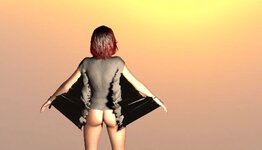
Hi! I tried converting clothes from DAZ3D the simplest way: save as scene, then open in VaM with Clothing Creator. However, the clothes are loading incorrectly. Can anyone help me out with what I'm doing wrong?
 

Attachments

  • vam.jpg
    vam.jpg
    295.1 KB · Views: 0
  • vam1.jpg
    vam1.jpg
    128.6 KB · Views: 0
You are using clothing for the wrong Genesis model, Genesis8 clothing needs to be adjusted to fit to the Daz Genesis2 model that vam uses and be in a t-pose position. The clothing importer in vam wraps the shape of the clothing to the nearest vertex on the model, so if it's not in the right place to start with you get weirdness like this.

You need to adjust the pose and shape of the genesis 8 figure in daz to match genesis2 while they are wearing it. Then export the clothing as an .obj and re-import it to lock in the new shape and save a scene subset.
 
Upvote 0
You are using clothing for the wrong Genesis model, Genesis8 clothing needs to be adjusted to fit to the Daz Genesis2 model that vam uses and be in a t-pose position. The clothing importer in vam wraps the shape of the clothing to the nearest vertex on the model, so if it's not in the right place to start with you get weirdness like this.

You need to adjust the pose and shape of the genesis 8 figure in daz to match genesis2 while they are wearing it. Then export the clothing as an .obj and re-import it to lock in the new shape and save a scene subset.
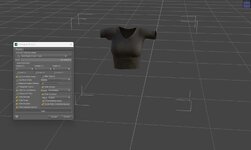
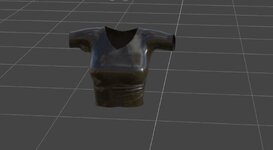
Dude! Thanks for the help, it worked! Can I ask one more thing? When I import the garment back, it gets this weird shiny surface. Am I missing something in the export settings?
 

Attachments

  • v1.jpg
    v1.jpg
    218.6 KB · Views: 0
  • v2.jpg
    v2.jpg
    57.4 KB · Views: 0
Upvote 0
Dude! Thanks for the help, it worked! Can I ask one more thing? When I import the garment back, it gets this weird shiny surface. Am I missing something in the export settings?
I think the one you imported is missing the normal map and specular/gloss. It should have the exact same uv layout, so adding the existing maps in vam, or on the surfaces tab will make it look like the original.
 
Upvote 0
Back
Top Bottom