• Hi Guest!

    We are extremely excited to announce the release of our first Beta1.1 and the first release of our Public AddonKit!
    To participate in the Beta, a subscription to the Entertainer or Creator Tier is required. For access to the Public AddonKit you must be a Creator tier member. Once subscribed, download instructions can be found here.

    Click here for information and guides regarding the VaM2 beta. Join our Discord server for more announcements and community discussion about VaM2.
  • Hi Guest!

    VaM2 Resource Categories have now been added to the Hub! For information on posting VaM2 resources and details about VaM2 related changes to our Community Forums, please see our official announcement here.

VaM 1.x Help with Foot issue

Threads regarding the original VaM 1.x

SmutHut80085

New member
Joined
May 6, 2022
Messages
7
Reactions
12
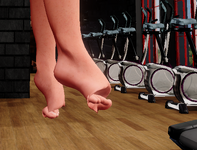
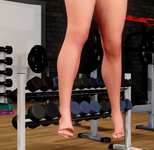
Hi There, Im hoping someone could help with an issue im having with a particular look of mine. For some strange reason everytime i load this look into a scene i get this weird problem with the feet. I was having the same issue with the fingers but that was resolved but setting some of the morph values to default. I've tried doing this with the toes but there doesn't seem to be any morphs that affect the toes specificly. This issue persists even when the look is reuploaded, the scene is reset, in every scene ive tried and also when i use any pose presets. I really don't want to delete the look as it one of my personal favs and its a standard female look so no crazy attachments or morph.


If someone could explained why this is happening i'd be very grateful for any advice thanks.
 

Attachments

  • foot issue.png
    foot issue.png
    493 KB · Views: 0
  • foot issue 2.png
    foot issue 2.png
    345.5 KB · Views: 0
Did you use the Morph merge and split plugin to create the final look? You should always put the model in the T-pose before doing the merge, and always exclude pose morphs when doing the merge. If some random pose morph gets baked into the look, then any other pose will have issues.
 
Did you use the Morph merge and split plugin to create the final look? You should always put the model in the T-pose before doing the merge, and always exclude pose morphs when doing the merge. If some random pose morph gets baked into the look, then any other pose will have issues.
Thanks for the advice. No i didn't use Morph merge and split i never use that plugin as i've personally never have good results from it.
 
Was the morph created outside Vam, like in Daz, or Blender? I can't see how you could cause that just by spinning dials in Vam. It looks like a rigging issue.
 
Back
Top Bottom