• Hi Guest!

    We are extremely excited to announce the release of our first Beta1.1 and the first release of our Public AddonKit!
    To participate in the Beta, a subscription to the Entertainer or Creator Tier is required. For access to the Public AddonKit you must be a Creator tier member. Once subscribed, download instructions can be found here.

    Click here for information and guides regarding the VaM2 beta. Join our Discord server for more announcements and community discussion about VaM2.
  • Hi Guest!

    VaM2 Resource Categories have now been added to the Hub! For information on posting VaM2 resources and details about VaM2 related changes to our Community Forums, please see our official announcement here.
Animatis

Plugins + Scripts Animatis

Download [1.15 MB]
so im working on update 1.4.8 .
what is finished:
1. Looping animations with triggers (camera changes, sound FX, scene events) now work reliably
2. Crossfade transitions between animations are smoother and more predictable
3. No more morph popping during transitions when using similar morph values

what is comming before update is complete :
1.Per-animation target control (enable/disable controllers/morphs per animation instead of global-only)
2.Enhanced copy/paste tools (copy only morphs, only controllers, or specific groups)
3.Additional JSONStorable actions (PlayByName, Next, Previous — easier integration with triggers/plugins)

This will take some time i think but will be well worth it.

I hope you all find Animatis worth while and usable. have fun animating! :)
 
Kimowal updated Animatis with a new update entry:

1.4.6- bug fixes and new futures!

Animatis Update – New Features & Improvements


✔ Feature 1: JSONStorable Actions for External Control


Animatis can now be controlled directly from other plugins (LogicBricks, Timeline, scene triggers, etc.) through new JSONStorable Action endpoints.


New actions added:


  • PlayTargetAnimation – Play an animation by name
    (Set the TargetAnimationName string parameter first)
  • PlayNextAnimation – Jump...

Read the rest of this update entry...
 
Ok new update released :), As of now the "visual" tab is just that and not still implemented. actually im not sure we would need it as we have that in Timeline by Accid Bubbles, however please give me feedback on what you guys think. if its a future you want i could try implement it, this way Animatis would be for both advanced users and also beginners i think. What do you guys think?
 
This resource has been removed and is no longer available.
 
Kimowal updated Animatis with a new update entry:

1.4.6

⭐ Animatis 1.4.6 — New Features, Improvements & Bug Fixes


This update introduces several powerful new features that expand how Animatis can be used inside scenes — including full external trigger control, selective keyframe copying, per-animation target settings, and improved stability across the system.


🔧 1. JSONStorable Actions for External Control


Animatis can now be controlled directly from other plugins or scene...

Read the rest of this update entry...
 
Kimowal updated Animatis with a new update entry:

1,4,7

Animatis Update — Per-Segment Speed + UI Polish​


This update adds a feature that was requested: variable playback speed between keyframes, so you can control pacing realistically without adding a ton of extra keys.

Big thank you to Moleculo for the suggestion!🍺

🚀 New: Per-Segment Speed (between keyframes)​


You can now set a speed multiplier per keyframe segment (the...

Read the rest of this update entry...
 
Very good!:giggle:
1. I noticed a bug that was difficult to reproduce. By setting different speeds for 1 and 2 frames, the duration of my animation went beyond the limit. The total animation length was 1 second, and the timeline was 1.2 seconds. After restarting the plugin, the problem disappeared.
2. There is also a bug with adjusting the animation duration. If you go into the negative zone in the duration settings, the playback timeline will break, although it will show a negative time, it will not be able to play it.
 
I've played around with this and like it so far. I'm more familiar with timeline so it took a minute to get used to. I play in VR mostly and don't really have any VR specific feedback but I am a sucker for filter/search boxes where long drop downs are involved.
You may have covered these already, I only skimmed the discussion and update notes.
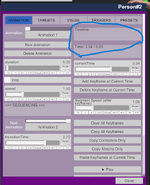
1. In the animation tab, the Timeline and Time boxes seem to be taking up a bunch of space. Is this unavoidable? I've seen it in other plugins as well.
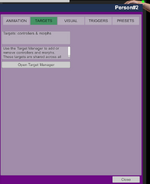
2. In the Targets tab, is the target overview necessary? Could it go directly to the Target Manager page?
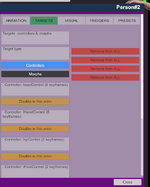
3. After adding targets, the red Remove From All buttons show up. They correspond to the controls in the list on the left, but that may not be apparent to newer users. Possibly add a numbering system or put the buttons near the Disable buttons to make it more clear.

4. Can each instance of Animatis only work on the person on which its installed? I put it on 2 people and could animate them individually but didn't have a "master" timeline, if that makes sense. Would I just have to sync the animations according to time and play them both at the same time?
5. You might also consider adding a "controller" version that could be added to a simple sign like vamtimeline.controller. That way you could choose which instance of Animatis to edit and not have to open the person atoms plugin menu.

Are 4 and 5 beyond the scope of this plugin? I know Animatis isn't a Timeline replacement but those are nice features.
 

Attachments

  • ss1.png
    ss1.png
    109.6 KB · Views: 0
  • ss2.png
    ss2.png
    39.6 KB · Views: 0
  • ss3.png
    ss3.png
    64.2 KB · Views: 0
Kimowal updated Animatis with a new update entry:

1,4,8

Animatis Update 1.4.8 - MULTI-PLAY Tab + Controller Exclusions (Layered Playback)​


This update introduces multi-animation playback clean, predictable, and easy to manage.


✅ What’s new​


  • Added a dedicated “MULTI-PLAY” tab
  • New CreateMultiPlayTab() UI:
    • Clear header + master/slave explanation
    • Per-animation controls (Play / Stop / Follow Master Time / Exclusions)
  • Removed the old multi-play...

Read the rest of this update entry...
 
Back
Top Bottom