
• Hi Guest!

    We are extremely excited to announce the release of our first Beta1.1 and the first release of our Public AddonKit!
    To participate in the Beta, a subscription to the Entertainer or Creator Tier is required. For access to the Public AddonKit you must be a Creator tier member. Once subscribed, download instructions can be found here.

    Click here for information and guides regarding the VaM2 beta. Join our Discord server for more announcements and community discussion about VaM2.
  • Hi Guest!

    VaM2 Resource Categories have now been added to the Hub! For information on posting VaM2 resources and details about VaM2 related changes to our Community Forums, please see our official announcement here.
Chest Direction Morphs

Plugins + Scripts Chest Direction Morphs

Download [<1 MB]

coinstacc

Member
Joined
Aug 26, 2024
Messages
23
Reactions
75
coinstacc submitted a new resource:

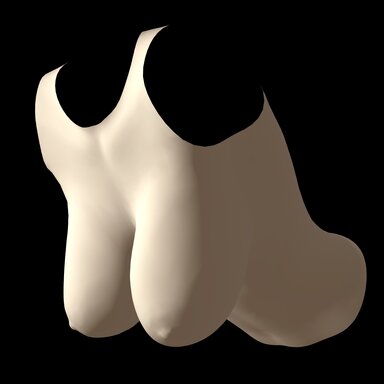
Chest Direction Morphs - Let 'em hang loose.

I like soft, heavy boobies. 😃👍

The DAZ rig does not. 🫤👎

View attachment 540106

Plugins like Everlaster's Naturalis and VeeRifter's BreastAutoGravity are great for average-sized breasts, but they're still limited by the shape of the morphs and don't always work when you're making things bigger. So I let the titty-obsessed worm that lives in my brain pilot me into throwing together this thing.

Directional lists define what morphs to apply when...

Read more about this resource...
 
Last edited:
Same thing, cannot add the plugin when it is in a var file. Extracing the plugin as the native .cs file and adding it to Person atom got the plugin to show up, but either nothing works or I just dont understand how to use this. Perhaps add a demo scene would be helpful, along with instructions.
 
The ide is brilliant, and I've been dreeming of such stuff to show up in the vam_hub at some point, but any small video tutorial of how to work with this plugin folks?
 
Updated the description with a better breakdown of how to use the plugin, as well as some of its current limitations.
 
Nice Mod, But you can't tweak it on/off since you can't disable it.
I saved a preset for sagging big tits that i want to trigger when model is on all fours.
now i can't disable it when she standing - i must do it manualy.
(i tried save empty preset, but it's not working)

Please update the plugin so we can teak it on/off at least so it will be flexible.

one solution is disable the plugin and reload the preset, but you know.......

Thanks in advance
 
Nice Mod, But you can't tweak it on/off since you can't disable it.
I saved a preset for sagging big tits that i want to trigger when model is on all fours.
now i can't disable it when she standing - i must do it manualy.
(i tried save empty preset, but it's not working)

Please update the plugin so we can teak it on/off at least so it will be flexible.

one solution is disable the plugin and reload the preset, but you know.......

Thanks in advance
In general, this is the idea behind the "base" list; it contains any morphs you want to be applied by default, but have overridden by leaning in a specific direction. This is also why there's a "+base" button beneath any morph that hasn't already been added to the base list, to make it easy to go through your direction morphs and add them. (The alternative would be having to add your desired defaults to every direction except the one you want, which would be annoying and cumbersome!)

Let's say, hypothetically, you want to have the combo of "Breast Large" set to 1 and "Breasts Heavy" set to 1 normally, but when leaning forward you want to have "Breast Large" set to 1, "Breasts Hang Forward" (pose) set to 1, and "Breasts Depth" (pose) set to 1. To achieve this, your lists would look like this:

Forward:
Breasts Heavy - 0
Breasts Depth - 1
Breasts Hang Forward - 1

Base:
Breasts Heavy - 1
Breasts Depth - 0
Breasts Hang Forward - 0

So when the character transitions to leaning forward, the "forward" morphs will smoothly blend from the "base" morphs. Additionally, in this example, the "Breast Large" morph doesn't need to be added to any list, since it would be the same regardless of direction, so the plugin wouldn't need to modify it at all.

If you want an instantaneous trigger of some morphs that's not dependent on direction, you can use the "clothed" list to act as an instant override; since I never actually got around to fully integrating the actual clothing aspect, that's basically how it acts anyway. Similar to the example above, add your default morphs to the "base" list and your modified morphs to the "clothed" list, and use the "override clothing" toggle as a switch to activate them. They'll be instantly applied at the specified weight based on the "clothing max influence" slider. Or you can leave "override clothing" checked, and animate the influence slider if you want direct control over the transition.

Hope this clears up the intent behind the design, and why I won't be adding that sort of activation/deactivation functionality.

(This recent hotfix was because I've been poking at the script a bit more, trying to plot out how to replace the failed "clothing" system with a more flexible override system, but that's still off in the future, since I don't have a lot of time to work on these things.)
 
It would be helpful if I could copy the presets from the Busting Free scene.
Just submitted an update for the Busting Free scene, updating it to the newest plugin version and with a separate .var for just the preset. (It's currently awaiting approval.)
 
Hi, am curious about one aspect. Or maybe a request?

First, should say this is a wondrous plug-in. Thank you! 😻
For laying on back or going forward, it just adds so much to Naturalis-TM.

Also thank you alot for your demo of Bustin Free.
I needed that to figure out plugin is meant to work.
Before that, was wondering what i was doing wrong.

Curious question is:
How is plugin designed to accomodate for
leaning forward, say 20-30 degrees against doorframe
vs
doggy on all fours (90 degrees).
Seems it's either or?
Larger breasts react very different to that last 30-45 degrees going perpendicular.
Is it presets?

The way this plug-in works right now auto adjusting is great. Can't imagine triggering presets, except for different characters, but not for different positions.

One thought to address that 'lean fwd" vs doggy all 4's conundrum is
>>> "Down" should not kick in for measuring until at 45degrees approx?
Or better yet make 'down" a user-driven choice as to at what angle it kicks in.

Not sure if any updates are in the future winds.

100% agree - like soft, heavy boobies. Daz rig does not. :p
 
Hi, am curious about one aspect. Or maybe a request?

First, should say this is a wondrous plug-in. Thank you! 😻
For laying on back or going forward, it just adds so much to Naturalis-TM.

Also thank you alot for your demo of Bustin Free.
I needed that to figure out plugin is meant to work.
Before that, was wondering what i was doing wrong.

Curious question is:
How is plugin designed to accomodate for
leaning forward, say 20-30 degrees against doorframe
vs
doggy on all fours (90 degrees).
Seems it's either or?
Larger breasts react very different to that last 30-45 degrees going perpendicular.
Is it presets?

The way this plug-in works right now auto adjusting is great. Can't imagine triggering presets, except for different characters, but not for different positions.

One thought to address that 'lean fwd" vs doggy all 4's conundrum is
>>> "Down" should not kick in for measuring until at 45degrees approx?
Or better yet make 'down" a user-driven choice as to at what angle it kicks in.

Not sure if any updates are in the future winds.

100% agree - like soft, heavy boobies. Daz rig does not. :p
There's a bit of finicky behavior with the transitions between directions yeah. It does scale the morph power based on the angle, but I have found that, depending on the morph, they don't always blend super well. I suspect that this is largely due to the morphs themselves sometimes being entirely different shapes (e.g. Breasts Heavy vs Breasts Hang) without a dedicated transitional form, so half of one and half of the other doesn't necessarily look like an actual partial lean would. Part of it also might be that the current calculations are linear based on angle, rather than following how a weight would actually hang based on its base's angle.

So in the current iteration:
0° forward lean (fully upright) results in Down = 100% and Forward = 0%
22.5° forward lean is Down = 75% and Forward = 25%
45° is Down = 50% and Forward = 50%
67.5° is Down = 25% and Forward = 75%
90° (fully face-down) is Down = 0% and Forward = 100%

A more realistic transition would probably be sinusoidal, with the ends of the range ramping more slowly than the middle.

As mentioned above I'm rolling some update ideas around in my head, and this was definitely one thing that I wanted to improve, to the extent that I can at least; make the application of the angular morphs be component-based, rather than interpolated one after the other based on the angle directly. The idea of an updated override system could also be handy here; if you get the directions working in a nice way but can't get an angle between them to look right, making an override for those specific cases and applying it or fading it in and out when needed could be a workaround.
 
So in the current iteration:
0° forward lean (fully upright) results in Down = 100% and Forward = 0%
22.5° forward lean is Down = 75% and Forward = 25%
45° is Down = 50% and Forward = 50%
67.5° is Down = 25% and Forward = 75%
90° (fully face-down) is Down = 0% and Forward = 100%

A more realistic transition would probably be sinusoidal, with the ends of the range ramping more slowly than the middle.

As mentioned above I'm rolling some update ideas around in my head, and this was definitely one thing that I wanted to improve, to the extent that I can at least; make the application of the angular morphs be component-based, rather than interpolated one after the other based on the angle directly. The idea of an updated override system could also be handy here; if you get the directions working in a nice way but can't get an angle between them to look right, making an override for those specific cases and applying it or fading it in and out when needed could be a workaround.
Ohhhh, so i didn't play enough!
And, somehow I thought upright was Base, and i see i got Down totally wrong even though you have (default) behind that. My bad.
That's a real handy summary! Thanks!

So i guess this opens another question, or a a revisit to what already wrote.
A breast hanging forward as she leans vs a breast hanging down (hence my honest mixup in breast-states) would appear quite different, and would need different morphs?
Am thinking of breasts quite a bit larger than your cool helpful demo. Or am i seeing that wrong?

Your idea of overrides sound pretty good for that next level of tweaking.
Really look forward to it! :)
 
So i guess this opens another question, or a a revisit to what already wrote.
A breast hanging forward as she leans vs a breast hanging down (hence my honest mixup in breast-states) would appear quite different, and would need different morphs?
Am thinking of breasts quite a bit larger than your cool helpful demo. Or am i seeing that wrong?
I'm not super sure what you mean with that question, but I'm seeing a couple of interpretations:

A) if you mean that "down" (standing upright) morphs should be different than "forward" (leaning over) morphs, yes in general that's the idea behind the plugin, because certain morphs only look good in certain orientations. I used a few of the "hanging" morphs for the forward direction to get the appearance of the breasts dangling away from the chest, and "heavy"/"natural" morphs for the down (upright) direction to have them sag against the chest.

B) if you mean that partially leaning forward would look different than either being fully upright or fully bent over, and would need its own different morphs, then yes, that's a big limitation here. The combo of e.g. halfway sagging against the chest and halfway hanging away from the chest doesn't end up looking as natural as each direction might on its own, at least in the way I usually set mine up.

If you mean something else let me know. In theory, extra large breasts shouldn't be too different in their behavior than smaller ones, though the extra size might make the limitations a bit more obvious.
 
B) if you mean that partially leaning forward would look different than either being fully upright or fully bent over, and would need its own different morphs, then yes, that's a big limitation here. The combo of e.g. halfway sagging against the chest and halfway hanging away from the chest doesn't end up looking as natural as each direction might on its own, at least in the way I usually set mine up.
Yes, it was exactly (B).
Sorry, that didn't write clear enough that you had to interp.

Agree, the extra size is more obvious, in say doggy position.
Would refine that by saying, the larger breasts often 'arguably' hang downwards more yet due to gravity, and their weight and their greater size independence from chest attachment.
Not worried about perfect morph transitions. But do hope to see a mostly hanging direction option for body @ 90% or perpendicular to standing default.

Did just go through this script to see if could see a way.
Compliments by the way on doing all that; that's Alot of figuring out!
see now, how you triggered the morphs directions under 'Vector3 gravVec = Physics.gravity.normalized;'
See how you worked around the 0 degree option, to get FWD to work 100% at down.
But can't see how could trigger a morph for just say the range of 60-110deg (from 0deg at standing).
Not with that operation command anyway?
Does that fit in with your thought: "that's a big limitation here."?

Being mainly a script-appreciator, with basic editing skills, will simply say again how much appreciate what you did here.
 
Did just go through this script to see if could see a way.
Compliments by the way on doing all that; that's Alot of figuring out!
see now, how you triggered the morphs directions under 'Vector3 gravVec = Physics.gravity.normalized;'
See how you worked around the 0 degree option, to get FWD to work 100% at down.
But can't see how could trigger a morph for just say the range of 60-110deg (from 0deg at standing).
Not with that operation command anyway?
Does that fit in with your thought: "that's a big limitation here."?
The way things are right now (which you probably saw at least part of) it reads the gravity vector and then calculates its angle to the axes of the chest "bone". It interpolates morphs based on the angle to each axis, with down/up being measured against the Y vector, forward/back against the Z vector, and left/right against the X vector. It does this one by one through down/up, forward/back, and left/right, so that at the end you get a mix of the morphs for each direction. It isn't set up to read custom angle ranges, and I don't think that's something I'd want to add, partly because the storing and calculations would get more difficult but also because the UI is already pretty dense and I don't want to add that much more stuff in lmao.

I suppose I should clarify what I mean by overrides, in case I was being too vague: when I talk about overrides, I mean a custom set of morphs that can be activated by the user directly. The x/y/z direction morphs are set up to be "plug and play" so that they work on their own without any input from the user after being set up, but overrides would be exposed to the rest of VaM so that they can be activated and adjusted with triggers if needed. I initially started trying to integrate this as a "clothing" system because I figured it'd be helpful to have a custom state for e.g. if you character is wearing a bra, but I never really got that part working, so instead now there's basically just a "clothed" list of morphs that can be turned on and off, with a slider to adjust its influence (100% being entirely clothed morphs, 0% being the same as being off). The thought is to then take that clothing idea and expand on it so that the user can add a list of multiple, stacking overrides that they can set up and then trigger themselves. So you could have an override to lift and squish the breasts for when they're in a bra, and another one to suppress nipple morphs if the character is wearing pasties, and these could work together or independently based on if you activate them and how much "influence" they have. So you could potentially make an override with morphs for a breast shape that looks good when leaning partway forward, and then activate that when the character bends over; if the character is just switching to a "static" pose it could be toggled on, or if the character has a "bending over" animation the "influence" of the override could be animated from 0% to 100% as the animation plays to get a smooth transition. That's really the only workaround I can think of for this kind of issue, and it does take a little bit more work than the plug and play nature of the main directional morphs.

tl;dr: intended scope of the plugin is just based on down/up/forward/back/left/right, no easy/automatic way to get around the issue of partial bends, potential future way of dealing with it by allowing you to trigger a separate set of custom morphs whenever you need to.

(If you haven't already, mess around with the "clothed" morph list in the plugin! Don't bother adding clothing to the clothing list, just use the "override clothing" toggle to activate the morphs and "clothing max influence" slider to adjust how much they get applied. Should give a direct sense of how such an override system would happen, and could even work for your current situation if you only have one scenario where the regular directional morphs don't look good.) (Also it's pretty fun to animate your characters' titties dropping free as they pull off a top. :))
 
Back
Top Bottom