

• Hi Guest!

    We are extremely excited to announce the release of our first Beta1.1 and the first release of our Public AddonKit!
    To participate in the Beta, a subscription to the Entertainer or Creator Tier is required. For access to the Public AddonKit you must be a Creator tier member. Once subscribed, download instructions can be found here.

    Click here for information and guides regarding the VaM2 beta. Join our Discord server for more announcements and community discussion about VaM2.
  • Hi Guest!

    VaM2 Resource Categories have now been added to the Hub! For information on posting VaM2 resources and details about VaM2 related changes to our Community Forums, please see our official announcement here.
Morph Merge And Split - Extended

Plugins + Scripts Morph Merge And Split - Extended

Download [<1 MB]
It's part of BodyLanguage. I'm trying to filter out expression morphs based on vertex data cause all region/naming is meaningless for most of them.
I basically do the same as you did. Creating spheres and putting them in place on LateUpdate.
For my purpose it doesn't matter too much if the visualization isn't right. It just buggs me and I thought it would be a nice gimmick to keep in, but not in this state...
i noticed you aren't enabling PostSkinVerts for the vertices used so here's the full breakdown on how to enable PostSkinVerts, because i'm lazy i've told AI to make a concise summary for all the steps required:

# PostSkinVerts Reference
`DAZSkinV2` does not compute final skinned positions for all vertices every frame. `postSkinVerts` is a `bool[]` opt-in flag — only vertices marked `true` get their `rawSkinnedVerts` position updated. Everything else stays stale.
---
## Getting the Skin
```csharp
DAZCharacterSelector selector = containingAtom.GetComponentInChildren<DAZCharacterSelector>();
DAZSkinV2 skin = selector.selectedCharacter.skin;
```
---
## Enabling Vertices
```csharp
// Single vertex
skin.postSkinVerts[vertexIndex] = true;
skin.postSkinVertsChanged = true;
// Batch — set the flag ONCE after the loop
for (int i = 0; i < myVertices.Length; i++)
{
int idx = myVertices;
if (idx < skin.postSkinVerts.Length)
skin.postSkinVerts[idx] = true;
}
skin.postSkinVertsChanged = true;
```
---
## Reading Positions
Positions in `rawSkinnedVerts` are in **skin-local space**:
```csharp
Vector3 worldPos = skin.transform.TransformPoint(skin.rawSkinnedVerts[vertexIndex]);
```
**Read in `LateUpdate`** — `DAZSkinV2` skins during its own `LateUpdate`, so reading in `Update` gives last frame's data.
---
## Disabling
```csharp
// Single
skin.postSkinVerts[vertexIndex] = false;
skin.postSkinVertsChanged = true;
// Batch
for (int i = 0; i < myVertices.Length; i++)
{
int idx = myVertices;
if (idx < skin.postSkinVerts.Length) skin.postSkinVerts[idx] = false;
}
skin.postSkinVertsChanged = true;
```
Always disable in `OnDisable`/`OnDestroy` to avoid leaving orphaned enabled vertices that waste performance.
---
## API Reference
| Property | Type | Notes |
|---|---|---|
| `skin.postSkinVerts` | `bool[]` | Opt-in per-vertex skinning |
| `skin.postSkinVertsChanged` | `bool` | Dirty flag — must set after mutating the array |
| `skin.rawSkinnedVerts` | `Vector3[]` | Skinned positions (local space) |
| `skin.dazMesh.baseVertices` | `Vector3[]` | Unskinned base mesh positions |
---
## Gotchas
- **`postSkinVertsChanged`** — forgetting this means VaM ignores your changes to the array.
- **Base vertices only** — indices 0–23007 are the base mesh. Higher indices are morph duplicates and generally not useful.
- **Local space** — `rawSkinnedVerts` values must be transformed via `skin.transform.TransformPoint()`.
- **Timing** — read in `LateUpdate`, after `DAZSkinV2` has finished skinning.
- **GC** — pre-allocate any arrays you use per-frame as class fields. Don't allocate in `LateUpdate`.
- **Multi-instance conflicts** — if multiple plugin instances enable/disable the same vertices, one disabling can stomp on another's enabled state. Guard against this if relevant.

 
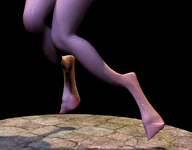
Please extend the range of the "Limbs Falloff visual" to above the knees, as leg shapes like those of a goat's hooves cannot be cut.
 
So maybe it's just this specific model, but I just tried the plugin with Zin's Princess Ruto, and the split between hands and feet has some major issues

I've also tried it with Oni's Lola Bunny, and it had similar issue. but on a different axis
The problem I encountered is similar to yours, but what I wanted to separate was not the fisherman's leg but the goat's hoof.
 
The issue was fixed in a update from Skynet following my post. Try it again.
Perhaps you could try splitting the legs of this character to see if it works.
 

Attachments

  • 20260210050037.png
    20260210050037.png
    69.7 KB · Views: 0
The issue was fixed in a update from Skynet following my post. Try it again.
I think the cutting range is too small to cover the knee area, which causes this kind of situation to occur when transitioning to the regular role.
 

Attachments

  • 20260210050333.png
    20260210050333.png
    324.8 KB · Views: 0
i noticed you aren't enabling PostSkinVerts for the vertices used so here's the full breakdown on how to enable PostSkinVerts, because i'm lazy i've told AI to make a concise summary for all the steps required:

# PostSkinVerts Reference
`DAZSkinV2` does not compute final skinned positions for all vertices every frame. `postSkinVerts` is a `bool[]` opt-in flag — only vertices marked `true` get their `rawSkinnedVerts` position updated. Everything else stays stale.
---
## Getting the Skin
```csharp
DAZCharacterSelector selector = containingAtom.GetComponentInChildren<DAZCharacterSelector>();
DAZSkinV2 skin = selector.selectedCharacter.skin;
```
---
## Enabling Vertices
```csharp
// Single vertex
skin.postSkinVerts[vertexIndex] = true;
skin.postSkinVertsChanged = true;
// Batch — set the flag ONCE after the loop
for (int i = 0; i < myVertices.Length; i++)
{
int idx = myVertices;
if (idx < skin.postSkinVerts.Length)
skin.postSkinVerts[idx] = true;
}
skin.postSkinVertsChanged = true;
```
---
## Reading Positions
Positions in `rawSkinnedVerts` are in **skin-local space**:
```csharp
Vector3 worldPos = skin.transform.TransformPoint(skin.rawSkinnedVerts[vertexIndex]);
```
**Read in `LateUpdate`** — `DAZSkinV2` skins during its own `LateUpdate`, so reading in `Update` gives last frame's data.
---
## Disabling
```csharp
// Single
skin.postSkinVerts[vertexIndex] = false;
skin.postSkinVertsChanged = true;
// Batch
for (int i = 0; i < myVertices.Length; i++)
{
int idx = myVertices;
if (idx < skin.postSkinVerts.Length) skin.postSkinVerts[idx] = false;
}
skin.postSkinVertsChanged = true;
```
Always disable in `OnDisable`/`OnDestroy` to avoid leaving orphaned enabled vertices that waste performance.
---
## API Reference
| Property | Type | Notes |
|---|---|---|
| `skin.postSkinVerts` | `bool[]` | Opt-in per-vertex skinning |
| `skin.postSkinVertsChanged` | `bool` | Dirty flag — must set after mutating the array |
| `skin.rawSkinnedVerts` | `Vector3[]` | Skinned positions (local space) |
| `skin.dazMesh.baseVertices` | `Vector3[]` | Unskinned base mesh positions |
---
## Gotchas
- **`postSkinVertsChanged`** — forgetting this means VaM ignores your changes to the array.
- **Base vertices only** — indices 0–23007 are the base mesh. Higher indices are morph duplicates and generally not useful.
- **Local space** — `rawSkinnedVerts` values must be transformed via `skin.transform.TransformPoint()`.
- **Timing** — read in `LateUpdate`, after `DAZSkinV2` has finished skinning.
- **GC** — pre-allocate any arrays you use per-frame as class fields. Don't allocate in `LateUpdate`.
- **Multi-instance conflicts** — if multiple plugin instances enable/disable the same vertices, one disabling can stomp on another's enabled state. Guard against this if relevant.
Thanks a lot! Enabling the postSkinVerts did the trick :)
 
Please extend the range of the "Limbs Falloff visual" to above the knees, as leg shapes like those of a goat's hooves cannot be cut.
the plugin was made to work with humanoid character morphs, no guarantees it will work for non-humanoid morphs unfortunately
 
Back
Top Bottom