• Hi Guest!

    We are extremely excited to announce the release of our first Beta1.1 and the first release of our Public AddonKit!
    To participate in the Beta, a subscription to the Entertainer or Creator Tier is required. For access to the Public AddonKit you must be a Creator tier member. Once subscribed, download instructions can be found here.

    Click here for information and guides regarding the VaM2 beta. Join our Discord server for more announcements and community discussion about VaM2.
  • Hi Guest!

    VaM2 Resource Categories have now been added to the Hub! For information on posting VaM2 resources and details about VaM2 related changes to our Community Forums, please see our official announcement here.
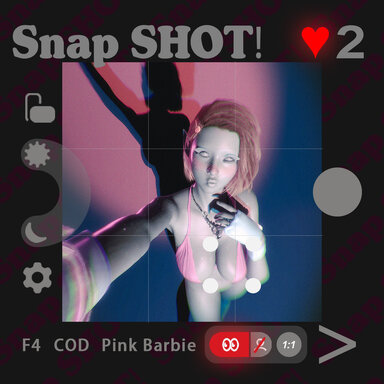
SnapSHOT! (app)

Scenes SnapSHOT! (app)

Download [15.55 MB]
supperGR updated SnapSHOT! (app) with a new update entry:

Core Update: Local Storage Enhancement ! !

Version 2 Update: Local Storage Enhancement

We’re excited to announce the latest version of the SupperGR ShotSequence Manager Plugin, packed with key improvements to enhance your experience. This update introduces local storage for critical data, ensuring your counters and settings persist even when the scene isn’t saved.


🚀 What’s New in v2:

...

Read the rest of this update entry...
 
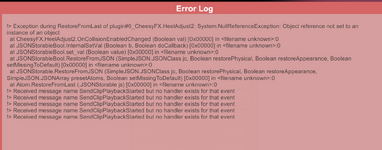
Thank you for a fantastic app. Just want to report a couple of errors. Here seems to be errors with Heel Adjust.

Screenshot 2026-01-17 230058.png

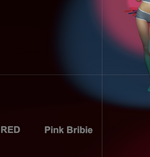
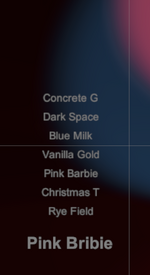
And Pink Barbie doesn't work if you select another colour and then try to use it again. Could be the spelling error conflicting?

Screenshot 2026-01-17 230133.png
Screenshot 2026-01-17 230207.png

Thanks very much!
 
And Pink Barbie doesn't work if you select another colour and then try to use it again. Could be the spelling error conflicting?

View attachment 558872
View attachment 558873

Thanks very much!

I noticed the Pink Barbie thing as well, so I'm glad to see it's been brought up.

One thing I'd like to know - is there a plan to have this available for non-female models? I want to take nice pictures of my boys, too. :)
 
Thank you for a fantastic app. Just want to report a couple of errors. Here seems to be errors with Heel Adjust.

View attachment 558869

And Pink Barbie doesn't work if you select another colour and then try to use it again. Could be the spelling error conflicting?

View attachment 558872
View attachment 558873

Thanks very much!
I noticed the Pink Barbie thing as well, so I'm glad to see it's been brought up.

One thing I'd like to know - is there a plan to have this available for non-female models? I want to take nice pictures of my boys, too. :)

Hey guys! :D
Sorry I only just noticed this discussion here!


You were absolutely right — after checking, the Pink Barbie issue was caused by a very, very dumb spelling mistake on my side (my English strikes again… :censored:).
It’s already fixed and an update has been pushed!


@OriginalCustard
Regarding the Heel Adjust error: yes, I see the same error every time on startup as well (including in my SlutShow scene), but so far it doesn’t seem to affect functionality at all. I haven’t been able to identify what exactly is triggering it yet.
If you run into any other errors while using Heel Adjust, please let me know!


@VaMRainey
Hi! You’re absolutely right
Support for non-female or futa models is something I’d like to look into in future updates. This is actually a legacy limitation inherited from SlutShow, but I’ll see what I can do to improve compatibility going forward!


Thanks a lot to both of you for reporting this and for the kind feedback — it’s really appreciated! 🫡 🫡 🫡
 
supperGR updated SnapSHOT! (app) with a new update entry:

v3 Update – Fixed “Pink Barbie” Theme Switching Issue

This v3 update is a required bug-fix release.
A spelling error has been fixed that previously prevented the “Pink Barbie” theme from switching correctly.


With this issue resolved, the Pink Barbie theme can now be enabled and switched normally, behaving consistently with the other themes.


While the change itself is small, it affected a core visual feature, so updating is strongly recommended.


Special thanks to @OriginalCustard and...

Read the rest of this update entry...
 
:love:Thank you very much for your APP work! !
I would like to ask about an abnormal situation: the UI of the V3 version app interface and the photo-taking interface in this update seems to have some issues. I wonder if others are experiencing the same problem?:unsure:
 

Attachments

  • 2026-02-04_20-1.png
    2026-02-04_20-1.png
    412.4 KB · Views: 0
Hey guys! :D
Sorry I only just noticed this discussion here!


You were absolutely right — after checking, the Pink Barbie issue was caused by a very, very dumb spelling mistake on my side (my English strikes again… :censored:).
It’s already fixed and an update has been pushed!


@OriginalCustard
Regarding the Heel Adjust error: yes, I see the same error every time on startup as well (including in my SlutShow scene), but so far it doesn’t seem to affect functionality at all. I haven’t been able to identify what exactly is triggering it yet.
If you run into any other errors while using Heel Adjust, please let me know!


@VaMRainey
Hi! You’re absolutely right
Support for non-female or futa models is something I’d like to look into in future updates. This is actually a legacy limitation inherited from SlutShow, but I’ll see what I can do to improve compatibility going forward!


Thanks a lot to both of you for reporting this and for the kind feedback — it’s really appreciated! 🫡 🫡 🫡
Thank you so much for an amazing app!
 
:love:Thank you very much for your APP work! !
I would like to ask about an abnormal situation: the UI of the V3 version app interface and the photo-taking interface in this update seems to have some issues. I wonder if others are experiencing the same problem?:unsure:
Hi there!

Ohhh, thanks for pointing this out — this might actually be my mistake, sorry about that o_O

I just realized that in a recent update I also updated the referenced VAMStory plugin version, and I forgotten to clearly mention this in the update notes...:rolleyes: The current required version should be VAMStory v0.39 (previously it was likely v0.38 or earlier), and that version mismatch could indeed cause UI display issues like the one in your screenshot.

Please try updating VAMStory to the latest version and reload the scene — the issue should be resolved after that.

If the problem still happens, feel free to let me know anytime and I’ll take a closer look. Thanks again for the report and sorry for the confusion!
 
Hi there!

Ohhh, thanks for pointing this out — this might actually be my mistake, sorry about that o_O

I just realized that in a recent update I also updated the referenced VAMStory plugin version, and I forgotten to clearly mention this in the update notes...:rolleyes: The current required version should be VAMStory v0.39 (previously it was likely v0.38 or earlier), and that version mismatch could indeed cause UI display issues like the one in your screenshot.

Please try updating VAMStory to the latest version and reload the scene — the issue should be resolved after that.

If the problem still happens, feel free to let me know anytime and I’ll take a closer look. Thanks again for the report and sorry for the confusion!
Hi😃
This UI issue persists even after updating to VAMStory.39.:unsure:
 
Hi😃
This UI issue persists even after updating to VAMStory.39.:unsure:
That’s quite strange indeed o_O
8856.png

Could you provide a bit more information? That would be really helpful for debugging:

• Are there any error messages related to VAMStory in the log?
• Do the buttons still respond correctly when clicked, even though the UI looks wrong?
• Did you use a previous version of this scene/app, and if so, did the UI display correctly there?
• If the buttons are clickable, you can tap the icon in this area to enter the secondary UI menu — could you check whether that second-level UI displays correctly?

Any extra details will help me track this down much faster!
 
Last edited:
That’s quite strange indeed o_OView attachment 563607
Could you provide a bit more information? That would be really helpful for debugging:

• Are there any error messages related to VAMStory in the log?
• Do the buttons still respond correctly when clicked, even though the UI looks wrong?
• Did you use a previous version of this scene/app, and if so, did the UI display correctly there?
• If the buttons are clickable, you can tap the icon in this area to enter the secondary UI menu — could you check whether that second-level UI displays correctly?

Any extra details will help me track this down much faster!

!> Exception during RestoreFromLast of plugin#0_CheesyFX.HeelAdjust2: System.NullReferenceException: Object reference not set to an instance of an object
at CheesyFX.HeelAdjust2.OnCollisionEnabledChanged (Boolean val) [0x00000] in <filename unknown>:0
at JSONStorableBool.InternalSetVal (Boolean b, Boolean doCallback) [0x00000] in <filename unknown>:0
at JSONStorableBool.set_val (Boolean value) [0x00000] in <filename unknown>:0
at JSONStorableBool.RestoreFromJSON (SimpleJSON.JSONClass jc, Boolean restorePhysical, Boolean restoreAppearance, Boolean setMissingToDefault) [0x00000] in <filename unknown>:0
at JSONStorable.RestoreFromJSON (SimpleJSON.JSONClass jc, Boolean restorePhysical, Boolean restoreAppearance, SimpleJSON.JSONArray presetAtoms, Boolean setMissingToDefault) [0x00000] in <filename unknown>:0
at Atom.RestoreFromLast (.JSONStorable js) [0x00000] in <filename unknown>:0
!> Received message name SendClipPlaybackStarted but no handler exists for that event

:unsure:o_O
• Although the UI appears abnormal, functional responses remain normal when clicked.

•I have used this scene before, and this issue did not occur in the previous two versions.

•The secondary UI menu also fails to display after entering photo mode.
 
!> Exception during RestoreFromLast of plugin#0_CheesyFX.HeelAdjust2: System.NullReferenceException: Object reference not set to an instance of an object
at CheesyFX.HeelAdjust2.OnCollisionEnabledChanged (Boolean val) [0x00000] in <filename unknown>:0
at JSONStorableBool.InternalSetVal (Boolean b, Boolean doCallback) [0x00000] in <filename unknown>:0
at JSONStorableBool.set_val (Boolean value) [0x00000] in <filename unknown>:0
at JSONStorableBool.RestoreFromJSON (SimpleJSON.JSONClass jc, Boolean restorePhysical, Boolean restoreAppearance, Boolean setMissingToDefault) [0x00000] in <filename unknown>:0
at JSONStorable.RestoreFromJSON (SimpleJSON.JSONClass jc, Boolean restorePhysical, Boolean restoreAppearance, SimpleJSON.JSONArray presetAtoms, Boolean setMissingToDefault) [0x00000] in <filename unknown>:0
at Atom.RestoreFromLast (.JSONStorable js) [0x00000] in <filename unknown>:0
!> Received message name SendClipPlaybackStarted but no handler exists for that event

:unsure:o_O
• Although the UI appears abnormal, functional responses remain normal when clicked.

•I have used this scene before, and this issue did not occur in the previous two versions.

•The secondary UI menu also fails to display after entering photo mode.
Thanks a lot for the detailed log and explanation — that helps a lot.

The HeelAdjust2 error is not related to this issue. This is a known and long-existing warning (it already exists in my Slutshow scene as well... ), and fortunately it does not affect HeelAdjust2’s actual functionality at all, so we can safely rule this out.

Since you mentioned that:
• all buttons are fully clickable and function correctly,
• the issue did not exist in previous versions, and
• even the text-based buttons in the camera / secondary UI fail to display,

this strongly suggests that the problem is not caused by the recent v3 change, nor by image-based UI elements.


Based on this behavior, it is very likely a VAMStory-related edge case or random bug. I tested the scene in a clean VAM environment on my side and everything works normally there.

As a temporary workaround, you may want to continue using the previous v2 version and see if the issue disappears. If more users report the same problem, I will seriously consider rolling back or adjusting the VAMStory dependency version.

Thank you again for the careful testing and feedback :D
 
Thanks a lot for the detailed log and explanation — that helps a lot.

The HeelAdjust2 error is not related to this issue. This is a known and long-existing warning (it already exists in my Slutshow scene as well... ), and fortunately it does not affect HeelAdjust2’s actual functionality at all, so we can safely rule this out.

Since you mentioned that:
• all buttons are fully clickable and function correctly,
• the issue did not exist in previous versions, and
• even the text-based buttons in the camera / secondary UI fail to display,

this strongly suggests that the problem is not caused by the recent v3 change, nor by image-based UI elements.


Based on this behavior, it is very likely a VAMStory-related edge case or random bug. I tested the scene in a clean VAM environment on my side and everything works normally there.

As a temporary workaround, you may want to continue using the previous v2 version and see if the issue disappears. If more users report the same problem, I will seriously consider rolling back or adjusting the VAMStory dependency version.

Thank you again for the careful testing and feedback :D
Okay, thank you very much😁
 
Where can I find my screenshots? Those are not in the "Vam\Saves\Screenshots". Or how to change this location?
 
Where can I find my screenshots? Those are not in the "Vam\Saves\Screenshots". Or how to change this location?
Okay, I figured out. There is another supershot plugin on the session plugins list.
 
Back
Top Bottom