


You are using an out of date browser. It may not display this or other websites correctly.
You should upgrade or use an alternative browser.
You should upgrade or use an alternative browser.
Solved Why are there red lines like this in my frame? Is it a rendering error, or is it being caused by a plugin?
- Thread starter nero_xu
- Start date
Solution
Just before I reached out to the manufacturer for after-sales support, the issue was finally resolved. All I did was set the 'Shader Cache Size' to 0 in the NVIDIA Control Panel, and that fixed it.
It turns out the root of the problem was leftover shader files from my previous graphics card that hadn't been cleared out. I don't understand why these files weren't removed even after using professional driver uninstaller software (DDU) for a clean reinstall. Regardless, the problem seems to be permanently fixed now, and I hope this helps others facing the same issue.
You don't need to worry about this setting affecting your performance permanently either—just restart your computer and then change the value back to your preferred setting.
It turns out the root of the problem was leftover shader files from my previous graphics card that hadn't been cleared out. I don't understand why these files weren't removed even after using professional driver uninstaller software (DDU) for a clean reinstall. Regardless, the problem seems to be permanently fixed now, and I hope this helps others facing the same issue.
You don't need to worry about this setting affecting your performance permanently either—just restart your computer and then change the value back to your preferred setting.


Never seen that.
- Try another scene or an empty scene and see if you still have it. If not > it's the scene
- If you still have it > it probably is your drivers or your setup. Try updating your GPU drivers.
Upvote
0

I’ve tried disabling all plugins and creating a new scene, but the issue persists. My drivers are confirmed to be up to date. This problem started right after I upgraded to an RTX 5070 last week; my previous GPU had to be replaced due to VRAM failure.Never seen that.
- Try another scene or an empty scene and see if you still have it. If not > it's the scene
- If you still have it > it probably is your drivers or your setup. Try updating your GPU drivers.
Is it possible that the previous VRAM issues caused some form of file corruption within VaM? I’m planning to do a clean reinstall of VaM—what is the best way to go about this?
Upvote
0
This issue is clearly unrelated to shader settings.Check the shader settings. Having shader quality on low can make things look bad.
Upvote
0
Is it possible that the previous VRAM issues caused some form of file corruption within VaM? I’m planning to do a clean reinstall of VaM—what is the best way to go about this?
No. VRAM is a read only kind of thing. This will never corrupt system files.
If you changed hardware, especially GPU, use DDU ( Display Driver Uninstaller ) to completely clear the system of any potential drivers. Then reinstall from scratch your GPU drivers.
Upvote
0
I followed the proper steps to uninstall and reinstall my graphics drivers, but the issue persists. I’m currently downloading a fresh copy of VaM to see if the problem still occurs.No. VRAM is a read only kind of thing. This will never corrupt system files.
If you changed hardware, especially GPU, use DDU ( Display Driver Uninstaller ) to completely clear the system of any potential drivers. Then reinstall from scratch your GPU drivers.
Upvote
0
I followed the proper steps to uninstall and reinstall my graphics drivers, but the issue persists. I’m currently downloading a fresh copy of VaM to see if the problem still occurs.
Ensure you're doing it in another folder and not the same one which could probably still produce the effect.
Upvote
0
Unfortunately, that didn't work. Are there any other ways to troubleshoot this issue?I’m starting to think this is actually a plugin issue after all.Ensure you're doing it in another folder and not the same one which could probably still produce the effect.
Upvote
0
Unfortunately, that didn't work
You created a secondary install. Without installing anything, tested a quite empty/default scene with a basic enviro and a default character and you still had that?
Upvote
0
Okay, my bad. Following your advice, the screen looks fine now and everything seems normal. Can I safely assume that the issue is coming from one of the .var files?You created a secondary install. Without installing anything, tested a quite empty/default scene with a basic enviro and a default character and you still had that?
Upvote
0
Okay, I’ve finally identified the cause. The issue starts as soon as I enable PostMagic. I’m certain it’s a PostMagic problem because the same rendering error persists across multiple scenes with completely different visual styles. Here is the log—can anyone tell what’s going on?


Upvote
0
First try to grab these files, they might be corrupted.
Don't have multiple copies of the same var file, don't use sub directories in AddonPackages folder.
Can you show me your settings?
PostMagic does basic stuffs on the post process and should not lead to that result. What's your GPU ?
Don't have multiple copies of the same var file, don't use sub directories in AddonPackages folder.
Can you show me your settings?
PostMagic does basic stuffs on the post process and should not lead to that result. What's your GPU ?
Upvote
0
RTX5070.The issue occurs specifically when I enable 'userLUT'.First try to grab these files, they might be corrupted.
Don't have multiple copies of the same var file, don't use sub directories in AddonPackages folder.
Can you show me your settings?
PostMagic does basic stuffs on the post process and should not lead to that result. What's your GPU ?
Upvote
0
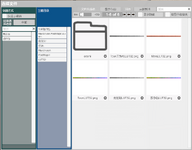
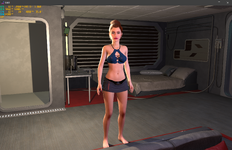
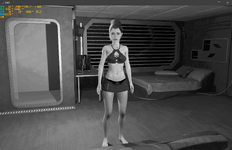
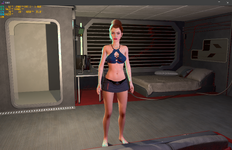
I'm not sure if it's actually related to the LUT files themselves. Here are four images showing: LUT off, LUT on, and two different presets for comparison.Are you sure that the lut file is available on your version?
'coz if you don't have the LUT file, it might lead to improper computation of the LUT and completely break the LUT pass.

Upvote
0
You have asian characters in your paths, this could break VAM's normal behavior.
But beyond that, if enabling PM/Lut does that, it obviously tied to it. Now it might be produced by a combination of factors, but finding what is beyond me.
If you have that result inside of your base build (the new clean one you downloaded), it could be possible that it has to do with something else ( PC / Windows / Drivers... etc )
But beyond that, if enabling PM/Lut does that, it obviously tied to it. Now it might be produced by a combination of factors, but finding what is beyond me.
If you have that result inside of your base build (the new clean one you downloaded), it could be possible that it has to do with something else ( PC / Windows / Drivers... etc )
Upvote
0
I can confirm that my installation path is entirely in English, and I’m using a clean client from the VaM Updater. The Chinese text you see is from a translation plugin, but I can guarantee the issue persists even without that plugin installed.You have asian characters in your paths, this could break VAM's normal behavior.
But beyond that, if enabling PM/Lut does that, it obviously tied to it. Now it might be produced by a combination of factors, but finding what is beyond me.
If you have that result inside of your base build (the new clean one you downloaded), it could be possible that it has to do with something else ( PC / Windows / Drivers... etc )
For now, my only workaround is to disable PostMagic/LUT as much as possible.
Upvote
0
Just before I reached out to the manufacturer for after-sales support, the issue was finally resolved. All I did was set the 'Shader Cache Size' to 0 in the NVIDIA Control Panel, and that fixed it.
It turns out the root of the problem was leftover shader files from my previous graphics card that hadn't been cleared out. I don't understand why these files weren't removed even after using professional driver uninstaller software (DDU) for a clean reinstall. Regardless, the problem seems to be permanently fixed now, and I hope this helps others facing the same issue.
You don't need to worry about this setting affecting your performance permanently either—just restart your computer and then change the value back to your preferred setting.
It turns out the root of the problem was leftover shader files from my previous graphics card that hadn't been cleared out. I don't understand why these files weren't removed even after using professional driver uninstaller software (DDU) for a clean reinstall. Regardless, the problem seems to be permanently fixed now, and I hope this helps others facing the same issue.
You don't need to worry about this setting affecting your performance permanently either—just restart your computer and then change the value back to your preferred setting.
Upvote
1
Solution
Similar threads
- Replies
- 0
- Views
- 537
- Replies
- 2
- Views
- 923

- Replies
- 3
- Views
- 1K

- Replies
- 4
- Views
- 2K

- Replies
- 2
- Views
- 320