

You are using an out of date browser. It may not display this or other websites correctly.
You should upgrade or use an alternative browser.
You should upgrade or use an alternative browser.
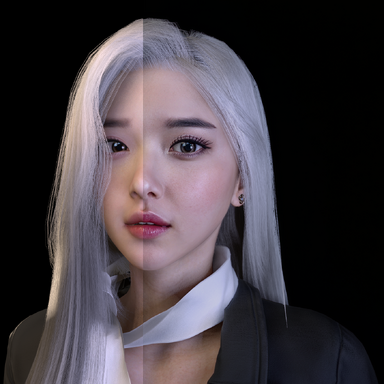
Paid Plugins + Scripts VaM DLSS Suite Upscaling+Neural Rendering+Frame Gen
- Thread starter UncleBurrito
- Start date

Ya i run v3. But supershot is not working at all for me bor is framegen.My performance manager has been showing the frame rate all along. As for Super Shot, have some problems with it dropping out, but rebooting Vam usually fixes it. I run the DLSS plugin at a moderate level though, I avoid going over 2 passes on NR and I keep Frame Gen off. I was also wondering if you are running the latest version, Version 3, which is much more stable and VR capable?
Is this mod reversable? Can I remove it if I dont like it? Is there a chance that it will completely F up my VAM?
it's easy to uninstall, you have to copy a couple of files to the vam root folder and a directory. To uninstall just delete those two files and the directory. Easy.Is this mod reversable? Can I remove it if I dont like it? Is there a chance that it will completely F up my VAM?

Sorry, I just remembered that I had to play around with the Supershot settings. Turn off the "Resolution Multiplier", but leave the MSAA settings on. Then set all of the DLSS5 settings to their lowest and Framegen off. Close out of Vam and try the scene again. I have found that once all goes to hell with either plugin when you have the DLSS5 running, you have to reboot Vam to fix it. After you get a pic that looks good start turning up the DLSS5 settings until you are getting pics that you like. Don't forget to try playing around with the "Scene lighting" tab and giving it some light by moving the setting from black to whiter, also try turning as many lights off as possible and then add only what you need to get a good look. You won't need as many with scene lighting cranked up. It takes some playing around to get it all working right, but once you find a good setting, the results are worth it.Ya i run v3. But supershot is not working at all for me bor is framegen.
GitHub - tig3rmast3r/OFXR-Bridge: Frame generation for VR using Optical Flow
Frame generation for VR using Optical Flow. Contribute to tig3rmast3r/OFXR-Bridge development by creating an account on GitHub.
 github.com

No this one cannot be used in VR in VAM.The current frame gen projects that can be used in VR mode in VAM.
GitHub - tig3rmast3r/OFXR-Bridge: Frame generation for VR using Optical Flow
Frame generation for VR using Optical Flow. Contribute to tig3rmast3r/OFXR-Bridge development by creating an account on GitHub.
It cannot be used directly; \VaM_Data\Plugins\openvr_api.dll needs to be recompiled.No this one cannot be used in VR in VAM.
You're talking about recompiling openvr and calling it into openxr, which as far as I know the only way to do it with opencomposite dlls, which do not work properly in VAM VR and breaks controls.It cannot be used directly; \VaM_Data\Plugins\openvr_api.dll needs to be recompiled.
A walk thru for this would be great.You can run this for just the upscaling to improve fps in vr right?
There is a good walk through on his Discord server. It is located on the "Download Things" section under the tab for the version 3 .dll.A walk thru for this would be great.
I would double check the install and make sure that all the files are there in the Vam_Updater folder. Also make sure you are running the Version 3 file, it is much more stable for me. You should also turn off MSAA in user preferences and increase the scene lighting some.Can't get this working. UI pops up no issue but when I try activating NR, there are no visible changes, even after changing the settings as in the video
As far as we have tested no it does not work. Turning on DLSS 4 alone does not increase performance in VR. It only helps when you enable DLSS 5 too, which is a shame...You can run this for just the upscaling to improve fps in vr right?
also available via dfc (reshade addon), lowering resolution down to 50% gives a large fps boost and the result is still very good. would be nice to be able to have this exposed on this plugin.Yes, frame gen would be much appreciated.
Alternatively, the option to adjust the neural rendering resolution from 100% to a lower value would be useful. Apparently, you can do this if NR runs through OptiScaler, which I was curious to know if this add-on uses, given the lack of ReShade.
is it possible to diy?

when will this be free?UncleBurrito updated VaM DLSS NR and DLAA Plugin RTX 20/30/40/50 with a new update entry:
VaM DLSS 1.0.3 the VR update
Read the rest of this update entry...
Similar threads


- Replies
- 1
- Views
- 779