


Take your time, this is hugeAlso oh god, I didn't even KNOW there was an active thread for my plugin. Here's a look at the coming update.
View attachment 621140
You are using an out of date browser. It may not display this or other websites correctly.
You should upgrade or use an alternative browser.
You should upgrade or use an alternative browser.
Paid Plugins + Scripts VaM DLSS Suite Upscaling+Neural Rendering+Frame Gen
- Thread starter UncleBurrito
- Start date
It is a replacement for MSAA. MSAA is extremely performance heavy. The coming version will have upscaling.Yea I know what DLSS is but I just wonder what the benefit of the DLSS 3 - 4.5 is here? I mean yes in other games DLSS 4.5 gives me a great FPS boost because my GPU doesnt have to render a resolution as high as without but DLSS is not implemented at all in VAM so does it even do anything?
Should MSAA be disabled completely or on top of that? Or does one exclude the other?It is a replacement for MSAA. MSAA is extremely performance heavy. The coming version will have upscaling.
Why not have frame gen for vr too? I mean that's where it's really needed...upscale too. That would make your plugin not just a "nice to have" but actually needed, no play without it.I am almost done with VR. This has been a LOT of work. Like a shit ton. Mostly because I wanted perfect image stability and performance. But It's pretty much ready. Just final adjustment and fixing bugs with the non-vr new features like frame gen.
I think when he says "non-vr new features", he means "features other than VR", not "features that don't work with VR".Why not have frame gen for vr too? I mean that's where it's really needed...upscale too. That would make your plugin not just a "nice to have" but actually needed, no play without it.
This is a great plugin, but the FPS drops three times just when you enable a scene that demonstrates any looks. Given that in VAM adding any looks to a scene ruins the FPS, even the simplest scene won’t give you more than 30 fps with this plugin. But it looks very beautiful.
Attachments
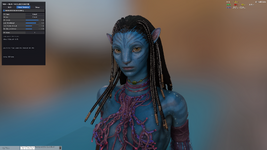
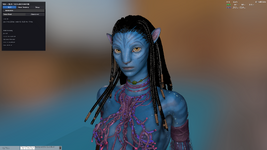
Its working great except the DLSS 3, 4 and 4.5. As soon as I enable it and run anything below DLAA quality I get some serious ghosting when moving. What is causing this? Its when Neural Rendering is enabled and "Run before DLSS" is turned on!
I have a 5070TI with the latest Nvidia drivers installed. Its alot worse when moving than in the picture below.

I have a 5070TI with the latest Nvidia drivers installed. Its alot worse when moving than in the picture below.
Hello,still doesnt work. lol
I followed the installation instructions and installed BepInEx_win_x64, but the F10 menu still does not appear in VaM.
Do I also need to install the VaM DLSS 1.0.2 plugin from this page?
Any guidance would be appreciated. Thank you!
Have you right clicked the .zip file before unzipping it and under Properties checked Trust this file?Hello,
I followed the installation instructions and installed BepInEx_win_x64, but the F10 menu still does not appear in VaM.
Do I also need to install the VaM DLSS 1.0.2 plugin from this page?
Any guidance would be appreciated. Thank you!
Hi,Have you right clicked the .zip file before unzipping it and under Properties checked Trust this file?
I re-downloaded and unblocked the file, but F10 still does not work.
Am I missing something in the installation path?
Thanks!
The BepInEx log shows “0 plugins to load”. Maybe that's the reason?
[Message: BepInEx] BepInEx 5.4.23.5 - VaM (9/7/2026 7:51:25 PM)
[Info : BepInEx] Running under Unity v2018.1.9.10931241
[Info : BepInEx] CLR runtime version: 2.0.50727.1433
[Info : BepInEx] Supports SRE: True
[Info : BepInEx] System platform: Bits64, Windows
[Message: BepInEx] Preloader started
[Info : BepInEx] Loaded 1 patcher method from [BepInEx.Preloader 5.4.23.5]
[Info : BepInEx] 1 patcher plugin loaded
[Info : BepInEx] Patching [UnityEngine.CoreModule] with [BepInEx.Chainloader]
[Message: BepInEx] Preloader finished
[Warning: HarmonyX] AccessTools.Property: Could not find property for type UnityEngine.Application and name isBatchMode
[Message: BepInEx] Chainloader ready
[Message: BepInEx] Chainloader started
[Info : BepInEx] 0 plugins to load
[Message: BepInEx] Chainloader startup complete
UncleBurrito updated VaM DLSS NR and DLAA Plugin RTX 20/30/40/50 with a new update entry:
VaM DLSS 1.0.3 the VR update
Read the rest of this update entry...
VaM DLSS 1.0.3 the VR update
Yes. VR. But it does a lot more than that.
First of all. Real DLSS Super Sampling
That's Upscaling. It can improve Neural Rendering performance by several times as long as you have the hardware to run it.
DLSS NR also has the option to run before upscaling. That's what gives you the performance.
You can also disable MSAA to save up on performance.
Upscaling also works in vr and Neural Rendering is locked to always use upscaling for best performance.
[ATTACH...
Read the rest of this update entry...
Ghosting is a known issue right now. It's one of those things that are a bit difficult to get right. I'll keep working on it to minimize it.Its working great except the DLSS 3, 4 and 4.5. As soon as I enable it and run anything below DLAA quality I get some serious ghosting when moving. What is causing this? Its when Neural Rendering is enabled and "Run before DLSS" is turned on!
I have a 5070TI with the latest Nvidia drivers installed. Its alot worse when moving than in the picture below.
View attachment 621561
I suggest you get the latest 1.0.3 version and try on that. It is released. If not, send the log and I'll help you out.Hi,
I re-downloaded and unblocked the file, but F10 still does not work.
Am I missing something in the installation path?
Thanks!
The BepInEx log shows “0 plugins to load”. Maybe that's the reason?
[Message: BepInEx] BepInEx 5.4.23.5 - VaM (9/7/2026 7:51:25 PM)
[Info : BepInEx] Running under Unity v2018.1.9.10931241
[Info : BepInEx] CLR runtime version: 2.0.50727.1433
[Info : BepInEx] Supports SRE: True
[Info : BepInEx] System platform: Bits64, Windows
[Message: BepInEx] Preloader started
[Info : BepInEx] Loaded 1 patcher method from [BepInEx.Preloader 5.4.23.5]
[Info : BepInEx] 1 patcher plugin loaded
[Info : BepInEx] Patching [UnityEngine.CoreModule] with [BepInEx.Chainloader]
[Message: BepInEx] Preloader finished
[Warning: HarmonyX] AccessTools.Property: Could not find property for type UnityEngine.Application and name isBatchMode
[Message: BepInEx] Chainloader ready
[Message: BepInEx] Chainloader started
[Info : BepInEx] 0 plugins to load
[Message: BepInEx] Chainloader startup complete
DLSS Frame Gen does not work in VR. It will introduce a lot of input lag. You'll almost certainly throw up. I am looking for alternate methods for later. Upscaling already works in VR in the latest version. Just update to 1.0.3Why not have frame gen for vr too? I mean that's where it's really needed...upscale too. That would make your plugin not just a "nice to have" but actually needed, no play without it.
Maybe this is a stupid question but do you have a Function key on your keyboard or something that prevents the game from registering when you press the F10 key?Hi,
I re-downloaded and unblocked the file, but F10 still does not work.
Am I missing something in the installation path?
Thanks!
The BepInEx log shows “0 plugins to load”. Maybe that's the reason?
[Message: BepInEx] BepInEx 5.4.23.5 - VaM (9/7/2026 7:51:25 PM)
[Info : BepInEx] Running under Unity v2018.1.9.10931241
[Info : BepInEx] CLR runtime version: 2.0.50727.1433
[Info : BepInEx] Supports SRE: True
[Info : BepInEx] System platform: Bits64, Windows
[Message: BepInEx] Preloader started
[Info : BepInEx] Loaded 1 patcher method from [BepInEx.Preloader 5.4.23.5]
[Info : BepInEx] 1 patcher plugin loaded
[Info : BepInEx] Patching [UnityEngine.CoreModule] with [BepInEx.Chainloader]
[Message: BepInEx] Preloader finished
[Warning: HarmonyX] AccessTools.Property: Could not find property for type UnityEngine.Application and name isBatchMode
[Message: BepInEx] Chainloader ready
[Message: BepInEx] Chainloader started
[Info : BepInEx] 0 plugins to load
[Message: BepInEx] Chainloader startup complete
I see! With the 1.0.2 version you could choose different letter versions of DLSS. And the letter E was working the best for the ghosting problem for me. Why is that not an option anymore?Ghosting is a known issue right now. It's one of those things that are a bit difficult to get right. I'll keep working on it to minimize it.
No, other function keys like F1 are working fine in VaM, so the keyboard itself is not the issue.Maybe this is a stupid question but do you have a Function key on your keyboard or something that prevents the game from registering when you press the F10 key?
F10 just doesn’t trigger the DLSS menu.
I think there is some confusion between the different installation instructions for BepInEx and the DLSS plugin versions.
Could someone please provide the correct step-by-step installation order and folder structure for the plugin?
Thank you!
Could someone please provide the correct step-by-step installation order and folder structure for the plugin?
Thank you!
Yes, the winhttp.dll file is located in the main VaM directory.Do you have winhttp.dll in you vam folder ?
How to install?I think there is some confusion between the different installation instructions for BepInEx and the DLSS plugin versions.
Could someone please provide the correct step-by-step installation order and folder structure for the plugin?
Thank you!
- Step 1: Download [BepinEX](https://github.com/BepInEx/BepInEx/releases/download/v5.4.23.5/BepInEx_win_x64_5.4.23.5.zip)
- Step 2: Extract everything inside the VaM folder. right next to vam.exe
- Step 3: Download the mod zip.
- Step 4: Extract everything inside the VaM folder. Same place. Next to vam.exe.
- Step 5: Launch VaM and press f10 to open the VaM DLSS menu. Adjust your settings accordingly.
# How to update?
If you have had the previous version installed, then you can skip the BepinEx installation. Simply drag and drop the new version and override when asked.
I just wanted to double-check step 3 (downloading the mod zip), and I’ve now confirmed it. Everything makes sense now.How to install?
- Step 1: Download [BepinEX](https://github.com/BepInEx/BepInEx/releases/download/v5.4.23.5/BepInEx_win_x64_5.4.23.5.zip)
- Step 2: Extract everything inside the VaM folder. right next to vam.exe
- Step 3: Download the mod zip.
- Step 4: Extract everything inside the VaM folder. Same place. Next to vam.exe.
- Step 5: Launch VaM and press f10 to open the VaM DLSS menu. Adjust your settings accordingly.
# How to update?
If you have had the previous version installed, then you can skip the BepinEx installation. Simply drag and drop the new version and override when asked.
Thanks again for your support!

You need to follow the download link to Patreon for the script that operates it in Vam. Download it as well and unzip it to the same folder and it should work. Yes, it is a paid add-on, but the version 3 works GREAT and in VR.ok, I downloaded BepInEx_win_x64_5.4.23.5 file, extract to my Vam main folder but F10 doesnt work. Am I missing another other files?
Similar threads


- Replies
- 1
- Views
- 766
