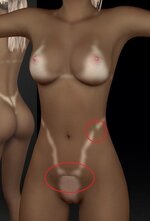
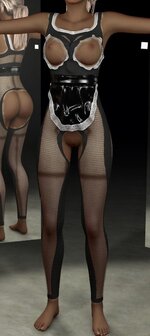
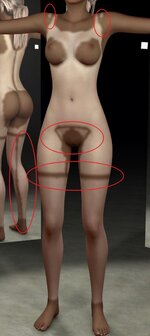
Thanks for the kind words.
A decal was my first plan, actually. I ended up here from chasing a tan line that
follows the clothing faithfully. It's built to generate the tan from the diffuse
skin and reproduce the detail of that base — that's the whole point of the design.
One thing — do you have the full texture set loaded (normal, specular, gloss),
or diffuse only? And which Resolution did you export at?
I roughly get what you're after, but I'd ask you to spend a bit more time with the
plugin first. If I've got any of this wrong, tell me.
Thx.
I did and exported at 2k resolution. I take back the part of losing detail. it indeed works ontop of your current diffuse, that a overlook on my part
After your reply (thanks for that) I took some more time to play around with the plugin per your suggestion. and
for me I came to the following conclusion
Regarding the decal suggestion - what is the reasoning behind it, and what would
the advantage be?
The plugin in it's current state with using the
diffuse skin is absolutely fine for characters that have naturaly tanned skin. you just copy and paste their original skin color and the results are amazing.
with paler models it get a little tricky. if I want the skin color to remain the same the tanline gonna be very hard to notice. ofcoure this makes sense because the model is pale... what you can do with a decal texture with
DecalMaker for example, is load the same decal twice
(or more) to make it brighter thus being more noticeable. now I get you might say the model is already pale how much more pale does one have to be under the clothes. and to that I say you have a point. but it's all about artistic value in the end of the day. with some models I am fine with the original pale skin to get a bit more tanned and with some I think it just ruins the whole look.
now ofcourse I could use any other
tanline decal that there is on the HUB. but none of them get close to what this plugin is able to pull off, with basicaly infinite possibilites.
Appart from that topic I got a few points I want to address/suggest.
- with the brush feature can you add a
mirror effect. so the work you do on one side is the same with the other side and it works simultaneously
- I havent really been able to pull of skimpy/thin lines as even with thin clothing after pushing the mask feather up, the affected area becomes large. Lowering mask feather results in jagged lines and yes I have played with the other in built setting to combat this to no conlusion.
are you able to implement something in the lines of that we could play with the
witdh of the affected area while keeping the feather up?
- when I brush my models moves as I select one of their joinst as well, do you know any way how to dissable that? I am not that keen on freehand brushing myself as I tend to mess things up rather than makin them better but still I want to try XD
Yet to test it but I saw your recent update, amazing quality of life features!