TanLineMaker

Plugins + Scripts TanLineMaker

Download [<1 MB]

Calvados

Member
Joined
Dec 13, 2024
Messages
40
Reactions
92
Calvados submitted a new resource:

TanLineMaker - TanLineMaker

TanLineMaker

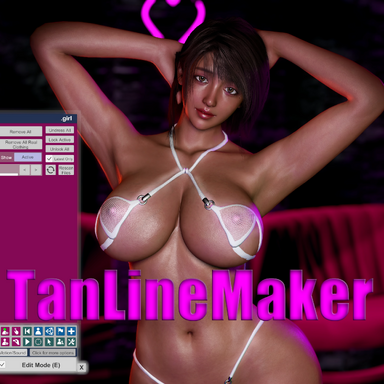
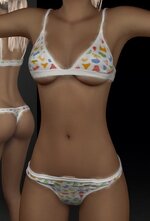
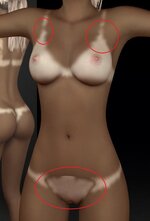
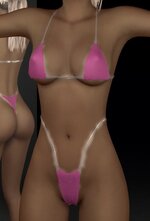
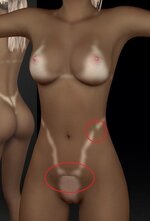
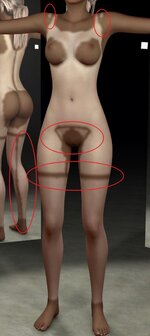
Create tan line decals directly inside VaM. Put swimwear on your model, press one button, and the skin outside the clothing is tanned while the covered area stays pale. The clothing mesh itself defines the boundary, so the tan line matches the garment exactly — no UV painting, no external tools.

View attachment 612645
How it works

The plugin reads your model's actual skin texture and multiplies it with the colors you...

Read more about this resource...
 
Whoa I've been dreaming of a way to make natural looking tan lines. Thank you!

Also, does this allow masking palms and soles so they don't tan?
 
It has a "brush" mode, so try using it on your palms or the soles of your feet; you can restore sunburned areas to their original color.
 
Thank you for creating the plugin, which has added more possibilities for character details. However, I encountered some issues while using it.
1. When there is a significant contrast in skin tones, visible pixelation of sunburns can be observed. Could the resolution of the edges be increased to make the sunburns more precise?
2. When creating sunburns, there are noticeable lines at the edges of the texture, even when using a brush to paint. Could this be optimized?
Once again, thank you for the time and effort you have invested in the community.
 

Attachments

  • 1.jpg
    1.jpg
    33 KB · Views: 0
  • 2.jpg
    2.jpg
    29.2 KB · Views: 0
  • 3.jpg
    3.jpg
    27.9 KB · Views: 0
  • 4.jpg
    4.jpg
    27.1 KB · Views: 0
  • 5.jpg
    5.jpg
    66.3 KB · Views: 0
  • 6.jpg
    6.jpg
    54.7 KB · Views: 0
As noted on the description page, this is still the initial release, so there are some bugs and areas where usability could be improved. There are several points I plan to fix.
Please expect these improvements to be included in Version 2 or later.
A "brush mode" is available for making corrections after generation; please give it a try.
 
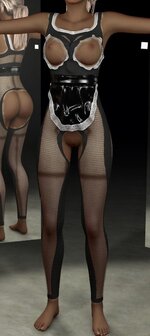
Hey this is a great plugin I hope you don't mind me asking who is the author of the clothing your model is wearing in the sample video and picture?
 
Hey this is a great plugin I hope you don't mind me asking who is the author of the clothing your model is wearing in the sample video and picture?
Thank you for the kind words about the plugin.
This is a costume created by the late Monster Shinkai.

*Please note that the costumes have been changed due to a version update.
 
Last edited:
It's a great plugin, only thing I don't like is that it's a Diffuse Texture, resulting in completely altering the details and complexion of any model.
Incase possible it would be amazing if this could be made into a Decal texture where also only the tanline shows up.

Nevertheless a great plugin
 
It's a great plugin, only thing I don't like is that it's a Diffuse Texture, resulting in completely altering the details and complexion of any model.
Incase possible it would be amazing if this could be made into a Decal texture where also only the tanline shows up.

Nevertheless a great plugin
Thanks for the kind words.

A decal was my first plan, actually. I ended up here from chasing a tan line that
follows the clothing faithfully. It's built to generate the tan from the diffuse
skin and reproduce the detail of that base — that's the whole point of the design.

One thing — do you have the full texture set loaded (normal, specular, gloss),
or diffuse only? And which Resolution did you export at?

I roughly get what you're after, but I'd ask you to spend a bit more time with the
plugin first. If I've got any of this wrong, tell me.

Thx.
 
It's a great plugin, only thing I don't like is that it's a Diffuse Texture, resulting in completely altering the details and complexion of any model.
Incase possible it would be amazing if this could be made into a Decal texture where also only the tanline shows up.

Nevertheless a great plugin
+1
 
Regarding the decal suggestion - what is the reasoning behind it, and what would
the advantage be?

This plugin was designed to generate tan lines that follow the outfit as
faithfully as possible, without needing external software such as Substance 3D
Painter. Rather than a generic decal reused across characters, it produces a tan
line built for that specific outfit and that specific skin.

There is also a practical cost: a decal would occupy the slot otherwise used for
makeup or tattoos.
 
Regarding the decal suggestion - what is the reasoning behind it, and what would
the advantage be?

This plugin was designed to generate tan lines that follow the outfit as
faithfully as possible, without needing external software such as Substance 3D
Painter. Rather than a generic decal reused across characters, it produces a tan
line built for that specific outfit and that specific skin.
What if it were possible to actually reuse the same decal textures for multiple characters? This would save storage space, as well as time since it would not be necessary to regenerate the same tanned cloth texture for other character textures. It is a shame that this option was not an alternative method, as it would have been a great opportunity for those who prefer it and they would have been very grateful for it.

There is also a practical cost: a decal would occupy the slot otherwise used for
makeup or tattoos.
Some people including myself, find the DecalMaker plugin to be a useful tool for this purpose. And 16Gb of VRAM is sufficient, as the game only uses half of that for my scene setup.
 
What if it were possible to actually reuse the same decal textures for multiple characters? This would save storage space, as well as time since it would not be necessary to regenerate the same tanned cloth texture for other character textures. It is a shame that this option was not an alternative method, as it would have been a great opportunity for those who prefer it and they would have been very grateful for it.


Some people including myself, find the DecalMaker plugin to be a useful tool for this purpose. And 16Gb of VRAM is sufficient, as the game only uses half of that for my scene setup.
There is no mention of VRAM requirements anywhere, nor is such information included in the documentation.

Regarding storage capacity, even if four 4096-resolution textures were used, the total size would be a mere 39.5 MB. It is hardly worth the effort of redesigning the plugin just to save that amount of space.

Three things have to hold at the same time: the tanned skin, the untanned skin,
and the outfit as it sits in VaM. The line only reads correctly when all three
agree.

DecalMaker is a tool designed to solve a completely different problem, so comparing the two is meaningless.
 
Thanks for the kind words.

A decal was my first plan, actually. I ended up here from chasing a tan line that
follows the clothing faithfully. It's built to generate the tan from the diffuse
skin and reproduce the detail of that base — that's the whole point of the design.

One thing — do you have the full texture set loaded (normal, specular, gloss),
or diffuse only? And which Resolution did you export at?

I roughly get what you're after, but I'd ask you to spend a bit more time with the
plugin first. If I've got any of this wrong, tell me.

Thx.
I did and exported at 2k resolution. I take back the part of losing detail. it indeed works ontop of your current diffuse, that a overlook on my part

After your reply (thanks for that) I took some more time to play around with the plugin per your suggestion. and for me I came to the following conclusion

Regarding the decal suggestion - what is the reasoning behind it, and what would
the advantage be?

The plugin in it's current state with using the diffuse skin is absolutely fine for characters that have naturaly tanned skin. you just copy and paste their original skin color and the results are amazing.
with paler models it get a little tricky. if I want the skin color to remain the same the tanline gonna be very hard to notice. ofcoure this makes sense because the model is pale... what you can do with a decal texture with DecalMaker for example, is load the same decal twice (or more) to make it brighter thus being more noticeable. now I get you might say the model is already pale how much more pale does one have to be under the clothes. and to that I say you have a point. but it's all about artistic value in the end of the day. with some models I am fine with the original pale skin to get a bit more tanned and with some I think it just ruins the whole look.

now ofcourse I could use any other tanline decal that there is on the HUB. but none of them get close to what this plugin is able to pull off, with basicaly infinite possibilites.


Appart from that topic I got a few points I want to address/suggest.

- with the brush feature can you add a mirror effect. so the work you do on one side is the same with the other side and it works simultaneously
- I havent really been able to pull of skimpy/thin lines as even with thin clothing after pushing the mask feather up, the affected area becomes large. Lowering mask feather results in jagged lines and yes I have played with the other in built setting to combat this to no conlusion.
are you able to implement something in the lines of that we could play with the witdh of the affected area while keeping the feather up?
- when I brush my models moves as I select one of their joinst as well, do you know any way how to dissable that? I am not that keen on freehand brushing myself as I tend to mess things up rather than makin them better but still I want to try XD

Yet to test it but I saw your recent update, amazing quality of life features!
 
Back
Top Bottom