Hi Regguise after a thorough test of your plugin,I have a few findings for your reference if you need some review. Love this plugin so much and thanks again! Relevant pics attached.
1.Shading seam. After using the recltoh plugin, rendered shading seams appear exactly where the model has UV seams. Enabling Pushout + Bilateral Smooth + HC Correction tends to cause severe UV distortion, which greatly ruins the visual effect. But this issue is still useful in a few scenarios, and it causes issues at other times.
Two useful cases:
1.We sometimes want to intentionally use UV seams as the stitching lines of the clothes.
2.It can also be used for making clothes with sharp edges on the model, achieving the same effect as Shade Flat in Blender.
Suggestion : make this shading seam effect toggleable.
2.Friction in sim tab malfunction. The friction parameter in the green circle is actually not friction , it‘s much more like collision spring, the higher the value, the clothing tends to bounce more intensively againt the object it collides with, acting like a boucing ball with infinite loop if the value is high enough and at the meantime the damping parameter is low enough-around zero-when falling to ground.
Suggestion: add a effective friction parameter
3.Clothing with proxy cloth enabled cannot be grabbed using the Cloth Grab Sphere,but clothing with stopper's proxy can be grabbed by sphere. But stopper's proxy will lead to mesh distortion. Proxy in the recloth plugin is still irreplaceable.
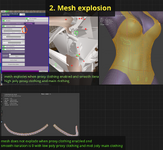
4. Mesh explosion. After using proxy cloth, setting Smooth Iteration to 0 will cause mesh explosion. From my test,this issue appears with some high poly proxy clothing, but disappears with very low poly proxy clothing. I do not know whether poly count is the cause.
5. Pushout. The Pushout feature will distort the mesh of clothing with raised detailed geometry.
Its working mechanism is to push mesh parts that are close enough to the body outward along the body surface.
However, the top ends of some raised details are not close enough to the body, while their bottom ends are within the proximity threshold.
This results in the destruction of detail geometry.
Suggestion1: adding an option to offset all mesh vertices uniformly along the normal direction of the body surface if possible,
Suggestion2:
add a option to mask out areas(using material slots e.g.)to turn off pushout effect in custom regions, this is useful for creating skin tight clothing edge part to fit the real body well while we do not want rest parts of the clothing be pushed out for good reason and we can hide the relevent body parts to prevent cliping for rest parts of the clothing. This is crucial because when pose the character limbs, the clothing edge will misalign with the real body and clipping appears, refer to ‘6. Misalignments’ for details.
6. Misalignments. For tight skin clothing, I tested using the body mesh to create a recloth version clothing and there are many misalignments between the real body and clothing, but we can use proxy within this plugin to largely solve the problem- proxy red value at 0.01-0.02 will work well but the clothing will lag behind the body when move the body quickly even if the damping and detach strengh and weight are all set to 0,so sometimes still need to turn off the recloth plugin or use a combination of both. And also use hide skin plugin on hub to achieve the best possible result.
For clothing not tight-skin, the plugin works like a charm in most cases I believe. And pushout patially solves of the problem if most misalignment parts are inside body if want good tight skin effect.
7. Performance of the proxy sim. Enable proxy sim of the recloth plugin eats a lot of compute resources and takes some efforts to cook so the functions of those not related to sim are still first priority.