ReCloth Blender Export Tools

Toolkits + Templates ReCloth Blender Export Tools

Download [<1 MB]
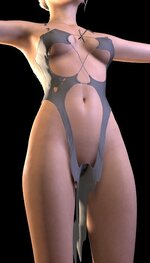
This is how VAM looks natively in Figure 1, but it becomes Figure 2 when using your plugin. Do you know why?
 

Attachments

  • Figure 1.jpg
    Figure 1.jpg
    44.8 KB · Views: 0
  • Figure 2.jpg
    Figure 2.jpg
    42.4 KB · Views: 0
This is how VAM looks natively in Figure 1, but it becomes Figure 2 when using your plugin. Do you know why?
There could be many causes. Could you please provide a bit more information. Also it is always good to go back the tutorial and check if there any steps you missed.
 

Similar threads

Plugins + Scripts ReCloth
Replies
42
Views
3K
Assets + Accessories Medieval Tools
Replies
2
Views
224
Replies
1
Views
652
Replies
19
Views
4K
Back
Top Bottom