[Project CRAFT] ASSET CUA STUDIO: Now supports BlendShape animation conversion

Plugins + Scripts [Project CRAFT] ASSET CUA STUDIO: Now supports BlendShape animation conversion

Download [100.5 MB]
That's actually a pretty good idea.

I could add an overlay list in the 3D view so you can preview them one by one. If you want to bake one into the package, just select it.

What do you think?

Maybe, not sure what you mean exactly. I think check boxes beside the animations in the list would be best.

Also I realized yesterday I would like to be able to disable individual materials from being imported if that would be possible. Using this app is making me learn a few things about blender though, so I can just figure out how to do it in there otherwise. But it would be cool to have that in the app.

Another little thing I thought of: A "Select all" button/check box for the check box in the lists would also be nice. I batch imported like 30 things yesterday and I had to go check them all one by one.
 
Is it possible to import rigged assets so it has "physics" (for a lack of a better term)? To be more precise, I've successfully imported hair assets and they show up in VaM with no issue, however they are completely static. I'm not sure if I'm importing the assets "wrong" or if the app isn't capable of that in the first place and I'm missing some steps to drive the bones. I'm fairly new to this pipeline (and Blender in general) so I apologize for any potential dumb question/statement I give off. :D
 
Is it possible to import rigged assets so it has "physics" (for a lack of a better term)? To be more precise, I've successfully imported hair assets and they show up in VaM with no issue, however they are completely static. I'm not sure if I'm importing the assets "wrong" or if the app isn't capable of that in the first place and I'm missing some steps to drive the bones. I'm fairly new to this pipeline (and Blender in general) so I apologize for any potential dumb question/statement I give off. :D
To give CUA-based hair physics, you'd probably need a companion runtime DLL.
 
Shadow Venom updated [Project CRAFT] ASSET CUA STUDIO: Open Source Release with a new update entry:

1.3 Release

View attachment 609225

v1.3
  • 🗑️ Delete meshes right in the 3D view. Click any part of a model, a ground plane, a backdrop, scan clutter and press Delete to drop it from the export. The prop re-centers, re-floors and re-scales to what's left, so "I only want the prop, not the floor it shipped with" is now one click. Deleted meshes are listed under Advanced, restorable one by one (or all at once), and saved with your project.
  • ↩️ Undo / redo in...

Read the rest of this update entry...
 
Thank you for this. I have been marveling at your work from afar. This is because I am not a 3D person so a lot of this stuff is over my head. But a thought has been coursing through my head since I encountered your first post. This thought won't go away so let me blurt it out.

Is there a way to take a VaM character that is fully clothed, posed or animated, and bake that into an NPC? The use case would be for a chorus line behind a main dancer, or a lineup of working ladies at a House of Ill Repute. When I first encountered your posts, I was thinking that the workflow would be to export the clothed/animated VaM look to Unity and then back in via your tool. But that sorta doesn't make sense and would be way beyond my skills. Anyway, just curious. Thanks again.
 
Thank you for this. I have been marveling at your work from afar. This is because I am not a 3D person so a lot of this stuff is over my head. But a thought has been coursing through my head since I encountered your first post. This thought won't go away so let me blurt it out.

Is there a way to take a VaM character that is fully clothed, posed or animated, and bake that into an NPC? The use case would be for a chorus line behind a main dancer, or a lineup of working ladies at a House of Ill Repute. When I first encountered your posts, I was thinking that the workflow would be to export the clothed/animated VaM look to Unity and then back in via your tool. But that sorta doesn't make sense and would be way beyond my skills. Anyway, just curious. Thanks again.

Hi! No need to feel intimidated at all. 😊 I'm actually not a 3D person either. Just like you, this all started as a hobby.

That's exactly why I know how overwhelming it can be if you have to learn every single step from scratch. I'm definitely not saying we shouldn't learn those things, but I do think it's okay to simplify the process first, lower the barrier to entry, and let people build and keep their enthusiasm. That's really the whole reason I've been making these tools.

As for your question, that's honestly something I've been dreaming of making happen for a long time. It's actually one of the reasons I created CUA Puppeteer in the first place. It already solves the problem of mapping animations from a VaM character to a CUA character, or even baking the animation into a CUA asset.


Converting the VaM character itself into a CUA isn't really the hard part. The real challenge has always been hair and clothing, especially if you want to preserve their physics simulation. I still haven't found a solution that I'm truly happy with.

So, in short, it's definitely not impossible, but there are still quite a few roadblocks to overcome before it becomes a smooth workflow. Hopefully one day we'll get there. 🙂
 
Glad to hear great minds think alike. hehe ;)

There is a CUA of a room that looked a lot like an apartment I once lived in. Except it was mirrored. Thinking it would be drop dead easy to "flip" it, I spent several infuriating weeks trying to learn enough of Unity etc. to do this. I eventually threw in the towel and walked away with my tails between my legs like a whipped dog.

When I first learned of Puppeteer, I immediately went searching for 3D assets that I could bring in. But alas, most were not what I had in mind. At the end of the day, I would love for my beloved Presets to be baked into NPCs. Really looking forward to see what next comes out of that galaxy brain of yours. (y)
 
I tried several times to use this great plug over a couple of weeks, and it didn't work for me. The glb was converted to cua but for the life of me I can't figure out how to get it into VAM. I copied cua asset bundle into vam and even into vam assets. I'm missing something. If you can steer me in the right direction, I would greatly appreciate it and if not I'll just keep trying to figure it out. Thanks.
 
I tried several times to use this great plug over a couple of weeks, and it didn't work for me. The glb was converted to cua but for the life of me I can't figure out how to get it into VAM. I copied cua asset bundle into vam and even into vam assets. I'm missing something. If you can steer me in the right direction, I would greatly appreciate it and if not I'll just keep trying to figure it out. Thanks.

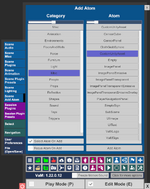
Hi! Here's how to add your converted CUA to a VaM scene:


1.
Place the converted CUA in the appropriate folder, usually VaM/Custom/Assets. I recommend setting this as the export path directly in the app so you don't have to move the files manually each time.

1785321056098.png

2. In VaM, add a new Custom Unity Asset atom.

1785321140316.png

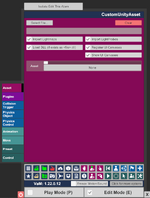
3. Select the atom, open the Asset tab, and click Select File.

1785321107430.png

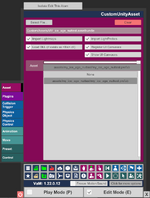
4. Once it's loaded, choose the Prefab you exported.

1785321185317.png

Hope this helps!
 
Hi! Here's how to add your converted CUA to a VaM scene:


1.
Place the converted CUA in the appropriate folder, usually VaM/Custom/Assets. I recommend setting this as the export path directly in the app so you don't have to move the files manually each time.

View attachment 610232

2. In VaM, add a new Custom Unity Asset atom.

View attachment 610234

3. Select the atom, open the Asset tab, and click Select File.

View attachment 610233

4. Once it's loaded, choose the Prefab you exported.

View attachment 610235

Hope this helps!
 
Hi! Here's how to add your converted CUA to a VaM scene:


1.
Place the converted CUA in the appropriate folder, usually VaM/Custom/Assets. I recommend setting this as the export path directly in the app so you don't have to move the files manually each time.

View attachment 610232

2. In VaM, add a new Custom Unity Asset atom.

View attachment 610234

3. Select the atom, open the Asset tab, and click Select File.

View attachment 610233

4. Once it's loaded, choose the Prefab you exported.

View attachment 610235

Hope this helps!
Thank you very much for your time. I will give it a try.(y)
 
Hello! LOVE this! 10/10, thank you so much for your hard work!

I have one QOL request if possible
I have been tinkering around and I've found when I'm messing with slightly bigger stuff like a building or small environment, I sometimes have a lot of materials to tinker with to make them look correct in vam(emissions and stuff). While I don't mind doing that It can become a bit tedious when I'm looking to change a specific material and while the material list is 30+ long.
With the latest update of being able to select a mesh I was wondering if it would be possible when selecting a mesh to also highlight the material tab that it is connected to?
 
Hello! LOVE this! 10/10, thank you so much for your hard work!

I have one QOL request if possible
I have been tinkering around and I've found when I'm messing with slightly bigger stuff like a building or small environment, I sometimes have a lot of materials to tinker with to make them look correct in vam(emissions and stuff). While I don't mind doing that It can become a bit tedious when I'm looking to change a specific material and while the material list is 30+ long.
With the latest update of being able to select a mesh I was wondering if it would be possible when selecting a mesh to also highlight the material tab that it is connected to?
I've been doing my best to keep it from becoming another Unity, but I have to say... I think this is a really cool idea. Thank you!
 
Shadow Venom updated [Project CRAFT] ASSET CUA STUDIO: Now supports BlendShape animation conversion with a new update entry:

v1.4 BlendShape support and more

Changelog

v1.4

View attachment 614406
View attachment 614407

The big one. Two new capabilities, and a batch of "the tool knew, but didn't tell you" fixes.
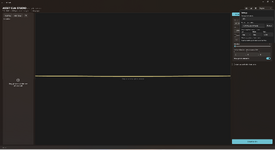
  • 🌳 Shape-key (blendshape) animation now converts. A community member brought in an animated tree, watched it sway in the preview, exported it — and got a statue. Its wind wasn't bones at all; it was shape keys, and shape keys weren't...
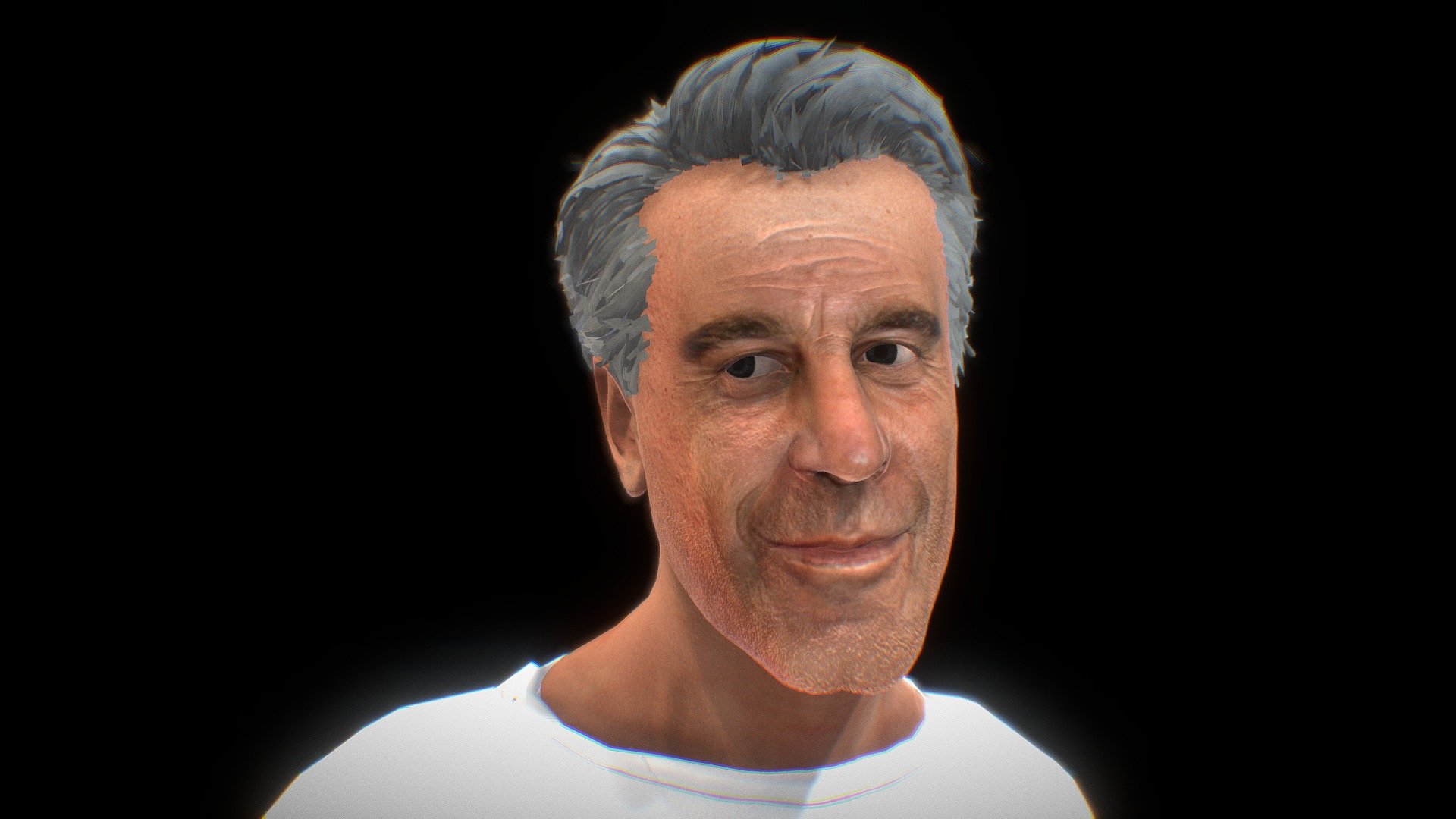
Read the rest of this update entry...
 
Been using this program for the past few days and it's absolutely super handy. There's one problem I've been having, some GLB files appear to have broken black textures when loaded into VAM. While In the CUA studio, it all looks good. It only happens when the model is animated.

First example:
(I know, great example but I've tried a ton and this is the only one where I could remember the name from xD)

Another example:

It loads in fine without an animation, but the moment an animation is attached to it it breaks (black textures, glitchy IN vam). Also, in particual from this site, after adding an animation I have to re-open and export the GLB in blender to make sure CUA Studio can export it or else it shows this error:
"done --- 0 of 1 converted *****.glb: [PYI-****:ERROR] failed to excute script 'glb2cua_mold due to unhandled exception!"

Keep up the great work! Hope u know to fix this =)
 
Been using this program for the past few days and it's absolutely super handy. There's one problem I've been having, some GLB files appear to have broken black textures when loaded into VAM. While In the CUA studio, it all looks good. It only happens when the model is animated.

First example:
(I know, great example but I've tried a ton and this is the only one where I could remember the name from xD)

Another example:

It loads in fine without an animation, but the moment an animation is attached to it it breaks (black textures, glitchy IN vam). Also, in particual from this site, after adding an animation I have to re-open and export the GLB in blender to make sure CUA Studio can export it or else it shows this error:
"done --- 0 of 1 converted *****.glb: [PYI-****:ERROR] failed to excute script 'glb2cua_mold due to unhandled exception!"

Keep up the great work! Hope u know to fix this =)
Thanks for reporting the issue. I’ll take a look when I have some time.
 
The plugin is really awesome, probably one of the best things for creators or people who just want to explore more in VAM and don't know much about 3D.


Maybe I am doing something wrong, but is there not an option to control rotation on all axis? The rotation slider is also a bit annoying, I would prefer an option to type in the number ideally (keep the slider, but if possible let us type in the 45 or 90... degrees) But more importantly I really think there is no option to control the rotation of an imported asset fully. I can just rotate it around the Y axis and I really think rotating the object on all axis, just like we can move it on all axis should be in there.


Also, if possible, I imported an asset and it had a lot of other smaller assets, I would love to have the option to mass select more assets/items in the preview and delete them.. Ideally making the selection with mouse by click and dragging to select (like a box selection) AND / OR having a list somwhere in there of all the items in the glb and by clicking on one in the list it would highlight in the viewport (again being able to shift+click to mass select more items in the list and delete) would be brilliant.

Either way, this plugin is really incredible already. Thank you for making this.
 
The plugin is really awesome, probably one of the best things for creators or people who just want to explore more in VAM and don't know much about 3D.


Maybe I am doing something wrong, but is there not an option to control rotation on all axis? The rotation slider is also a bit annoying, I would prefer an option to type in the number ideally (keep the slider, but if possible let us type in the 45 or 90... degrees) But more importantly I really think there is no option to control the rotation of an imported asset fully. I can just rotate it around the Y axis and I really think rotating the object on all axis, just like we can move it on all axis should be in there.


Also, if possible, I imported an asset and it had a lot of other smaller assets, I would love to have the option to mass select more assets/items in the preview and delete them.. Ideally making the selection with mouse by click and dragging to select (like a box selection) AND / OR having a list somwhere in there of all the items in the glb and by clicking on one in the list it would highlight in the viewport (again being able to shift+click to mass select more items in the list and delete) would be brilliant.

Either way, this plugin is really incredible already. Thank you for making this.

Those are some really great suggestions! I’ll definitely take your feedback into account and make some improvements to both the features and the overall user experience. I’ll put out an update when I get some time.


As for the ability to delete individual objects, that feature was actually already available in the version released that day.


The catch is that it largely depends on how the original model creator built the asset, or more simply, whether those parts are actually separate objects in the first place. So you can’t necessarily just delete any part you want.


For that kind of fine-grained editing, where you need to work directly with vertices and triangles, you’d probably still want a more advanced tool like Blender.


And that’s actually why I included a dedicated Blender export plugin with the tool in the first place.
 
Those are some really great suggestions! I’ll definitely take your feedback into account and make some improvements to both the features and the overall user experience. I’ll put out an update when I get some time.


As for the ability to delete individual objects, that feature was actually already available in the version released that day.


The catch is that it largely depends on how the original model creator built the asset, or more simply, whether those parts are actually separate objects in the first place. So you can’t necessarily just delete any part you want.


For that kind of fine-grained editing, where you need to work directly with vertices and triangles, you’d probably still want a more advanced tool like Blender.


And that’s actually why I included a dedicated Blender export plugin with the tool in the first place.

Thank you and looking forward to that update! As for the selecting / deleting - I didn't mean to have an option to select vertices or things that the original creator didn't separate himself. What I mean is that I downloaded an environment asset and it had an example set already built there to showcase how the singular assets can be used and those singular assets were next to it in the same file, but there was just so many things overall and it was really big and while I was able to select a gate, door frame, fence, and whatever else I had to do it manually by clicking directly on the asset.

What I'd love to do is holding some key or just by click+hold and then having the option to box select or draw a selection around the objects and it would automatically allow me to select multiple objects (those that I can select) and then it would let me "mass delete selection" or if there's more things I can do with it then have a little menu pop up somewhere and it would tell me, for example like "create a new group" and it would group the objects together before I would export it to VAM, or I could group it and idk change scale to that specific group of objects, but the rest would be left alone... This way I can basically pre-build a lot of things in your plugin and only then when I am satisfied I can export it to VAM and in vam later on apply more plugins to it or just move it around.. Maybe I am saying dumb things, so don't feel the need to overly explain to me that I am not getting it, but I think at least the "box selection" or selecting multiple objects with drawing around them would really help with bigger environment assets. Thank you!
 
Back
Top Bottom