• Hi Guest!

    We have posted a new VaM2 dev log on Patreon, starting a monthly cadence of written progress updates between Beta releases. Highlights include the new Gizmos System, Selection Carousel, and Modes System with Context-Specific Editing. Beta1.2 is 15 of 21 items complete.

    Read the full post on Patreon, or follow progress on the public Trello roadmap.
Morph Merger

Plugins + Scripts Morph Merger

Download [<1 MB]

Project Canyon

Active member
Featured Contributor
Joined
May 13, 2020
Messages
13
Reactions
206
Project Canyon submitted a new resource:

Morph Merger - Combine your look into one morph by merging your morphs.

Morph Merger for VaM

Combine your look into one morph by merging your morphs.

Share a character without needing to share all those morphs, receive a look / scene without having to worry about bad morphs.

Create a 'base morph' for values that make up a look, only morphs needed for animation then need to be separate.

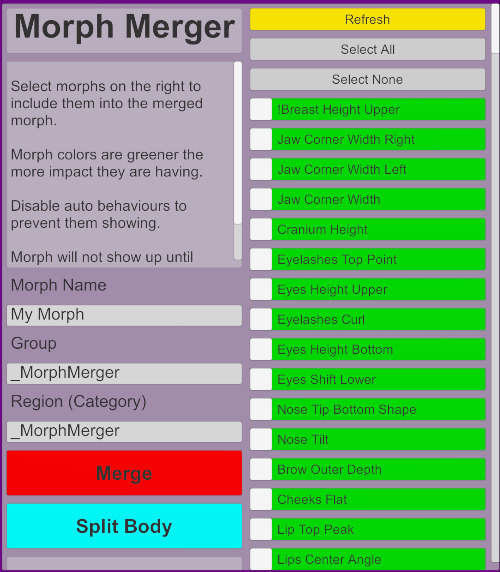
MorphMerger_UI.png

Read more about this resource...
 
Have you considered releasing as a VAR package?
 
While I can see the usefulness of this plugin, I am not a fan since it keeps the user from being able to edit out any morphs they don't care for. I know I can't be the only one, but I edit every single LOOk I download and I keep seeing more and more LOOKs that only contain the one morph and in those cases I just delete the entire package and move on. So if a user wants to share their looks, then it would be beneficial to them to not make their LOOK a single morph, or at the very least have head and body morphs.
 
While I can see the usefulness of this plugin, I am not a fan since it keeps the user from being able to edit out any morphs they don't care for. I know I can't be the only one, but I edit every single LOOk I download and I keep seeing more and more LOOKs that only contain the one morph and in those cases I just delete the entire package and move on. So if a user wants to share their looks, then it would be beneficial to them to not make their LOOK a single morph, or at the very least have head and body morphs.
Many users have purchased morph packages. They cannot legally distribute these morphs, so if they make a look using them, they have 3 choices:
1) never share the look.
2) share the look, but without the morphs. It will then not look anything like it is supposed to unless the end user has also purchased the same morph pack.
3) Combine all the morphs into a single morph before distributing. It makes it hard to modify the look, but at least everybody gets to download it.
 
Many users have purchased morph packages. They cannot legally distribute these morphs, so if they make a look using them, they have 3 choices:
1) never share the look.
2) share the look, but without the morphs. It will then not look anything like it is supposed to unless the end user has also purchased the same morph pack.
3) Combine all the morphs into a single morph before distributing. It makes it hard to modify the look, but at least everybody gets to download it.

if they purchased morphs packages, then they can't be combined and then shared, that is still a copyright violation and to encourage that is simply wrong and encouraging copyright violation. If a user purchases a morph package then they are purchasing it for their own personal use and that alone, not to share. This is the same dishonesty as purchasing a character addon and then pasting the textures over the VAM default ones and sharing.
 
Have you considered releasing as a VAR package?

I have it's up on my list of todos :) I need to strip the splitting functionality out as it doesn't work correctly and based on our chat I don't think it's going to be fixable.
 
The latest VAM patch (1.20.77.7) appears to have broken this plugin as it fails the security check on load.
 
The latest VAM patch (1.20.77.7) appears to have broken this plugin as it fails the security check on load.
!> Compile of ProjectCanyon.MorphMerger.2:/Custom/Scripts/MorphMerger/src/MorphMerger.cs failed. Exception: System.Security.SecurityException: Security Check Failed (TypeRestriction) : [MVRPlugin_ProjectCanyon_MorphMerger_2__Custom_Scripts_MorphMerger_src_MorphMerger_cs_5ead31b48187a5fa3fa61a80ff19f33e_14, MVRPlugin_ProjectCanyon_MorphMerger_2__Custom_Scripts_MorphMerger_src_MorphMerger_cs_5ead31b48187a5fa3fa61a80ff19f33e_14.dll] : The type 'System.Environment' is prohibited and cannot be referenced
at DynamicCSharp.ScriptDomain.SecurityCheckAssembly (System.Byte[] assemblyData, Boolean throwOnError) [0x00000] in <filename unknown>:0
!> Compile of ProjectCanyon.MorphMerger.2:/Custom/Scripts/MorphMerger/src/MorphMerger.cs failed. Errors:
!> Compile of ProjectCanyon.MorphMerger.1:/Custom/Scripts/MorphMerger/src/MorphMerger.cs failed. Exception: System.Security.SecurityException: Security Check Failed (TypeRestriction) : [MVRPlugin_ProjectCanyon_MorphMerger_1__Custom_Scripts_MorphMerger_src_MorphMerger_cs_b2155f3528909f0f6e17043afc540025_15, MVRPlugin_ProjectCanyon_MorphMerger_1__Custom_Scripts_MorphMerger_src_MorphMerger_cs_b2155f3528909f0f6e17043afc540025_15.dll] : The type 'System.Environment' is prohibited and cannot be referenced
at DynamicCSharp.ScriptDomain.SecurityCheckAssembly (System.Byte[] assemblyData, Boolean throwOnError) [0x00000] in <filename unknown>:0
!> Compile of ProjectCanyon.MorphMerger.1:/Custom/Scripts/MorphMerger/src/MorphMerger.cs failed. Errors:
!> Compile of ProjectCanyon.MorphMerger.1:/Custom/Scripts/MorphMerger/src/MorphMerger.cs failed. Exception: System.Security.SecurityException: Security Check Failed (TypeRestriction) : [MVRPlugin_ProjectCanyon_MorphMerger_1__Custom_Scripts_MorphMerger_src_MorphMerger_cs_b2155f3528909f0f6e17043afc540025_16, MVRPlugin_ProjectCanyon_MorphMerger_1__Custom_Scripts_MorphMerger_src_MorphMerger_cs_b2155f3528909f0f6e17043afc540025_16.dll] : The type 'System.Environment' is prohibited and cannot be referenced
at DynamicCSharp.ScriptDomain.SecurityCheckAssembly (System.Byte[] assemblyData, Boolean throwOnError) [0x00000] in <filename unknown>:0
!> Compile of ProjectCanyon.MorphMerger.1:/Custom/Scripts/MorphMerger/src/MorphMerger.cs failed. Errors:

I suggest to append the date/time to the Morphname (Merge) like done in (Split) allready...

private void Merge()
{
try
{
var rndId = DateTime.Now.ToString("yyyy-dd-M--HH_mm_ss.fff");

ClearResultField();

EDIT: No change on 1.20.77.8
 
Last edited:
I posted this fix and update in Project Canyon's absence since it was a 1 line fix to get it functional again.
 
Hi, a newbie question,
How do I use the morph once I saved it?

I managed to load the plugin, open the settings and selected the (breast) morphs to my liking and pressed Merge and it seem to be saved some files in Custom/Atom/Person/Moprhs/Female folder..
I Hard Reset the game, and now it should be available.. somehow.. somewhere? the above guide does not really explain this..
I search in Morphs presets but there nothign showing up..
What am I missing?

Thx
 
Hi , usually you can access them if you open the "Female Morphs" Menu
So if you open a Model and choose Select Icon > Person > Control > Female Morphs > and search for the filename you added they should appear.
I mostly get two files Listed, a Head and Body Morph File.
 
My default, Morph merger creates morphs with the region "_MorphMerger". The region is what category they show up in when using the VaM morph category dropdown.

If you want your morph to show up in a different category, either enter that categoys as the "region" when you create it with mrophMerger, or find the morphName.vmi file in "Custom\Atom\Person\Morphs\female", open it with a text editor, and change the "region" field to what you want.
 
Thanks alot guys,
I finally found it in the morphs tab, selecting the custom morphs.(y)
 
Is it possible to '"reverse" the combining of mods? I sometimes download a character which has "Character_Name" as a morph, and I'd like to split all those incorporated/sub morphs into separate morphs. Is that doable?
 
Hi i am geting this Error with Morph Merger currently. No matter of V 1 or V2.

Tried Loading in Plugins / Or ATOM Menue Scdene / Session Plgin nothing works anymore.

Also tried several VAM Installations.
I am on current VAM Version.
Windows 10 64 Bit

Any idea how to fix that ?

2021-08-13 12_06_17-VaM.png


!> Compile of Custom/Scripts/MorphMerger/MorphMerger.cslist failed. Exception: System.Security.SecurityException: Security Check Failed (TypeRestriction) : [MVRPlugin_Custom_Scripts_MorphMerger_MorphMerger_cslist_3ca4c52d66e6f4917f22bf4e40e35266_6, MVRPlugin_Custom_Scripts_MorphMerger_MorphMerger_cslist_3ca4c52d66e6f4917f22bf4e40e35266_6.dll] : The type 'System.Environment' is prohibited and cannot be referenced
at DynamicCSharp.ScriptDomain.SecurityCheckAssembly (System.Byte[] assemblyData, Boolean throwOnError) [0x00000] in <filename unknown>:0
!> Compile of Custom/Scripts/MorphMerger/MorphMerger.cslist failed. Errors:
!> Compile of Custom/Scripts/MorphMerger/src/MorphMerger.cs failed. Exception: System.Security.SecurityException: Security Check Failed (TypeRestriction) : [MVRPlugin_Custom_Scripts_MorphMerger_src_MorphMerger_cs_b2155f3528909f0f6e17043afc540025_7, MVRPlugin_Custom_Scripts_MorphMerger_src_MorphMerger_cs_b2155f3528909f0f6e17043afc540025_7.dll] : The type 'System.Environment' is prohibited and cannot be referenced
at DynamicCSharp.ScriptDomain.SecurityCheckAssembly (System.Byte[] assemblyData, Boolean throwOnError) [0x00000] in <filename unknown>:0
!> Compile of Custom/Scripts/MorphMerger/src/MorphMerger.cs failed. Errors:
!> Compile of Custom/Scripts/MorphMerger/src/MorphMerger.cs failed. Exception: System.Security.SecurityException: Security Check Failed (TypeRestriction) : [MVRPlugin_Custom_Scripts_MorphMerger_src_MorphMerger_cs_b2155f3528909f0f6e17043afc540025_8, MVRPlugin_Custom_Scripts_MorphMerger_src_MorphMerger_cs_b2155f3528909f0f6e17043afc540025_8.dll] : The type 'System.Environment' is prohibited and cannot be referenced
at DynamicCSharp.ScriptDomain.SecurityCheckAssembly (System.Byte[] assemblyData, Boolean throwOnError) [0x00000] in <filename unknown>:0
!> Compile of Custom/Scripts/MorphMerger/src/MorphMerger.cs failed. Errors:
 
Last edited:
It should load as a person plugin. Make sure you have "ProjectCanyon.MorphMerger.2.var"
Make sure you have your permissions set to allow plugins in user preferences.
 
Hi ,

it is V 2 and my plugins are sure activated as allowed.
I am using Plugins everyday and the only one not working is this.
It has been working some weeks ago.

And the fact that i tried it in 3 different vam Versions what should i say then ? ;)

What means

" : System.Security.SecurityException: Security Check Failed (TypeRestriction) : [MVRPlugin_Custom_Scripts_MorphMerger_src_MorphMerger_cs_b2155f3528909f0f6e17043afc540025_7, MVRPlugin_Custom_Scripts_MorphMerger_src_MorphMerger_cs_b2155f3528909f0f6e17043afc540025_7.dll] : The type 'System.Environment' is prohibited and cannot be referenced "

If i search that Error it is always refering to not longer allowed Code even Meshed replied in another Plugin Thread regarding that Error

" Sorry the security update broke this plugin due to System.Environment class now being restricted .
This class exposes things that I don't want plugins to have access to. In this specific case the plugin is just using Environment.Newline. I suggest fixing by just using "\n" as a substitute.


Source:

"

And that Issue has been before if i check the Morph Merger Plugin History here.
 
Last edited:
Neither VaM not morph merger has updated in a long time.
I just tried it, and it's working fine for me.

So the problem is not with vam or morphmerger, but on your end.

I'd try running updater and repairing all. Then deleting and re-downloading the latest version of the plugin.
 
I just did a test and got that the same error message as you when I loaded the old version of the plugin. Make sure you're using version 2, not version 1. You might want to delete the first version completely in case some scene is referencing it. Or just remove and reload the plugin in any scene giving you the error.
 
It works again.

Hallelujah

I had both Versions in the Same dir.
Now that i deleted V1 it works again in all VAM Versions
incl the clean one.

I read i should never delete Old Plugin Versions since of the usage of Old Looks having used the Plugin ?
Is that still a must to not delete older Versions of Plugins?

Thx again DJ for your time helping me.

?
 
Last edited:
Final attempt, use this. It's the file that's working for me. Put it in custom/scripts.
 
Thx,

the CS also works good as a single file in /Scripts.
I wrote above that the Main Issue has been the old V1 being in same dir. (y)
And as so often i edited my Post again.
With A Lione Thread Answer you better wait a hour or so or i shoud better wait and calm down a bit haha.

Now i can start using TTobys help Info how i can create my first GENS Morphs File with Morph Merger "iF" TToby was correct.
Otherwise ill complain in his Thread again ;D
 

Similar threads

Back
Top Bottom