


Greetings community.
I'm completely new to VAM and hence a total noob as you might have noticed from the title.
Anayway. So I downloaded a scene and wanted to load it in VAM just like in the tutorial video below. The guy in the video launches VAM, loads the default scene and from there loads the scene. When I try to do that I can't see many of the buttons that are shown in the video. Now I can't find out how to load scenes? Is my VAM broken or something?
The tutorial video:
(31:36 is where he loads a scene)
What the menu looks like for me:
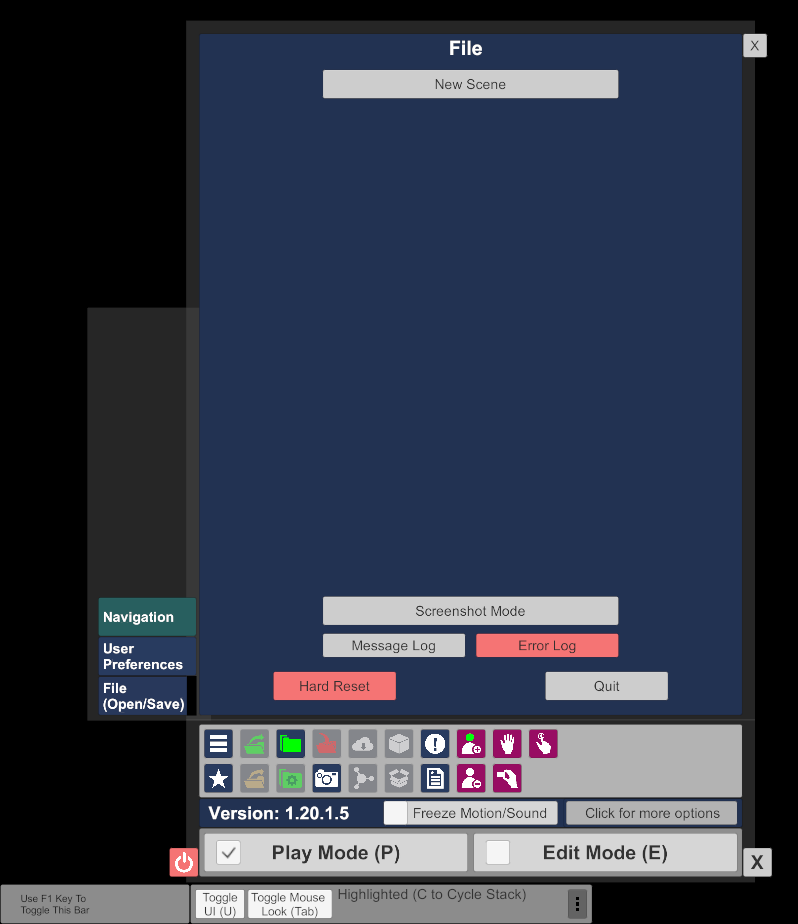
Please help a dumb person.
I'm completely new to VAM and hence a total noob as you might have noticed from the title.
Anayway. So I downloaded a scene and wanted to load it in VAM just like in the tutorial video below. The guy in the video launches VAM, loads the default scene and from there loads the scene. When I try to do that I can't see many of the buttons that are shown in the video. Now I can't find out how to load scenes? Is my VAM broken or something?
The tutorial video:
(31:36 is where he loads a scene)
What the menu looks like for me:
Please help a dumb person.

