
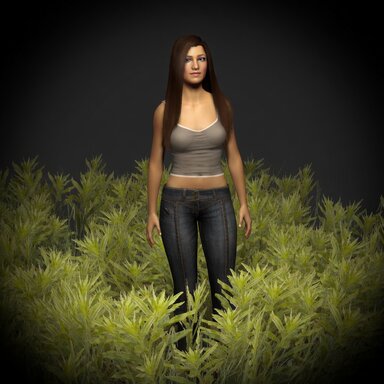
High-Performance Interactive Grass

Paid Plugins + Scripts High-Performance Interactive Grass

Go to pay site

PluginIdea

Well-known member
Featured Contributor
Joined
Jan 1, 2022
Messages
402
Reactions
3,585
PluginIdea submitted a new resource:

High-Performance Interactive Grass - High-performance custom grassland system accelerated by GPU

A high-performance, highly customizable interactive grass system. Grass adapts to any model surface, with real-time painting, multi-layer stacking, and object interaction.

Features:

1. GPU Shader Acceleration: High-density vegetation rendering at minimal performance cost.

2. Grows on Any Surface: Grass isn't limited to flat planes — it automatically grows on any model surface (CUA or built-in models).

3. Real-Time Mask Painting: Paint grass distribution directly onto your model like...

Read more about this resource...
 
PluginIdea updated High-Performance Interactive Grass with a new update entry:

Smarter foot push & performance controls

This greatly simplifies the configuration operation of the plug-in. All you need to do is add a plug-in to the CUA or the scene atom. Then add people. Grass on a CUA/mesh host now reacts to every Person in the scene and to VR hands, with a cleaner performance toolkit.

View attachment 612895

What’s new:

1. All-Person auto feet — Scans every Person’s left/right foot controls. . Toggle: Auto Feet (all Persons).

2. VR hand push — With Auto VR Hands on, both controllers flatten...

Read the rest of this update entry...
 
PluginIdea updated High-Performance Interactive Grass with a new update entry:

Flatten trail,Paint undo,Optimize

What’s new :

View attachment 630289

1. Flatten trail. Footsteps leave a dent that recovers over time. Strength and recover time are on the panel; you can turn the trail off.

2. Crowded scenes stay sane. When too many push sources are active, the nearest feet, hands, and Grass Interaction objects win. Setup is unchanged: auto feet on Persons, extra push via the Grass Interaction plugin.

3. Paint undo. One stroke at a time, button or Ctrl+Z. Up to 12 strokes.

See the intro...

Read the rest of this update entry...
 
Back
Top Bottom