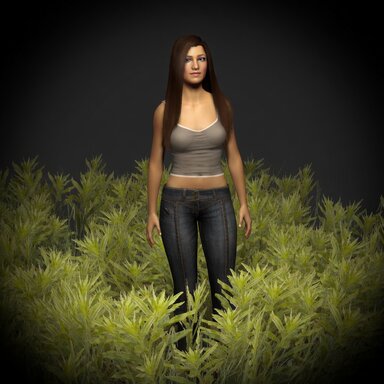

A high-performance, highly customizable interactive grass system. Grass adapts to any model surface, with real-time painting, multi-layer stacking, Custom grass texture,and object interaction.


Features:
1. GPU Shader Acceleration: High-density vegetation rendering at minimal performance cost.
2. Grows on Any Surface: Grass isn't limited to flat planes — it automatically grows on any model surface (CUA or built-in models).
3. Real-Time Mask Painting: Paint grass distribution directly onto your model like drawing. Supports paint, erase, and reset modes. Paint maps can be saved as textures or loaded from external files, RGBA four-channel mask rendering (r density, g height, b color, a stiffness).
4. Custom Blade Textures: Built-in textures included, plus you can load custom textures. Atlas formats are automatically detected.
5. Multi-Layer Stacking: Add multiple plugin instances on the same Atom (CUA or built-in) for layered grass. Each layer has independent settings and painting — combine them for rich, natural vegetation layers.
6. Object Interaction: Grass blades bend and spring back in real time as characters or objects pass through.
7. Advanced Wind System: Dynamic wind effects including gusts, directional sway, and secondary waves for more natural grass motion.
8. Preset Save & Load: Save all settings as a preset with one click. Load anytime to reuse your configuration.
9. Fully Customizable: Blade color, width, bend, density, specular, AO, and many more parameters — dial in exactly the look you want.
Quick Start: Attach InteractiveGrass.cslist to an Atom with MeshRenderer (CUA or built-in model) -> Set Target Renderer -> Choose Blade Texture (built-in or external, see attached bladeTexture.zip for reference) -> Enable Paint to draw grass.
Setting Up Interaction: Attach GrassInteraction.cslist to any Atom (Empty Atom recommended). Adjust interaction parameters in its plugin panel -> In the InteractiveGrass panel, click "Refresh Interaction Sources" and tune Interaction Strength and Radius.
Note : When loading an external blade texture, the filename must include an atlas suffix in the format _RxC, where R is the number of rows and C is the number of columns.
Example: Grass_4x12.png. Grass_1x1.png
Features:
1. GPU Shader Acceleration: High-density vegetation rendering at minimal performance cost.
2. Grows on Any Surface: Grass isn't limited to flat planes — it automatically grows on any model surface (CUA or built-in models).
3. Real-Time Mask Painting: Paint grass distribution directly onto your model like drawing. Supports paint, erase, and reset modes. Paint maps can be saved as textures or loaded from external files, RGBA four-channel mask rendering (r density, g height, b color, a stiffness).
4. Custom Blade Textures: Built-in textures included, plus you can load custom textures. Atlas formats are automatically detected.
5. Multi-Layer Stacking: Add multiple plugin instances on the same Atom (CUA or built-in) for layered grass. Each layer has independent settings and painting — combine them for rich, natural vegetation layers.
6. Object Interaction: Grass blades bend and spring back in real time as characters or objects pass through.
7. Advanced Wind System: Dynamic wind effects including gusts, directional sway, and secondary waves for more natural grass motion.
8. Preset Save & Load: Save all settings as a preset with one click. Load anytime to reuse your configuration.
9. Fully Customizable: Blade color, width, bend, density, specular, AO, and many more parameters — dial in exactly the look you want.
Quick Start: Attach InteractiveGrass.cslist to an Atom with MeshRenderer (CUA or built-in model) -> Set Target Renderer -> Choose Blade Texture (built-in or external, see attached bladeTexture.zip for reference) -> Enable Paint to draw grass.
Setting Up Interaction: Attach GrassInteraction.cslist to any Atom (Empty Atom recommended). Adjust interaction parameters in its plugin panel -> In the InteractiveGrass panel, click "Refresh Interaction Sources" and tune Interaction Strength and Radius.
Note : When loading an external blade texture, the filename must include an atlas suffix in the format _RxC, where R is the number of rows and C is the number of columns.
Example: Grass_4x12.png. Grass_1x1.png