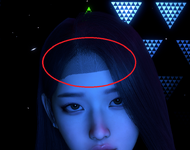
It's a scalp texture issue. One or more of the hairs you have loaded have a broken texture in the scalp section (hair -> customize -> scalp materials -> textures). Or it could be a cache problem, so you could try clearing that (User Preferences -> Clear Cache)
You can try deactivating the hair/hairs one by one to see which is the culprit and then either replace the scalp texture or hide it (by either adjusting alpha to -1.000 or toggling Hide Material under Shader).
It's a scalp texture issue. One or more of the hairs you have loaded have a broken texture in the scalp section (hair -> customize -> scalp materials -> textures). Or it could be a cache problem, so you could try clearing that (User Preferences -> Clear Cache)
You can try deactivating the hair/hairs one by one to see which is the culprit and then either replace the scalp texture or hide it (by either adjusting alpha to -1.000 or toggling Hide Material under Shader).