• Hi Guest!

    We have posted a new VaM2 dev log on Patreon, starting a monthly cadence of written progress updates between Beta releases. Highlights include the new Gizmos System, Selection Carousel, and Modes System with Context-Specific Editing. Beta1.2 is 15 of 21 items complete.

    Read the full post on Patreon, or follow progress on the public Trello roadmap.
Graceful Break

Scenes Graceful Break

Download [67.36 MB]

TrillWill

Member
Joined
May 4, 2026
Messages
7
Reactions
28
TrillWill submitted a new resource:

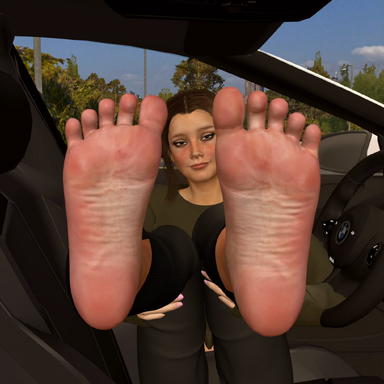
Graceful Break - Mackenzie has an idea for lunch that's far more satisfying than it is satiating...

The best part of any work day is obviously lunch. Mackenzie has a plan to make it all the more enjoyable...

Sit back and relax with your favorite coworker for your lunch break and let her give you a treat.

Shoutout/s to @Verytoxic and @SoleStorm. Without yall who knows if this scene would have ever seen the light of day 🙏

And an extra special shoutout to...

Read more about this resource...
 
Hi, I really like your scene, and hope to see more like this. Thanks mate.

I have one question: I have the paid version for Ankle Socks (https://hub.virtamate.com/resources/ankle-socks-worn-smelly.65189/).
Is there a possibility to change them in the scene, so it works while undressing? I tried to figure out if I can find something in TimeLine, but I wasnt able to.

kind regards
Thanks for the feedback! and Of Course! Heres how:

Timeline:
To change the socks out for different ones, you need to change their related triggers to match the new socks.
There are two types of triggers across 5 trigger frames (located at 0.000, 74.983, 76.283, 150.109, and 151.309). Take note of the settings in the "Receiver Atom" and "Receiver Target" sections as you will be reapplying them and they will disappear once you start configuring.
The first type are "Transition Actions" (The blue middle tab) which are used to fade the socks away and the second type are just the normal "Start Actions" which are used to make sure the socks are fully gone when they're supposed to be as well as making sure they're visible when needed (The green left tab).

1. Open timeline then scroll all the way down to the very bottom of the left hand panel and click on the "Triggers" row (So you can use the ƒ> button to navigate)

2. Change the triggers (Use the ƒ> button to navigate)

0.000 are two start actions at the end of the "Alpha Adjust" actions list you see when opening the frame. these make sure the socks are visible at the beginning of the scene. Go into the "Settings" for the two actions and open the "Receiver" drop down menu and select the part of the new sock that references the material/alpha (in this case that would be "SoleStorm:Whatever they named the paid onesMaterial..." then "Left" or "Right" to designate which side is which) that corresponds to the correct side for that action (make sure you don't make them both for the left or right sock) then reapply the same "Alpha Adjust" function in the "Receiver Target" row with its settings and that's done.

74.983 is a transition action to begin the right socks disappearance. Same as 0.000 but this time in the "Transition Trigger" tab and with only 1 trigger instead of 2. Like before, once in the settings for the transition action open the "Receiver" drop down, select the material component of the new R sock, then reapply "Alpha Adjust" and its settings.
76.283 is a start action responsible for making sure the sock is gone (Invisible, to be more specific). Swap the "Receiver", reapply "Receiver Target" and its settings, good (y)
150.109 is the same exact this as 74.983 but for the left sock.
151.309 you guessed it, its the same as 76.283 only for the left sock!

Reset Button:

If you've made it this far then you'll probably want to change the triggers in the "UI Reset" button as well. Go to the "Select" tab in the hamburger menu and check the "Show Hidden" box. Then you should be able to search for "UI Reset" in that same "Select" tab (Or just look at the passengers side dashboard cuz its located there). Once you're there its the same procedure as 0.000. Actions should be at the very bottom of the list.


Note: once you switch the socks the layering/visibility of the shoes/socks may get wonkey when they fade away. To fix this just pause the anim in the middle of a fade away and mess with the "Render Queue" slider in the "Shader" section of the offending clothing items main material controls


Back
Top Bottom