• Hi Guest!

    We are extremely excited to announce the release of our first Beta1.1 and the first release of our Public AddonKit!
    To participate in the Beta, a subscription to the Entertainer or Creator Tier is required. For access to the Public AddonKit you must be a Creator tier member. Once subscribed, download instructions can be found here.

    Click here for information and guides regarding the VaM2 beta. Join our Discord server for more announcements and community discussion about VaM2.
  • Hi Guest!

    VaM2 Resource Categories have now been added to the Hub! For information on posting VaM2 resources and details about VaM2 related changes to our Community Forums, please see our official announcement here.

VaM 1.x Dynamic skin fold based on joints and bends

Threads regarding the original VaM 1.x
Hello , had an idea dunno if it was proposed before
Dynamic normal map adjustment based of bending the model and joints , on arms legs , neck , chest , abdomen
Based on the bend strength it adjust the normal map strength

https://cdn.shadowcore.ru/posts/201...s-hd-for-genesis-3-8-female-00-main-daz3d.jpg

Could work based on decal maker normal layer
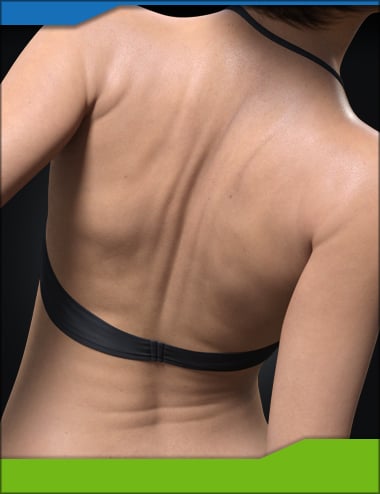
It's an interesting idea. I did test something like this a while ago to add subtle skin crease details to facial expressions, I don't make plugins, so my idea was to animate the decalmaker image to corresponding morphs manually with timeline. My version was very look specific, and would look wrong with other base textures, so I shelved the idea.
One problem is that doing it for positioning the body would add a lot of new textures if you had to stack multiple 4k normal maps for each possible position. It is doable though.
 
interesting , tho it dosent need to be 4k or 8 k , just a decal at 2k with a transparent background , so its only for that specific part , could be the same texture , just repositioned on the mesh layer like a clothing item
 
interesting , tho it dosent need to be 4k or 8 k , just a decal at 2k with a transparent background , so its only for that specific part , could be the same texture , just repositioned on the mesh layer like a clothing item
Repositioning a normal map would be problematic due to the uv layout/texture seems, as the limbs and torso for the Genesis2 model use different texture slots, so getting it to blend over seems would be a nightmare. Transparency doesn't work either, as decalmaker seams to read it as black for normal maps.
I tried making a blended normal map with decalmaker recently to make a skin tight thigh high with cutout holes. Her right leg is actually stacked decals and a normal map for the leather with decal maker. (I tried it as a clothing item first, but was getting clipping and offset issues, so I made it with decals as a test.) I didn't bake the skin normal maps for this, as I was just testing ideas, so I did it with a greyscale image/bump map for the leather texture and creases/stitching converted to a normal map. After a bit of trial and error, I found out you need a flat base colour (50%) to actually blend and have the base skin normal map show through where the transparency/holes are.

1768874839.jpg
1768874850.jpg
 
That's something you'd do on the shader side. DecalMaker is way too much overhead to not be an FPS sink for realtime animation.
So custom shader to use with the loader is probably the only approach possible (if obviously you care about performances)
 
Back
Top Bottom