Abowkrass123
New member
Hi Community,
I'm still a beginner in this thing but I'm willing to learn and give my best to be able to give the community back.
In Vam I have normally lots of clipping issues because almost all my morphs have huge proportions and I also like to use the AltFuta Plugin for my morphs which makes finding appropriate clothing even trickier.
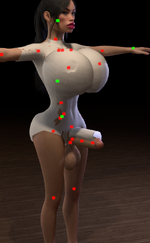
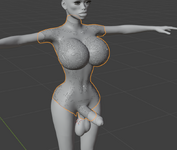
So I started to dig into clothes creation and I have done some tests but it seems somethings still don't click. The clothing once imported to Vam seems to be always a bit off and too big for my VAM character (see attachment). The quality is not so important to me because first I need to see some success with my workflow. The funny thing is, the same clothing is clipping really hard in Blender but in VAM Clothing Creator it is way to big for the model. I'll attach another image for you to see the blender perspective. It seems like the clothing is inflated and doesn't sit tight enough on the model
I have exported a .obj of one of my character morphs since I was thinking there is no point to create clothes for the Genesis 2 Base Model. I have imported the model to daz and chose "Modo" preset when importing the .obj. From there I have exported from daz to blender (I chose daz Studio as preset).
Finally I have my character model in Blender to use it as a reference. From there I have created a mesh for the clothing. After I was done I exported the mesh to daz. in daz I did a quick check if the clothing would fit to A) my character model and B) also how it would look on a Genesis 2 Model. After that I have created a .duf file to be imported for VAM.
I'm thinking I messed somewhere up when it comes to model export/import, but I'm not sure since I just started yesterday with the creation thing.
I really tried to google my way through and also tried to consult chatgpt but he was hallucinating like crazy.
Maybe some more knowledgeable can help!
Thanks for your time
I'm still a beginner in this thing but I'm willing to learn and give my best to be able to give the community back.
In Vam I have normally lots of clipping issues because almost all my morphs have huge proportions and I also like to use the AltFuta Plugin for my morphs which makes finding appropriate clothing even trickier.
So I started to dig into clothes creation and I have done some tests but it seems somethings still don't click. The clothing once imported to Vam seems to be always a bit off and too big for my VAM character (see attachment). The quality is not so important to me because first I need to see some success with my workflow. The funny thing is, the same clothing is clipping really hard in Blender but in VAM Clothing Creator it is way to big for the model. I'll attach another image for you to see the blender perspective. It seems like the clothing is inflated and doesn't sit tight enough on the model
I have exported a .obj of one of my character morphs since I was thinking there is no point to create clothes for the Genesis 2 Base Model. I have imported the model to daz and chose "Modo" preset when importing the .obj. From there I have exported from daz to blender (I chose daz Studio as preset).
Finally I have my character model in Blender to use it as a reference. From there I have created a mesh for the clothing. After I was done I exported the mesh to daz. in daz I did a quick check if the clothing would fit to A) my character model and B) also how it would look on a Genesis 2 Model. After that I have created a .duf file to be imported for VAM.
I'm thinking I messed somewhere up when it comes to model export/import, but I'm not sure since I just started yesterday with the creation thing.
I really tried to google my way through and also tried to consult chatgpt but he was hallucinating like crazy.
Maybe some more knowledgeable can help!
Thanks for your time