Question Any Plugin that better matches character location for changing out appearance/looks?

BIGGCANE55

Member
Joined
Nov 2, 2024
Messages
23
Reactions
39
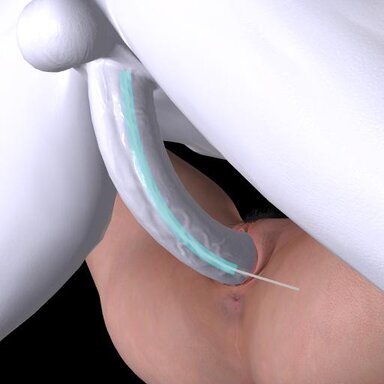
I was wondering if there is a way or plugin that aligns penis tip with vagina better. When switching appearnces of different hieghts or penis lengths, most poses
break". Any work done on that. IE set root to PEnis tip and Vagina vertex area, (or mouth or anus vertexes)? IF not, how hard do you think coding it will be. i have about level 3 skipsl out of 5 in coding json and creating plugins. So be willing to pick up on old work or try this out. But i do not want to go down a road that more expoerites coders have gone and fialed.
 
This is the most popular plugin for genital alignment as far as I know.


The one below is new and looks like might be a lot more powerful going by the example video. I haven't tried it myself to know how well it works though.

 
Upvote 0
Once an animation has been coded, it's very difficult to change the position of the root node to make it near the body part of interest. If you add the control node to the animation, you can control it in Timeline, but then you're stuck having to put the control node into every animation. There is no plugin to magically make every model work in every scene. For Timeline animations that have poses saved, you can stop the animation (hit stop twice), then reposition and save the pose. That doesn't always work.
The best example of having the right body part in the right place, which was done when the animation was created, is the Winter Retreat scene. That scene is very hard to break!
 
Upvote 0
I've thought about the feasibility of a "load relative to" plugin. Something that lets a user select a body part, then, when loading an appearance, offset the person control so that the selected body part stays in exactly the same position. It seems to me this should be a simple matter of recording the absolute position of the body part before and after appearance load, calculating the offset, then applying it to the person control.

Maybe even an option to reposition hands, feet and/or head as well. after the person control offset is applied, return these nodes to their pre-offset position.

No doubt it wouldn't be a perfect solution, but it should be an improvement. Unless there's some issue I'm not seeing, which is possible.

If you have coding experience, and use an AI coding agent as an assistant, it shouldn't be too big a project! Give it a shot!
 
Upvote 0
I've thought about the feasibility of a "load relative to" plugin. Something that lets a user select a body part, then, when loading an appearance, offset the person control so that the selected body part stays in exactly the same position. It seems to me this should be a simple matter of recording the absolute position of the body part before and after appearance load, calculating the offset, then applying it to the person control.

Maybe even an option to reposition hands, feet and/or head as well. after the person control offset is applied, return these nodes to their pre-offset position.

No doubt it wouldn't be a perfect solution, but it should be an improvement. Unless there's some issue I'm not seeing, which is possible.

If you have coding experience, and use an AI coding agent as an assistant, it shouldn't be too big a project! Give it a shot!
Interesting idea. I think that the way Timeline stores poses and/or the control node is going to be a problem, tho. If there are multiple animations (there almost always are), then how would that fix each one? Even with something like BodyLanguage, where it's easy to save each pose, you still end up having to fix each starting pose.
 
Upvote 0
The "penis" problem, I dived several times into that, it's pretty much unsolvable. That's why I only add appearance swap on women gender.

You can mathematically solve it, probably, but esthetically, it looks like crap. If you take a scene where proportions are massive, or the char has a massive dong, then compensating with another male character with a thin figure or body size will look bad. And vice versa.

It's an "area" of VAM that will probably stay that way as the whole concept of body proportions is not easy to fix dynamically.
 
Upvote 0
Appreciate the feedback. I thought as much. I know math would have to be involved. My guees is you would have to actually somehow have the root aligned with the penis and female root on the "entrance". The plugin i am thinking of trying would be pre start of animations. Where you compare the new locations of some of the main controllers, penis tip/mid/base, Hand, hip/(pelvis?), feet, knees, elbows, chest, head in relation to the root and compare the distances with the new appearances locations. May be a project i dabble with. So like hip is x/y/z from root. The one area would be setting the roots to as precise as i can to the vertix i want to call "0,0,0". Maybe AI can help with that. good test is to save 2 apearances, align manually as best i can for the roots. Then try and right a code that loads. But again, thanks. i think if i can figure out a viable plug in for this, it would open alot for reusable poses packages.
 
Upvote 0
You're forgetting the fact that the "root" of the alignment is tied to the overall proportions. So for instance, let's assume the "root" for both is the pelvic/hips area. At the moment you will change the overall proportions, the pelvic/hips area will also shift (torso too). Which could immediately be a problem for hands alignments in the animation, or eventually collision problems on the legs and chest.

I'm telling ya, this is a very tedious problem :p
 
Upvote 0
Back
Top Bottom