• Hi Guest!

    We have posted a new VaM2 dev log on Patreon, starting a monthly cadence of written progress updates between Beta releases. Highlights include the new Gizmos System, Selection Carousel, and Modes System with Context-Specific Editing. Beta1.2 is 15 of 21 items complete.

    Read the full post on Patreon, or follow progress on the public Trello roadmap.
Aged Urban Back Alley

Environments Aged Urban Back Alley

Download [56.19 MB]

LDR

Invaluable member
Featured Contributor
Joined
Apr 21, 2022
Messages
487
Reactions
5,272
LDR submitted a new resource:

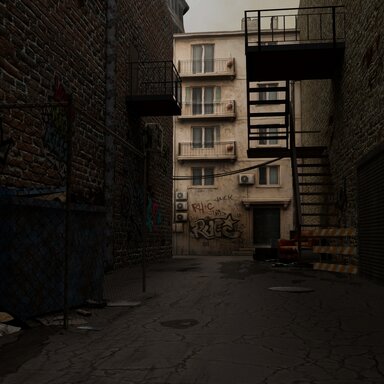
Aged Urban Back Alley - A grimy back alley in an old city district.

If want to get looks and quality scenes,please support me.
Only release on patreon Looks:
This is a 3D environment asset created at the request of a community member.
Overall I’m satisfied with it, except that the mesh...


Read more about this resource...
 
Is there any way to dim the lighting or built in skybox?
The lighting is baked into the textures, and I even made the skybox as a mesh model, so all you can really adjust is the texture color. Usually, the result won’t look very good. Still, you can try this plugin:
 
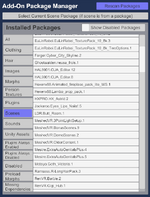
Just curious as to rather this is actually a scene and not an environment as listed. It shows as a scene inside of VAM. It doesn`t show up as a unity asset and doesn`t show anywhere in environment area when trying to add one.
 

Attachments

  • Screenshot 2026-05-02 133805.png
    Screenshot 2026-05-02 133805.png
    116.1 KB · Views: 0
Just curious as to rather this is actually a scene and not an environment as listed. It shows as a scene inside of VAM. It doesn`t show up as a unity asset and doesn`t show anywhere in environment area when trying to add one.
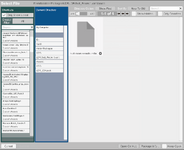
Strictly speaking, it is both a Scene and a Unity Asset.
You can only add it through Misc → CustomUnityAsset.
This is the standard way to use it in VaM.
:D

p1.png
p2.png
 
Strictly speaking, it is both a Scene and a Unity Asset.
You can only add it through Misc → CustomUnityAsset.
This is the standard way to use it in VaM.
:D

View attachment 588040View attachment 588041
Most definitely, and I finally figured it out going through the root directory, addon packages and to your var file. I was expecting it to show in the left panel like most of my environments, but hey, I learned something new. Great environment by the way.
 

Attachments

  • Screenshot 2026-05-02 220059.png
    Screenshot 2026-05-02 220059.png
    133.3 KB · Views: 0
Back
Top Bottom