
Very special thankies to @MacGruber . Your snippet of the code you provided to @vamurai was very much the core of this plugin and thankies to vamurai for asking if there was away to trigger it.
Window Camera Trigger: Complete Feature & User Guide
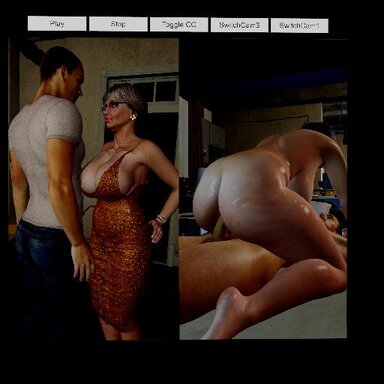
The Window Camera Trigger transforms standard camera view switches into smooth, professional cinematic cutscenes. This plugin introduces polished fade-to-black transitions, custom widescreen letterboxes, and automatic view management.Key Features & Capabilities
1. Cinematic Fade Transitions
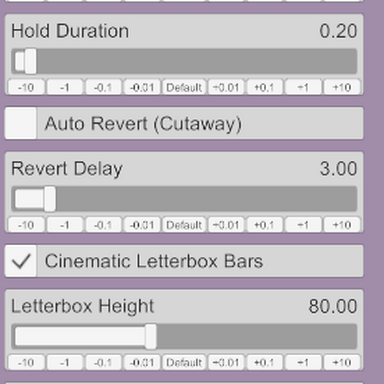
- Configurable Durations: Fine-tune your cutscenes with adjustable Fade Duration and Hold Duration sliders (up to 5 seconds).
- Seamless Blackouts: Fades the screen smoothly to black before switching camera views, hiding any abrupt repositioning or geometry clipping.
2. Dynamic Widescreen Letterbox Bars
- Cinematic Framing: Adds sleek black widescreen bars to the top and bottom of the screen to give your scenes an authentic movie feel.
- Customizable Height: Easily adjust the Letterbox Height slider to match your preferred aspect ratio.
- Smart Auto-Hiding: Letterboxes automatically appear when the Window Camera is active and instantly vanish (resetting height to 0) when you return to the default view.
3. Auto-Revert (Cutaway Mode)
- Timed Reaction Shots: Perfect for quick cutaways or character reaction shots. When enabled via the Auto Revert toggle and set with a Revert Delay, the plugin will automatically trigger a smooth transition back to your primary view after a set number of seconds.
4. Real-Time Hotkey & Manual Sync
- Watchdog Monitoring: Features a lightweight real-time background monitor (Update()) that tracks Virt-A-Mate's camera states.
- Instant Cleanup: If you manually toggle views using keyboard hotkeys (such as M) or external triggers, the plugin instantly recognizes the change, clears the letterboxes, and keeps everything synchronized.
5. Full Scene Persistence
- Saved with Scenes: All parameters (durations, toggles, and letterbox settings) are fully registered with VaM's serializer. When you save your scene, your exact plugin configurations are saved right along with it.
Trigger & Action Reference
The plugin registers several actions that you can map to VaM triggers, custom buttons, or Timeline keyframes:- Activate Window Camera: Smoothly fades out and switches to the Window Camera view.
- Deactivate Window Camera: Smoothly fades out and returns to the primary default view.
- Toggle Letterbox Bars: Instantly toggles the master letterbox state on or off.
- Enable Letterbox Bars: Forces the letterbox state to active.
- Disable Letterbox Bars: Forces the letterbox state to hidden.
Setup and Installation Guide
- Load the Plugin: Open any Atom or Session plugin slot in VaM and load WindowCameraTrigger.cs.
- Configure Your Settings:
- Adjust your desired Fade Duration and Hold Duration.
- Turn on Cinematic Letterbox Bars and set your target height.
- Configure Auto Revert if you are building automated cutaway sequences.
- Link Triggers: Use VaM's native trigger system to hook up actions like Activate Window Camera to scene events, audio cues, or timeline markers for automated cinematic direction!