
Contains executable files or external scripts. Ensure you trust the creator and apply your own security measures.
VoiceControl2 — hands-free voice triggers for VAM
Trigger anything in VAM with your voice. Speak a keyword or short phrase and fire any VAM trigger — load looks, start animations, switch scenes, toggle plugins, whatever you can wire to a trigger.
This is a modernized successor to the classic VoiceControl / VoiceTrigger plugins, rebuilt to survive Windows updates.
Why this version?
Older voice plugins relied on Windows Speech Recognition (WSR), which recent Windows updates have been removing or replacing — silently breaking those plugins. VoiceControl2 adds a second, future-proof speech engine that runs in a small companion app outside of VAM using the offline open-source Vosk engine. It doesn't depend on any Windows speech feature, so Windows updates can't break it — and because recognition runs in its own app, it doesn't compete with VAM for CPU.
Two speech backends — your choice
- Windows Speech (Legacy) — the classic in-VAM recognizer. Works if your Windows still has WSR. No extra setup.
- Vosk Companion (recommended) — fully offline recognition via the free VoskCompanion app (included). Independent of Windows speech services. Future-proof.
Features
- Add / rename / delete named voice triggers, each with full VAM trigger actions
- On-screen HUD feedback when a command is recognized
- Accurate keyword matching (grammar-based with Vosk; adjustable confidence with WSR)
- Active-microphone display, window-focus warning, full scene save/restore
What's included in this download
- StyleMavin.VoiceControl2.1.var — the VAM plugin (install in AddonPackages)
- VoskCompanion-v1.0.zip — the optional companion app for the Vosk backend (bundles everything, including a speech model — no extra downloads)
Setup
Plugin:
- Install the .var (drop it in AddonPackages).
- Add the plugin to an atom or as a Scene plugin. When choosing the file, pick VoiceControl2.cslist.
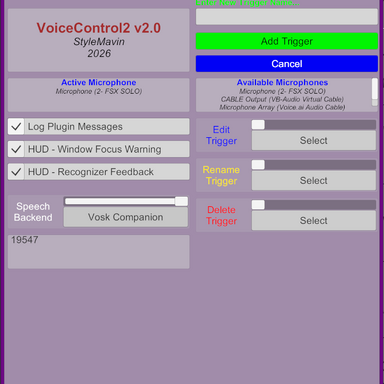
- Pick your Speech Backend in the plugin UI, add triggers, assign actions.
- Extract VoskCompanion-v1.0.zip anywhere and run VoskCompanion.exe.
- Click Start Listening. (The mic stays off until you do — opening the app never touches your audio.)
- In VAM, set the plugin's backend to Vosk Companion. The default port (19547) already matches.
As in Almadiel's original, the plugin repurposes the trigger action panel's "Name" field to enter and store the voice command(s) that fire each event.
- A trigger can have a single command, or multiple alternatives for the same command — any one of which fires the same event action(s).
- A trigger can define one event action or several. The extra actions don't each need a command word.
- As long as at least one event action has a command defined, the trigger is active and listening.
Privacy
All speech recognition is 100% offline and local. Nothing is ever sent to the internet — the companion talks to VAM only over a local-only (127.0.0.1) connection on your own machine.
Note on the companion app
VoskCompanion is an unsigned program, so Windows SmartScreen will warn on first run — click More info → Run anyway. The full source code is open if you'd like to review or build it yourself (links below).
GitHub (source & alternate downloads)
- Plugin: https://github.com/StyleMavin/VoiceControl2
- Companion app + releases: https://github.com/StyleMavin/VoskCompanion/releases
Credits
- Based on VeeRifter's VoiceControl plugin...
- ...which was itself based on Almadiel's original VoiceTrigger plugin
- Custom trigger handler: MacGruber / Acidbubbles
- Custom text input field: Acidbubbles
- HUD example: MeshedVR
- Offline speech: Vosk (Apache-2.0); audio capture: NAudio (MIT)
License
Plugin: CC BY-SA. Companion app: MIT. Bundled third-party licenses (Vosk, NAudio) are included in the companion download.
Contains executable files or external scripts. Ensure you trust the creator and apply your own security measures.