Click here to view the Disclaimer / 点击查看免责声明
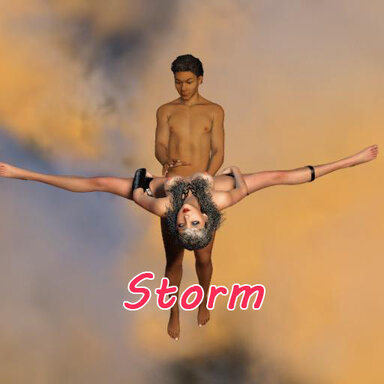
Storm, the superheroine who can control wind and thunder, caught up with Mr.Liao's outstanding performance last night, and then two of them had a fierce collision in the sky. I hope I can help Mr. Liao complete his wish of having sex with 100 famele here. 6% finished now.
风暴,可以控风控雷的超级女英雄,因为阿嘹昨晚出色的表现奋起直追,紧接着双方在高空发生剧烈摩擦。希望我可以在这里帮阿嘹完成百人斩的心愿。目前达成6%。
The filename for this scene is "Nobius.[No6]Storm.1.var", the screen-recording and screenshot are as follows:
本场景文件名“Nobius.[No6]Storm.1.var”,动画录屏及截图如下:
If you are missing hundreds or thousands of dependencies and can not use the “Scan hub for missing packages" feature, please try this little tool I made:
如果你缺失成百上千个依赖,无法使用自动补全依赖功能,请试试我做的这个小工具:
https://www.patreon.com/posts/145559666
Instructions:
Special Note: This scene includes high-altitude flight and violent rotations. Please watch with caution, taking into account your own physical condition. VR users, in particular, please pay more attention to the safety while the camera rotates.
1. It is recommended to play on a monitor.
2. VR users, please click the blue-purple button to start the game.
3. This scene consists of random animations, so theoretically it will be different every time you watch. “Stormbound Heart” adopts a musically self-contained approach. Combined with randomized animation, it maintains a complete musical experience regardless of playback length.
4. After clicking the start button, the scene will begin playing automatically. Playback duration is 20+ minutes. You can jump to the corresponding action at any time by pressing the hotkeys on your keyboard or clicking the buttons on the menu with your mouse.
5. Hotkeys:
* Jump to the corresponding actions : "1~9", "n", "u".
* Toggle between free/flying view : "BackSpace"
* Toggle show/hide of the menu : "o" (The menu will be automatically hidden, you need to click this button to bring it up.)
* Backup plan for FadeIn from a blackscreen, which should never happen : "i"
6. Menu Explanation:
* To loop a single action, please uncheck "Auto Play".
* Pressing the BackSpace button will not change whether "Flying View" is checked in the menu.
* When resetting the scene, all content will be based on the latest selection in the menu.
操作说明:
特别提示:本场景包含高空飞行和剧烈旋转,请根据自身情况谨慎观赏。特别是VR用户请在镜头旋转时注意自身安全。
1.建议用显示器游玩。
2.VR用户请点击蓝紫色按钮开始游戏。
3.本场景由随机动画组成,理论上每次观看都不一样。《风暴之心》采用“音乐自洽”的处理方式,配合随机动画,无论播放多长时间,听起来始终像一首完整的配乐。
4.点击开始按钮后,场景开始自动播放。播放时长20+分钟。按键盘上的热键,或用鼠标点击菜单上的按钮,均可随时跳转至相对应的动作。
5.热键:
* 跳转到相应动作:“1~9”、“n”、“u”。
* 切换 自由视角/飞行视角 :“退格键”
* 切换 菜单显示/隐藏:“o” (操作菜单会自动隐藏,需点击该按钮呼出)
* 黑屏应急自救方案, 理论上用不着:“i”
6.菜单说明:
* 如需单组动作循环,请取消勾选“自动跳转”。
* 按回退键不会影响菜单上“飞行视角”是否勾选。
* 重置场景时,所有内容均以菜单上现有的选择为准。
Thank you for your support!
感谢您的支持!
Nöbius
Storm, the superheroine who can control wind and thunder, caught up with Mr.Liao's outstanding performance last night, and then two of them had a fierce collision in the sky. I hope I can help Mr. Liao complete his wish of having sex with 100 famele here. 6% finished now.
风暴,可以控风控雷的超级女英雄,因为阿嘹昨晚出色的表现奋起直追,紧接着双方在高空发生剧烈摩擦。希望我可以在这里帮阿嘹完成百人斩的心愿。目前达成6%。
The filename for this scene is "Nobius.[No6]Storm.1.var", the screen-recording and screenshot are as follows:
本场景文件名“Nobius.[No6]Storm.1.var”,动画录屏及截图如下:
If you are missing hundreds or thousands of dependencies and can not use the “Scan hub for missing packages" feature, please try this little tool I made:
如果你缺失成百上千个依赖,无法使用自动补全依赖功能,请试试我做的这个小工具:
https://www.patreon.com/posts/145559666
Instructions:
Special Note: This scene includes high-altitude flight and violent rotations. Please watch with caution, taking into account your own physical condition. VR users, in particular, please pay more attention to the safety while the camera rotates.
1. It is recommended to play on a monitor.
2. VR users, please click the blue-purple button to start the game.
3. This scene consists of random animations, so theoretically it will be different every time you watch. “Stormbound Heart” adopts a musically self-contained approach. Combined with randomized animation, it maintains a complete musical experience regardless of playback length.
4. After clicking the start button, the scene will begin playing automatically. Playback duration is 20+ minutes. You can jump to the corresponding action at any time by pressing the hotkeys on your keyboard or clicking the buttons on the menu with your mouse.
5. Hotkeys:
* Jump to the corresponding actions : "1~9", "n", "u".
* Toggle between free/flying view : "BackSpace"
* Toggle show/hide of the menu : "o" (The menu will be automatically hidden, you need to click this button to bring it up.)
* Backup plan for FadeIn from a blackscreen, which should never happen : "i"
6. Menu Explanation:
* To loop a single action, please uncheck "Auto Play".
* Pressing the BackSpace button will not change whether "Flying View" is checked in the menu.
* When resetting the scene, all content will be based on the latest selection in the menu.
操作说明:
特别提示:本场景包含高空飞行和剧烈旋转,请根据自身情况谨慎观赏。特别是VR用户请在镜头旋转时注意自身安全。
1.建议用显示器游玩。
2.VR用户请点击蓝紫色按钮开始游戏。
3.本场景由随机动画组成,理论上每次观看都不一样。《风暴之心》采用“音乐自洽”的处理方式,配合随机动画,无论播放多长时间,听起来始终像一首完整的配乐。
4.点击开始按钮后,场景开始自动播放。播放时长20+分钟。按键盘上的热键,或用鼠标点击菜单上的按钮,均可随时跳转至相对应的动作。
5.热键:
* 跳转到相应动作:“1~9”、“n”、“u”。
* 切换 自由视角/飞行视角 :“退格键”
* 切换 菜单显示/隐藏:“o” (操作菜单会自动隐藏,需点击该按钮呼出)
* 黑屏应急自救方案, 理论上用不着:“i”
6.菜单说明:
* 如需单组动作循环,请取消勾选“自动跳转”。
* 按回退键不会影响菜单上“飞行视角”是否勾选。
* 重置场景时,所有内容均以菜单上现有的选择为准。
Thank you for your support!
感谢您的支持!
Nöbius