

Outliner (Remake)
I completely rebuilt the plugin and rethought its entire concept. This is not just an update — it is a full remake.
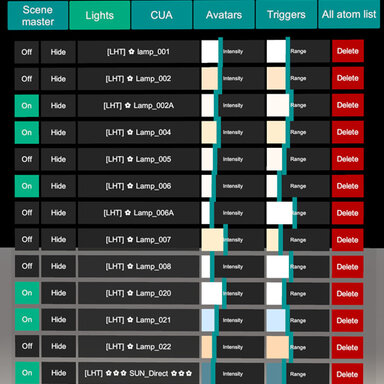
The main idea is inspired by Blender collections: you can organize atoms into collections and control your scene from one universal window. Outliner is designed for fast scene setup and already has a solid high-performance core.
Performance problems and lag spikes have been fixed. Outliner uses caching and updates only the parts affected by changes in the scene instead of repeatedly rebuilding everything.
When a scene starts, there may be a short pause of a few seconds. During this time Outliner builds its cache and sets up lightweight and targeted scene monitoring. After that, the monitoring has almost no performance impact while you work in the scene.

Well... what it?
Scene organization and navigation. I completely rebuilt the plugin and rethought its entire concept. This is not just an update — it is a full remake.
The main idea is inspired by Blender collections: you can organize atoms into collections and control your scene from one universal window. Outliner is designed for fast scene setup and already has a solid high-performance core.
Performance problems and lag spikes have been fixed. Outliner uses caching and updates only the parts affected by changes in the scene instead of repeatedly rebuilding everything.
When a scene starts, there may be a short pause of a few seconds. During this time Outliner builds its cache and sets up lightweight and targeted scene monitoring. After that, the monitoring has almost no performance impact while you work in the scene.
Well... what it?
- Scene tree. Outliner displays your scene as a clear tree. Click any atom in the list to select it directly in VaM.
- Collections and drag-and-drop. Create collections, select multiple atoms, and drag them into a collection. A collection tab bar is placed on the left for quick access. Select the atoms you need and drop them onto a tab. Hold Shift while clicking to select multiple atoms.
- Collection management. Hide, rename, delete, and sort collections. You can also perform bulk actions, including deleting all atoms in a collection with a confirmation prompt.
- Search and filters. Find atoms by name or type, or filter the tree to display only Lights, CUAs, or other atom types. Expand All and Collapse All buttons let you quickly open or close the entire tree.
- Fast navigation between atoms. The Parent and Link fields are clickable. Clicking one selects the related atom and automatically scrolls the tree to it. You can also quickly open the selected atom’s Move tab or focus on its origin point.
- Full SubScene support. A SubScene is treated as a special type of collection with its own pivot and internal hierarchies. Atoms that belong to a SubScene cannot be moved to other collections. First unlink them from the SubScene. They will then appear in the main “Unsorted” list.
- Quick atom controls. Clone atoms and quickly configure CUA assets and Light atoms directly from menu.
- Find reflection probes in the scene.
- Global scene settings. Adjust shadow settings and Pixel Light Count. Outliner is fully compatible with the PhotonBlaze plugin by @14mhz. If PhotonBlaze is found in the scene, Outliner will not compete for control or overwrite the settings managed by it. I plan to use PhotonBlaze in my upcoming rooms, so this compatibility is especially important to me.
Plugin integration :0
- Outliner can automatically update the versions of CUACollision and PresenceLighting assigned to your CUA atoms.
To start the update process open the Collection tab ⋮, select EvilBox and then choose Update. If newer versions are available in the AddonPackages folder, Outliner will find and assign them automatically.
- “DLSS” mode.
This mode was created to prevent color-space corruption. You may have noticed that the previous version did not work correctly with DLSS and could add an unwanted tint to the scene lighting. This has now been fixed!
The name “DLSS” may be a little misleading: this mode does not add DLSS to VaM. Outliner creates a separate game UI canvas for its menu so that the DLSS plugin running through BepInEx does not process Outliner’s 3D canvas placed in world space. It was tested with the VaM DLSS plugin by @UncleBurrito.
- Improved 3D-space controls for VR.
The menu should no longer fly off into the distance. You can assign a recovery hotkey to reset it if something goes wrong. This should not normally be necessary, as many safety checks and fallback measures have been added. - Customizable interface.
Adjust the menu scale, number of visible rows, window height, and how the menu follows the camera. Your settings are saved automatically.
- A convenient menu for adding different types of atoms.
- Collection automation, scripting, and triggers.
- Outliner uses the “PluginInterface.cs” library by @Foost. It provides a powerful and reliable foundation for a shared API between Outliner and my other plugins.
- Outliner uses some UI elements created by @14mhz.
- Compatibility with Mouse Control Overhaul by @Datel is still partial. Conflicts are now much less frequent when using the function that focuses on an atom’s origin point.
A Refresh button is available as a fallback. If the issue occurs and the in-game atom icons disappear from the screen, press Refresh to restore them.
Video