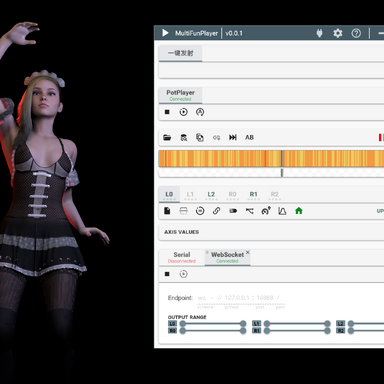
Before diving into the changelog, I want to share some news. I recently discovered Yoooi.BusDriver.6.var. Its goals are nearly identical to MFPButtDriver. Admittedly, the naming made it hard to locate; I only found it indirectly via a scene containing MFP keywords.
I regret not finding it sooner, but I’m also glad I discovered it now. If I had found it earlier, I would have lost motivation to develop this plugin.
Changes inspired by BusDriver
- Dual motion drive modes added: Implemented the Physics Link mode (similar to the string-based system in older MFPButtDriver builds, far more stable). The original Force mode is retained. We now have 3 available modes, Physics Link remains the recommended option.
- Single control joint optimization: Only one target joint is required now. This improvement was planned for v2.0. Since Controller B acts as a fixed pivot, it is no longer necessary.
- Origin Box UI ported: Origin Box is one of my favorite features from BusDriver, offering clear, intuitive visual reference for movement origin.
- L0 main axis direction setting: I originally scheduled this feature for v4.0. My early test scripts all used downward as the primary movement direction, but I recognize many users need alternate axes. Following BusDriver’s implementation, this feature is now live.
You may ask: If BusDriver already covers these features, why not just use it? Below are the exclusive, unique functions built only into MFPButtDriver:
Exclusive MFPButtDriver Features
1. Auto Gain Mechanic
Funscript data represents ideal joint movement. Inside VaM, driven bones get pulled and interfered with by surrounding body parts, and this interference varies across all axes.Auto Gain calculates frame-by-frame deviation between input script position and actual physical movement, dynamically adjusting gain automatically. Manual gain sliders existed in v1.0, but most users found them confusing. Manual controls have been removed; you only need a toggle to enable/disable automatic gain.
2. Natural Motion System
Adds subtle secondary movement to hips, chest, head, shoulders and hands to make animation feel organic. Implementation referenced Nickon7777.CompleteLocomotionSystemRemake.6 (CLS).
Natural Motion Parameters Overview
Hip / Chest / Head / Shoulder / Hand (identical structure for all 5 groups)
- Enable: Toggle feature on/off
- Intensity (0–100): Amplitude of secondary movement
- Delay (0–20): Follow smoothing / lag; higher = softer, slower response
Recommended defaults:
- Hip (Intensity:30 / Delay:6): Hip rotation & lateral sway
- Chest (Intensity:25 / Delay:8): Counter-rotation for body balance
- Head (Intensity:20 / Delay:10): Delayed head follow motion
- Shoulder (Intensity:20 / Delay:7): Minor shoulder rotation
- Hand (Intensity:15 / Delay:12): Responsive wrist movement
Step (Locomotion, disabled by default)
- Enable: Toggle stepping animation
- Threshold (5–60): Lateral movement value required to trigger a step
- Duration (0.2–1.5s): Length of single step animation
- Size (0.02–0.2): Lift height / stride scale
Arm Movement (Enabled by default)
- Enable: Toggle arm secondary motion
- Intensity (0.1–5): Mapping ratio between movement energy and arm lift angle
- Raise Speed (1–20): Arm lifting response speed (fast rise)
- Lower Speed (0.5–10): Arm lowering recovery speed (slow fall)
- Design logic: Fast raise, slow lower. Arms lift rapidly during intense motion, slowly settle during calm movement to simulate natural inertia.
3. Media Player Remote Control
Add playback control: Play / Pause / Seek forward / Seek backward / Timeline scrub + live script preview drawing.

Note: VAM's MVRScript blocks P/Invoke and external‑process creation. This feature relies on a bridge program to enable interaction between players. You can build PlayerBridge.exe by compiling PlayerBridge\PlayerBridge.cc from the archive, or download the pre‑built binary from GitHub:
https://github.com/nbnb9527/nb-VaMTools/releases/tag/v1.0
Currently supported player:
PotPlayerGuide to extend support for other players:
- Update bridge program (PlayerBridge.cs → ProcessCommand): Add window detection and command handling for new media players
| Player | Control Method | Reference |
|---|
| PotPlayer | Win32 WM_USER / WM_COMMAND | Implemented |
| VLC | HTTP API (default port 8080) | Launch with --extraintf=http |
| MPC-HC | WM_COMMAND menu IDs / command line | Planned |
| KMPlayer | WM_COMMAND | Similar to PotPlayer |
- Add control class inside plugin (MFPButtBoneDriver.cs):Inherit MediaPlayerControl, implement all playback methods, then register the new class into the control array.The UI dropdown will automatically populate without extra changes.
4. Auto Takeover Timeline
Sets the weight of the Timeline‑controlled target corresponding to the script‑driven bone object to 0 to achieve motion takeover. The weight will be restored to 1 when the script stops. This method automatically takes over the Timeline animation of the specified Controller, enabling script‑driven main motion while preserving head, hand and shoulder movements.
Roadmap & Future Plan
After implementing player control, I’ve realized something significant: this plugin no longer strictly depends on MultiFunPlayer.The T-Code stream sent by MFP is pre-smoothed, optimized for physical toys like OSR hardware, not raw funscript motion for VaM scene creation.
For creators building scenes entirely inside VaM, a direct funscript reader is more desirable.Therefore, my next project will be
FunSequencer.
FunSequencer Core Features
- Direct connection to PotPlayer, eliminate MFP as middleman
- Funscript clip editor: trim In/Out points, name independent clips
- Exposed trigger actions, natively compatible with Timeline, MacGruber LogicBricks
- Full scene persistence; all clips and settings save with scenes / SubScenes
中文版更新说明
正式更新 3.0 版本。先说一件事:我近期发现了 Yoooi.BusDriver.6.var,这款插件实现目标和 MFPButtDriver 高度重合。但它名字的辨识度有点低,我是通过一条带 MFP 关键词的场景才间接找到它。有点遗憾没能早点发现,但也庆幸现在才看到,不然我大概率就没有动力继续开发本插件了。
参考 BusDriver 完成的优化内容
- 新增两套驱动模式,增加 Physics Link 模式,效果和早期 MFPButtDriver 的绳驱动方案接近,稳定性大幅提升;保留原有的 Force 模式。目前一共三种驱动模式,优先推荐使用 Physics Link。
- 简化骨骼配置,仅需要单个受控关节,这个优化早在 2.0 版本就规划完成。既然 Controller B 只作为固定支点,不再需要配置。
- 移植 Origin Box 可视化原点功能,Origin Box 是我非常喜欢的 BusDriver 功能,可以直观显示运动基准位置。
- 增加 L0 主轴方向自定义设置,原本计划放到 4.0 更新。前期我测试脚本都默认向下为主运动方向,考虑到大量用户存在不同朝向需求,参考 BusDriver 方案直接加入。
有人会疑惑:既然 BusDriver 已经实现上述功能,为什么不直接使用?下面是 MFPButtDriver 独有的特色功能:
MFPButtDriver 独有功能
1. 自动增益机制
Funscript 记录的是理想运动轨迹。但 VAM 内驱动骨骼会受到周边肢体持续拉扯,各个方向受力干扰并不均衡。自动增益会逐帧对比输入脚本位置和人物实际运动位置,动态修正驱动力。1.0 版本存在手动增益滑块,但是大部分使用者很难调试参数,因此本次移除手动调节,仅保留开关一键启用。
2. Natural Motion 自然运动系统
参考 CLS(CompleteLocomotionSystemRemake)思路,让臀部、胸腔、头部、肩膀、手腕跟随主体动作产生细微联动,动画更加生动自然。参数说明:
臀部 / 胸腔 / 头部 / 肩膀 / 手部(5 组参数结构完全一致)
Enable:功能开关
Intensity(0–100):运动幅度
Delay(0–20):跟随延迟,数值越大动作越柔和、滞后更强
推荐基础预设:
臀部 (30/6):扭转 + 横向摆动
胸腔 (25/8):反向旋转维持身体平衡
头部 (20/10):延迟跟随转头
肩膀 (20/7):小幅旋转
手部 (15/12):手腕响应动作
Step 跨步系统(默认关闭)
Enable:开关
Threshold(5–60):横向运动达到阈值才触发抬脚
Duration(0.2–1.5s):单次跨步时长
Size(0.02–0.2):抬脚高度 / 步幅
Arm 手臂联动(默认开启)
Enable:开关
Intensity(0.1–5):运动幅度映射倍率
Raise Speed(1–20):抬起响应速度
Lower Speed(0.5–10):下落恢复速度
设计逻辑:
快抬慢落,剧烈动作手臂快速抬起,动作平缓后缓慢落下,模拟自然惯性。
3. 播放器远程控制
支持播放 / 暂停、前后快进、进度跳转、脚本预览绘制。
注意:VAM 的 MVRScript 禁止 P/Invoke 与外部进程创建,该功能依赖桥接程序实现播放器间的交互。你可以通过编译压缩包内 PlayerBridge\PlayerBridge.cc 得到 PlayerBridge.exe,也可以到 github 上下载预编译的版本
https://github.com/nbnb9527/nb-VaMTools/releases/tag/v1.0
当前仅支持 PotPlayer。拓展其他播放器方法:
- 修改桥接程序 PlayerBridge.cs 的 ProcessCommand,增加窗口查找与指令处理PotPlayer:Win32 窗口消息VLC:HTTP 接口MPC-HC:窗口菜单指令KMPlayer:兼容 PotPlayer 消息方案
- 在插件 MFPButtBoneDriver.cs 新增播放器控制类,继承 MediaPlayerControl,实现所有播放接口,注册进数组,UI 下拉菜单自动识别,无需额外修改界面。
4. 自动接管Timeline动作:Auto Takeover Timeline
根据脚本控制的骨骼对象可设置Timeline对应控制目标的权重为0,从而达到动作接管的目的。停止脚本时将权重恢复为1。通过这种方式可自动接管指定 Controller 的 Timeline 动画,在保留头、手、肩动作的同时,实现脚本驱动主动作。
后续开发规划
完善播放器控制功能后,我意识到一个关键点:本插件已经具备脱离 MFP 独立运行的潜力。MFP 向外输出的 TCode 经过平滑预处理,原始设计是服务 OSR 实体硬件,不完全适配 VAM 场景动画创作需求。对于纯粹在 VAM 内搭建交互式场景的创作者,更需要一个直接读取 Funscript 的工具。
因此,我接下来将启动全新插件
FunSequencer 的开发。核心能力:

直连 PotPlayer,不需要 MFP 中转
Funscript 片段剪辑,自定义 In/Out 区间、命名保存片段
对外暴露触发器接口,原生兼容 Timeline、MacGruber LogicBricks
所有片段、参数跟随场景、SubScene 持久保存分发