


LipLab
A lip makeup and lip shape plugin for Person atoms: lipstick, lacquer, wet look and glitter, painted straight onto the character's own skin lip material, plus a page of sliders that reshapes the lips. No clothing item, no extra geometry, no skin shader replacement. Works with the default VaM skin.

What it does

The 13 ready-made looks
All shots: same camera, same lighting, UI hidden, only the look changes.

Glass ombre, Red 999 velvet, Classic red satin, Berry ombre glossy, Bean paste satin, Nude matte, Coral glossy, Fine glitter red, Chunky glitter berry, Metallic foil wine, Holographic pink, Wet nude, and Off (back to the VaM default).
The panel
The pages follow the order of applying makeup: Presets, Lip shape, Lip lines, Lip liner, Lip color, Lip gloss, Glitter, Tools.

How to use
Dependencies
Notes
Credits and license
LipLab and its settings panel library OverlayUI are written by mutoe, license CC BY. The code was written mainly by AI coding assistants under the author's direction.
Idea that was looked at (no code copied): Solid Nails by Skynet (CC BY) for loading textures asynchronously and organizing material parameters.
The Lip shape page only drives morphs from other packages and does not include them: kemenate.Morphs by kemenate (FC, required), Import Reloaded Lite by Spacedog (FC, optional; a compilation credited to rp1902, DieTrying, dilldoeorg, TenStrip, aadhux, Lexbaird, Jabba, karanimo and Ghastly), plus the morphs built into VaM.
No third-party code, shader or texture is included in the package.
Version
Package mutoe.LipLab.2 is the first release on the Hub (it adds the Lip shape page).
A lip makeup and lip shape plugin for Person atoms: lipstick, lacquer, wet look and glitter, painted straight onto the character's own skin lip material, plus a page of sliders that reshapes the lips. No clothing item, no extra geometry, no skin shader replacement. Works with the default VaM skin.
What it does
- Lip color: a 32-swatch editable palette, opacity, ombre / bitten-lip gradient, lip liner, edge feathering and shape (grow / shrink), or your own mask image.
- Lip lines: keep the original, smooth them out, or draw light / deep lines.
- Sheen: matte, velvet, satin, glossy, glaze, glass, wet look and metallic finishes; gloss and specular can be even, wet in the center, wet patches, or driven by your own image.
- Glass highlight: an extra, very tight highlight layer drawn over the lips (a small shader asset bundle shipped in the package). It keeps the glassy lacquer look at high gloss without the horizontal banding along the lip line, and an edge-fade slider lets the highlight melt into the skin around the lips instead of stopping at the lip border.
- Glitter: fine, chunky, metallic foil and holographic flakes.
- Lip shape: sliders for the Cupid's bow peaks, upper lip bead, upper / lower lip thickness and fullness, lip edge definition, mouth corners, mouth width, philtrum depth and width, pout and M-shaped lips. They drive morphs that already exist (VaM's built-in ones and the kemenate.Morphs package); LipLab adds no morphs of its own. The shape is saved with your looks, and removing the plugin puts the morphs it changed back.
- 13 ready-made looks, plus a one-click factory dropdown on every page, so you can mix a color from one look with the sheen of another. Save your own looks (with a thumbnail) and load them later.
- Works on one Person or on all of them; it can also be added to a Session / Scene plugin and pick its target person in the panel.
The 13 ready-made looks
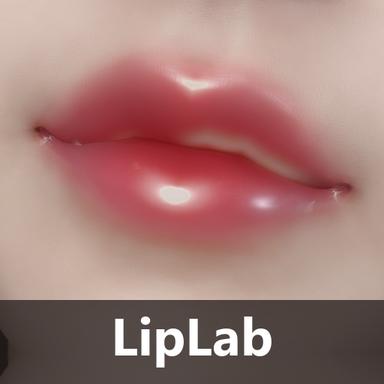
All shots: same camera, same lighting, UI hidden, only the look changes.
Glass ombre, Red 999 velvet, Classic red satin, Berry ombre glossy, Bean paste satin, Nude matte, Coral glossy, Fine glitter red, Chunky glitter berry, Metallic foil wine, Holographic pink, Wet nude, and Off (back to the VaM default).
The panel
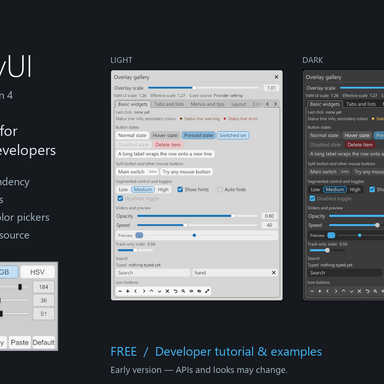
The pages follow the order of applying makeup: Presets, Lip shape, Lip lines, Lip liner, Lip color, Lip gloss, Glitter, Tools.
How to use
- Select a Person, open the Plugins tab, Add Plugin > Select File, choose
mutoe.LipLab>LipLab.cslist. VaM will ask to allow the plugin; accept. - Click "Open Custom UI...". The panel opens on the Presets page: pick a ready-made look, or work through the pages in makeup order.
- For the shape, open the Lip shape page and move the sliders. The "Zero all lip shapes" button on that page sets only the morphs listed there back to 0.
- Your own looks and palette are saved under
Saves/PluginData/LipLab/.
Dependencies
- mutoe.OverlayUI.5 (required, CC BY): the settings panel library, published separately by the same author.
- kemenate.Morphs.10 by kemenate (required, FC): the morphs behind the "Upper lip fullness" and "Lower lip fullness" sliders. Everything else on the Lip shape page uses VaM's built-in morphs.
- Spacedog.Import_Reloaded_Lite by Spacedog (optional, FC): only the "Upper lip bead" slider needs it. Without it that one slider is greyed out and everything else works.
Notes
- The package contains plugin source code and one small shader asset bundle (
assets/LipCoat.assetbundle, built from a shader written for this plugin). There is no .dll. - The sheen defaults are tuned for common skins; on the plain VaM skin, or another skin, fine-tune on the Lip gloss page.
- The glass highlight layer is optional: switch it off on the Lip gloss page if you do not want it.
- The Lip shape sliders show each morph's current value, so a lip morph you set elsewhere (for example in the Person's morph panel) shows up there too.
Credits and license
LipLab and its settings panel library OverlayUI are written by mutoe, license CC BY. The code was written mainly by AI coding assistants under the author's direction.
Idea that was looked at (no code copied): Solid Nails by Skynet (CC BY) for loading textures asynchronously and organizing material parameters.
The Lip shape page only drives morphs from other packages and does not include them: kemenate.Morphs by kemenate (FC, required), Import Reloaded Lite by Spacedog (FC, optional; a compilation credited to rp1902, DieTrying, dilldoeorg, TenStrip, aadhux, Lexbaird, Jabba, karanimo and Ghastly), plus the morphs built into VaM.
No third-party code, shader or texture is included in the package.
Version
Package mutoe.LipLab.2 is the first release on the Hub (it adds the Lip shape page).