• Hi Guest!

    We have posted a new VaM2 dev log on Patreon, starting a monthly cadence of written progress updates between Beta releases. Highlights include the new Gizmos System, Selection Carousel, and Modes System with Context-Specific Editing. Beta1.2 is 15 of 21 items complete.

    Read the full post on Patreon, or follow progress on the public Trello roadmap.
HEM' 15 - Monster Asset Pack 1 - Free

Demo + Lite HEM' 15 - Monster Asset Pack 1 - Free

Download [28.75 MB]
Demos or "Lite" versions of Paid Content
IMAGES-1.jpg

All creatures in this asset are fictional and should not be associated with real-life organisms.
Please do not discuss or inquire about the male version, as it is not allowed.


Asset package

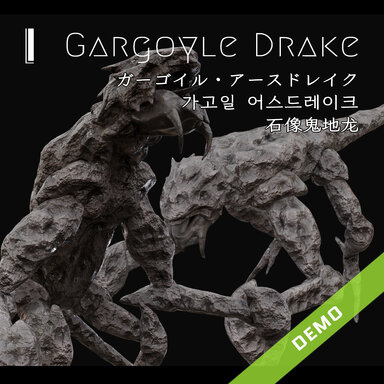
The assets include 1 monster (Gargoyle Drake) and 1 forms (with 4 poses for each form), totaling 4 assets , 1 DEMO Scene, 1 Plugin, and 4) CUA Presets

Dependency

CUA/XPS Controllers (By: Stopper)
It is recommended to use CUA/XPS Controllers version 10, as I cannot guarantee that v11 will run stably with my assets.​

Plugin
Tentacle_Anime_Controller.cs: Used to disable model animations and manage animation playback speed, with auxiliary features including "Disable Animations", "Disable Collision Volume", "Prevent Disappearance", "Dynamic Occlusion", "Disable Self-Collision", and "Skinned Motion Vectors".

Language
"English", "中文", "日本語", "Deutsch", "한국어", "Français", "Русский язык", "Español", "Português", "Italiano", "Ελληνικά", "Nederlands", "Svenska", "العربية"

Asset Usage Tutorial

1. Download the dependency package CUA/XPS Controllers (authored by Stopper).
  • Recommended version: v10 (Locate it via the HUB → Navigate to the CUA/XPS Controllers page → Open the History tab → Select the previous v10 release).
2. Use CustomUnityAsset to load the *.assetbundle file from the asset bundle, or load the asset preset via the Preset page, If you load via a preset, you can skip steps 3~5.
3. Add the built-in plugin "Monster_Asset_Pack_Controller.cs" from the asset bundle to the CustomUnityAsset (CUA).
4. Add the Plugins > CUA/XPS Controllers.10 plugin to the CUA (use version 10).
5. Select the root joint and click Create Controllers to generate control points.
6. Use Show Inactive Targets to display all inactive atom nodes, and control asset joints via the nodes.


Preset_A-BASE.jpg
Preset_A-P1.jpg
Preset_A-P2.jpg
Preset_A-P3.jpg
Gargoyle_Drake_DEMO.jpg
Monster_Asset_Pack_Controller.jpg
React to this content...

Share this resource

Credits

Creator Support Link
S Stopper
Back
Top Bottom