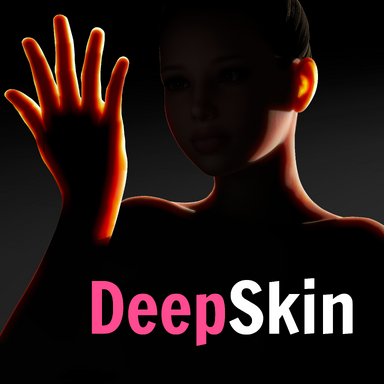


Ever since I started releasing scenes, I wanted to have subsurface scattering in them. So what began as a simple plugin for my own scenes eventually grew into DeepSkin, a custom skin shader and plugin with lots of control, quality and performance options, and a bunch of compatibility fixes.
New in V3: Realistic Teeth & Mouth Rendering


Since DeepSkin replaces VaM's own teeth, morphed teeth will also get the enhanced look:

Features
- Backlit transmission: the deep red glow of light passing through skin, with adjustable strength, sharpness, spread, thickness and color.
- Screen-space subsurface blur: soft, fleshy skin with per-channel scattering (red travels farthest)
- Bone shadows in backlit hands: a 46-capsule skeleton casts real bone shadows through translucent hands, and the capsules are editable.
- Texture detail preserve: keeps eyebrows, eyeliner and tattoos crisp under the blur.
- Painted transmission regions: Face, Nose, Lips, Ears, Eyelids, Hands, Feet, Arms, Legs and Torso, each with its own glow strength and tissue density.
- Paint any region by hand: a brush with mirroring, undo/redo and adjustable size/strength
- Match Colors To Skin Tone: derives the translucency color and scattering profile from the character's own skin.
- Tessellation: GPU subdivision for a rounder, smoother body.
- Scalp exclusion: skips tessellation under hair so scalps don't clip.
- Painted tessellation density plus saved tessellation-mask presets, including one built from VaM's own body map.
- Include clothing in the SSS: lip layers, makeup, tattoos and nipple layers can be manually included in the SSS, instead of having to mess with the renderqueue.
- Shadows that fade with alpha: transparent and fading clothing casts a shadow that fades smoothly, instead of popping out of existence when alpha reaches 0.
- Session Plugin mode: applies DeepSkin on every Person in every scene you load. (with the added ability to skip male atoms)
- Compatibility: SkinMicroDetail is compatible out of the box, and BodySmoother plugins are automatically taken over by DeepSkin's own tessellation.
- Presets: save and load your own presets, set a default preset, or pick from the included presets.
- Teeth & Mouth Overhaul: Teeth, gums and tongue are now included in the SSS and have realistic shadowing in the back of the mouth and behind the lips
DeepSkin Teaser Trailer:
Presets DeepSkin comes with the ability to save your own presets. A couple of presets are already included for you to load, or use as base for your own custom preset: |
Include clothing in the SSS Lip layers, makeup, tattoos and nipple layers can be manually included in the SSS, instead of having to mess with the renderqueue. |
Shadows that fade with alpha Transparent and fading clothing casts a shadow that fades smoothly, instead of popping out of existence when alpha reaches 0. |
Transmission Region Painting & Editing Paint your own regions for Ears, Lips, Nose, Face, Torso, Arms, Legs, Hands, Feet, Eyelids, and edit the transmission intensity and density for each of those regions. |
Tessellation Region Painting & Control Also paint your own tessellation masks, edit the how much tessellation is applied, and save your tessellation masks. |
Bones A 46-capsule skeleton casts real bone shadows through hands, with all the capsules being editable |
Match to Skin Color Match the transmission color automatically to your model's skin color |
How to use
Load DeepSkin.cslist on a Person atom or as a Session Plugin
Note on Tessellation and Performance
Tessellation is by far the biggest hit on performance. With only the screen-space SSS and transmission on, DeepSkin costs ~0.46ms per frame. Turning on tessellation, which looks noticeably better, raises that to around 2.4ms per frame (depending on the subdivision factor and painted mask). For VR, or whenever you want as much performance as possible, I recommend turning tessellation off or significantly lowering the tessellation amount. Half-Res Blur in the Performance tab helps as well, especially in VR. DeepSkin's default preset ships with tessellation ON for quality.
Photo-bomb (using the included "Extra" preset):
Credits
Plugin
- DeepSkin uses CustomTabUI by @14mhz . Many thanks for their awesome tools!
- Mouth textures provided by @BooMoon . Thank you!
Assets used in the preview images/videos
- Look is Sally by me
- Hairstyle is Tight Ponytail by @qdaro
- Bikini is micro bikini by @modkkola
- Glasses in photo are Elipse Glasses by @xxxa
- Glasses in trailer video are Office Red by @mopedlampe
- Pink lingerie top is Lingerie [A] by @Verytoxic
- Lips clothing is Lips Layer by @BooMoon
- Skirt is Plastic Skirt by @maru01
- Tattoo is Tattoo pack Flowers by @SpwCreation
- High quality shadows made possible with LightOptions by @Stopper
Special Thanks to @VamTimbo for making me the high-quality mocap!