Atom Pathfinding System

Plugins + Scripts Atom Pathfinding System

Download [1.01 MB]


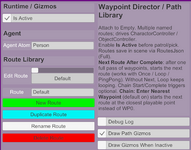
Build multiple named routes in one plugin and send a character or object along them.

1792977717059.png


Highlights:

1. One instance, a whole route library. New, duplicate, rename — all saved with the scene.

2. Click-to-place on desktop. Shift+MMB appends. Ctrl+Shift+MMB overwrites the current point.

3. Once, Loop, or PingPong. When a pass finishes, you can chain into the next route.

4. Chain in at the nearest point. The next route does not have to restart at WP0.

5. Fixed positions or live Atom targets. If the atom moves, the waypoint moves with it.

6. Per-point wait, facing, and skip. Face a world yaw, another atom, or the move direction.

7. Path triggers plus per-waypoint arrive triggers. Start, complete, and loop-restart hook into Timeline.

8. Start by route name. Jump by waypoint name or index. External triggers can take over mid-patrol.

9. Auto-start on scene load. Pick the Agent and which route should begin.

10. Path gizmos and NavMesh snap. Pause, resume, or preview-walk to the edit point.

Quick start: Add to an Empty → set Agent (AtomController) → enable Is Active → pick or add waypoints → Start Patrol

Requires AtomController on the Agent (Start Move). Pick mode is desktop-only.

See the intro video for details.

Attachments

  • 1792977695003.png
    1792977695003.png
    93.8 KB · Views: 0
1. Add the transfer function. You can select the target atom or position. So as to be directly transmitted to the target position.
2. The transfer function supports jumping across Navmesh. This means that you can have multiple navmesh in the scene at the same time, and you can transfer freely between them.


1771309098332.png
1771309106943.png

This greatly improves the application scope of the plug-in.
3. Added a target coordinate display function. It is convenient to display the coordinates of the mouse cursor.
1771309363507.png

4. Add escape logic.
1771309161131.png


1. Now the value output by currentSpeedTrigger will be normalized to the range of 0 to 1. In this way, you can better use this value for logical control.
2. Optimize the function and performance of several core algorithms.
  • Fixed the problem that the Dynamic Obstacle parameter could not be saved (reopening the scene will revert to the default).
  • Add a new Action: "Reset To Begin Point ".
1763973545554.png

  • Remove some code that will report errors in the new version of the game.

1763973431686.png
1760151669674.png


Fixed the problem that at the end of atomic navigation, even if the stopDistance is set to be extremely small, it will be separated from the target position by a certain distance.You can achieve this by turning the Approach distance and StopDistance as small as possible.
Back
Top Bottom