



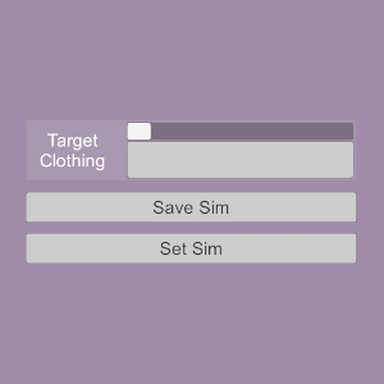


SimSetter is a small collection of plugins that allow you to save and restore a specific shape to a sim clothing item.
After manipulating a sim clothing item to be shaped in a certain way, via physics grab, morph changes, or pose adjustments, these plugins will save the position of the clothing's vertices and can then restore them to that exact position. This is useful for situations where certain morphs or poses may interfere with a clothing item's initialized sim state, or other situations where a person atom or other object is interacting with the clothing item in a specific way that the sim initialization would interfere with.
The saved sim position data will account for changes in atom position and rotation, but cannot account for pose or atom scale changes. These plugins do not freeze the sim in place; the physics remain active after the vertex positions are set.
SimSetter.cs:
SimSetter.cs saves one set of vertex positions for a single clothing item. Best for one-offs where only one clothing item needs special attention.

Target Clothing:
Use this menu to select which clothing item to save the sim position of. Active clothing is rescanned on menu open, so if you're just scrolling through and not seeing a recently added clothing item, open the menu and it should populate.
Save Sim/Set Sim:
The Save Sim button will save the sim vertex positions of the selected Target Clothing item, as well as clothing item itself. The Set Sim button will apply these vertex positions to the saved clothing item. These actions are also available as triggers, with an additional trigger Queue Set Sim that acts the same as Set Sim but with a slight delay.
Info Box:
This box will display the selected Target Clothing item's display name, as well as the saved clothing item and its vertex count.
Set On Load/Delay:
Set On Load will, when selected, automatically load the stored sim data when the scene is loaded. The Physics Frame Delay is a settable delay, measured by physics frames in the FixedUpdate method, for the Queue Set Sim trigger. 50 physics frames = 1 second. This is needed for things like pose changes, where if the pose and sim set are triggered at the same time, a delay is required for the sim to be set properly.
Presets:
Save/Load Item Preset will save or load the vertex data for the saved clothing item to/from a file.
OutfitSetter.cs:
OutfitSetter.cs saves a single set of sim vertex positions for multiple clothing items at once.

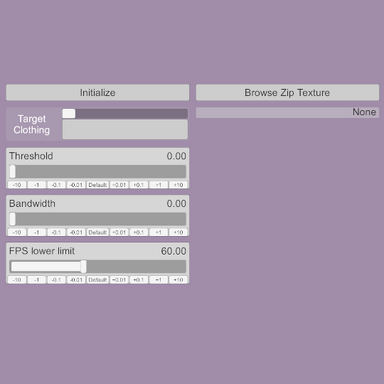
Target Clothing:
Functions the same as SimSetter.cs.
Save/Set Buttons:
When a Target Clothing item is selected, the (Select Clothing First) button becomes an Add [Clothing Item Name] button if the clothing item is not yet saved, or Update [Clothing Item Name] if the clothing item already has saved data. Selecting this button will save the sim vertex positions of the clothing item, overwriting any previously saved data for that item. Update All Saved Clothing will save the sim vertex positions for every clothing item already stored, but will not add new items. Set Selected Clothing Sim will apply the saved vertex positions of the Target Clothing item, if it is saved, and Set All Saved Clothing Sim will apply the saved vertex positions for all saved clothing items. There are also two additional triggers, Queue Set Sim and Queue Set Sim All, which queue loading of the Target Clothing's vertices or all saved clothing's vertices, respectively. Clear All Clothing And Sim will erase all stored data.
Info Box:
This box will display the selected Target Clothing item's display name, as well as the names of each of the saved clothing items.
Set On Load/Delay:
Functions the same as SimSetter.cs.
Presets:
Save/Load Outfit Preset will save or load the vertex data for all saved clothing items to/from a file. Save Item Preset will save the vertex data for the Target Clothing, if any is available, and Load Item Preset will add or overwrite the data for the clothing item saved in the file; these files are the same as the ones used in SimSetter.cs and can be shared between the plugins.
SheetSetter.cs
(no screenshot yet)
SheetSetter.cs works on SimSheet atoms. It has similar Save, Set, and Preset options to the other plugins, except its preset files are unique to it and not shared with the other scripts. It also uses Bundles, which is my chosen term for different sets of saved sim data, so it can save and load multiple sim states. Each bundle represents a saved state, and bundles can be added or removed depending on how many are needed. Unlike the other scripts, SheetSetter does not account for atom root position/rotation when saving or loading, so the saved sim data will be at an absolute position in the scene rather than relative to the atom's position/rotation; this is a deliberate decision so the SimSheet atom can be moved around to whatever positions are needed to create and save certain shapes without having to later move it back to those specific positions when applying the bundle data.
Plans for a version that can save multiple sets of sim clothing information are still in the works! I think I have it fairly well conceptualized, I just need to find the time to work on it.
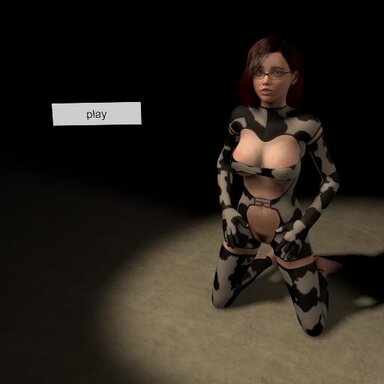
Silly little demo video:
After manipulating a sim clothing item to be shaped in a certain way, via physics grab, morph changes, or pose adjustments, these plugins will save the position of the clothing's vertices and can then restore them to that exact position. This is useful for situations where certain morphs or poses may interfere with a clothing item's initialized sim state, or other situations where a person atom or other object is interacting with the clothing item in a specific way that the sim initialization would interfere with.
The saved sim position data will account for changes in atom position and rotation, but cannot account for pose or atom scale changes. These plugins do not freeze the sim in place; the physics remain active after the vertex positions are set.
SimSetter.cs:
SimSetter.cs saves one set of vertex positions for a single clothing item. Best for one-offs where only one clothing item needs special attention.
Target Clothing:
Use this menu to select which clothing item to save the sim position of. Active clothing is rescanned on menu open, so if you're just scrolling through and not seeing a recently added clothing item, open the menu and it should populate.
Save Sim/Set Sim:
The Save Sim button will save the sim vertex positions of the selected Target Clothing item, as well as clothing item itself. The Set Sim button will apply these vertex positions to the saved clothing item. These actions are also available as triggers, with an additional trigger Queue Set Sim that acts the same as Set Sim but with a slight delay.
Info Box:
This box will display the selected Target Clothing item's display name, as well as the saved clothing item and its vertex count.
Set On Load/Delay:
Set On Load will, when selected, automatically load the stored sim data when the scene is loaded. The Physics Frame Delay is a settable delay, measured by physics frames in the FixedUpdate method, for the Queue Set Sim trigger. 50 physics frames = 1 second. This is needed for things like pose changes, where if the pose and sim set are triggered at the same time, a delay is required for the sim to be set properly.
Presets:
Save/Load Item Preset will save or load the vertex data for the saved clothing item to/from a file.
OutfitSetter.cs:
OutfitSetter.cs saves a single set of sim vertex positions for multiple clothing items at once.
Target Clothing:
Functions the same as SimSetter.cs.
Save/Set Buttons:
When a Target Clothing item is selected, the (Select Clothing First) button becomes an Add [Clothing Item Name] button if the clothing item is not yet saved, or Update [Clothing Item Name] if the clothing item already has saved data. Selecting this button will save the sim vertex positions of the clothing item, overwriting any previously saved data for that item. Update All Saved Clothing will save the sim vertex positions for every clothing item already stored, but will not add new items. Set Selected Clothing Sim will apply the saved vertex positions of the Target Clothing item, if it is saved, and Set All Saved Clothing Sim will apply the saved vertex positions for all saved clothing items. There are also two additional triggers, Queue Set Sim and Queue Set Sim All, which queue loading of the Target Clothing's vertices or all saved clothing's vertices, respectively. Clear All Clothing And Sim will erase all stored data.
Info Box:
This box will display the selected Target Clothing item's display name, as well as the names of each of the saved clothing items.
Set On Load/Delay:
Functions the same as SimSetter.cs.
Presets:
Save/Load Outfit Preset will save or load the vertex data for all saved clothing items to/from a file. Save Item Preset will save the vertex data for the Target Clothing, if any is available, and Load Item Preset will add or overwrite the data for the clothing item saved in the file; these files are the same as the ones used in SimSetter.cs and can be shared between the plugins.
SheetSetter.cs
(no screenshot yet)
SheetSetter.cs works on SimSheet atoms. It has similar Save, Set, and Preset options to the other plugins, except its preset files are unique to it and not shared with the other scripts. It also uses Bundles, which is my chosen term for different sets of saved sim data, so it can save and load multiple sim states. Each bundle represents a saved state, and bundles can be added or removed depending on how many are needed. Unlike the other scripts, SheetSetter does not account for atom root position/rotation when saving or loading, so the saved sim data will be at an absolute position in the scene rather than relative to the atom's position/rotation; this is a deliberate decision so the SimSheet atom can be moved around to whatever positions are needed to create and save certain shapes without having to later move it back to those specific positions when applying the bundle data.
Plans for a version that can save multiple sets of sim clothing information are still in the works! I think I have it fairly well conceptualized, I just need to find the time to work on it.
Silly little demo video:
>add clothing item
>it freaks out and clips through the model
>make adjustments to pose so it will stop clipping
>make adjustments to morphs so it will stop clipping
>gradually ease everything back to the way it was so clothing sim can adjust with it
>clothing sim is following nicely
>finally get it looking good and proper
>accidentally nudge person atom control
>complete sim explosion, back to square one
>mfw
So yeah. This is a thing that I realized could probably be done when I was messing around with clothing vertex positions in the ZipUnzipIt test.
Now includes OutfitSetter, which can save multiple clothing items.
What does it do?
SimSetter saves the exact position and shape of a sim clothing item and can then restore it to that position and shape. This is good for scenarios where the clothing sim gets reset, such as certain physics and collider changes within the scene, or even just on scene load.
How do I use it?
Use whatever means are available to you to manipulate the sim clothing item into the shape you want, be it cloth grab spheres or physics interactions or pose and morph changes. Once the clothing is positioned and set to the desired state, select the clothing item in the plugin's UI and press (or trigger) the "Save Sim" option. The text box on the right of the plugin UI should confirm the clothing item's vertices were saved. Pressing or triggering the "Set Sim" option will then set all of the clothing item's vertices back to the positions they were saved in.
Any examples of what kind of things would be worth saving?
Sure!
- If you have some morphs or poses which cause the clothing item to clip into the model when reset, e.g. certain tops might be too wide at the armpits and clip through the arms
- If you have the character interacting with their clothing item in some way, e.g. hooking their finger around a strap and pulling, putting their hand into their waitband, etc.
- If there are other physics objects causing the clothing to deform, e.g. something tucked under a shirt
- If the clothing is being worn in a nonstandard manner, e.g. panties that are being pulled off and are only around one leg
Limitations:
This plugin should be able to account for atom root position and rotation changes, but cannot account for atom scale or pose changes. Only one clothing item and one saved set of vertices per instance of the plugin. No presets, due to how transient the usefulness of a saved sim shape would be. This plugin does not fully freeze a sim clothing item into a predetermined shape; the sim remains active after the vertex positions are set. (The newer "OutfitSetter" plugin allows for saving of the sim state for multiple clothing items, but is still only able to save one state for the applicable items.)
How does it work behind the scenes?
"Save Sim" takes the position values of each vertex of the selected clothing item, subtracts out the person atom root's current position and rotation, and then saves them to an array. "Set Sim" will take that saved data, add the atom root's current position and rotation, then set each clothing vertex to that position. The setting happens over a couple of physics frames due to the fact that the clothing sim's acceleration needs to be disabled as it's set, and then re-enabled after, otherwise it reacts violently.
Hope its niche purpose is handy, and that it doesn't break anything.
>it freaks out and clips through the model
>make adjustments to pose so it will stop clipping
>make adjustments to morphs so it will stop clipping
>gradually ease everything back to the way it was so clothing sim can adjust with it
>clothing sim is following nicely
>finally get it looking good and proper
>accidentally nudge person atom control
>complete sim explosion, back to square one
>mfw
So yeah. This is a thing that I realized could probably be done when I was messing around with clothing vertex positions in the ZipUnzipIt test.
Now includes OutfitSetter, which can save multiple clothing items.
What does it do?
SimSetter saves the exact position and shape of a sim clothing item and can then restore it to that position and shape. This is good for scenarios where the clothing sim gets reset, such as certain physics and collider changes within the scene, or even just on scene load.
How do I use it?
Use whatever means are available to you to manipulate the sim clothing item into the shape you want, be it cloth grab spheres or physics interactions or pose and morph changes. Once the clothing is positioned and set to the desired state, select the clothing item in the plugin's UI and press (or trigger) the "Save Sim" option. The text box on the right of the plugin UI should confirm the clothing item's vertices were saved. Pressing or triggering the "Set Sim" option will then set all of the clothing item's vertices back to the positions they were saved in.
Any examples of what kind of things would be worth saving?
Sure!
- If you have some morphs or poses which cause the clothing item to clip into the model when reset, e.g. certain tops might be too wide at the armpits and clip through the arms
- If you have the character interacting with their clothing item in some way, e.g. hooking their finger around a strap and pulling, putting their hand into their waitband, etc.
- If there are other physics objects causing the clothing to deform, e.g. something tucked under a shirt
- If the clothing is being worn in a nonstandard manner, e.g. panties that are being pulled off and are only around one leg
Limitations:
This plugin should be able to account for atom root position and rotation changes, but cannot account for atom scale or pose changes. Only one clothing item and one saved set of vertices per instance of the plugin. No presets, due to how transient the usefulness of a saved sim shape would be. This plugin does not fully freeze a sim clothing item into a predetermined shape; the sim remains active after the vertex positions are set. (The newer "OutfitSetter" plugin allows for saving of the sim state for multiple clothing items, but is still only able to save one state for the applicable items.)
How does it work behind the scenes?
"Save Sim" takes the position values of each vertex of the selected clothing item, subtracts out the person atom root's current position and rotation, and then saves them to an array. "Set Sim" will take that saved data, add the atom root's current position and rotation, then set each clothing vertex to that position. The setting happens over a couple of physics frames due to the fact that the clothing sim's acceleration needs to be disabled as it's set, and then re-enabled after, otherwise it reacts violently.
Hope its niche purpose is handy, and that it doesn't break anything.




 I love your VR headset & hand movements in the demo video! ...Frickin hilarious!


