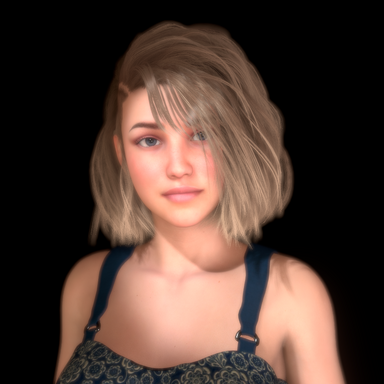
Introducing EXPRESSION STUDIO
A collection of 96 Facial Expression morphs and a custom UI to help you craft the perfect expression.
Note: Special thanks to @FantasiWrapper and @Gabberjaw for alerting me to upper teeth deformation issues, and to @MrGiggly for providing the fix!
This is not your average "Brow Down" morph. The eyebrow is kept at a consistent size and not shrunken by the compressed polygons, eyelid and cheek muscles correctly squint/flex as they would on a real person (for fun - try lowering your eyebrows without flexing the muscles around your eye).
Many of the morphs for this studio activate multiple facial muscles and have been designed to make it easier to craft expressions for those with no experience. Sliders have been adjusted to help prevent accidental "extreme" expressions.
Built in mirrors give you a quick side view and can be rotated from the UI from 90 degree view to 3/4 view. Mirrors can be toggled on and off to save FPS.
Load your custom appearance presets with ease. Just hit "reposition model" and the UI will raise or lower your model's face to the correct position automatically.
Use gaze controls to have your model look in different directions, straight ahead, or focus on you.
Adjust the background brightness from the main panel. See your active morph sliders at a glance with color-changing effects. The stronger the morph, the brighter the color. Switch between Brows, Eyes, Nose/Cheeks, and Mouth/Jaw morphs with the click of a button.
Get stuck or have questions? Click the Help button to bring up a menu of important topics, such as "how do I save my expression as a morph?" or "how do I make an eye-rolling expression?"
Dependencies/Credits:

Paid Morphs - AshAuryn's Creator Tools - Mouth Asymmetry - 174 Morphs
AshAuryn's Creator Tools 174 Morph Expansion - Mouth Asymmetry 174 Left/Right Asymmetry Morphs for the Mouth. Create your own unique expressions, or tweak existing ones. Located in Morphs Tab, in the category AshAuryn/Tools/Asymmetry/Mouth...
 hub.virtamate.com

AshAuryn's Genesis 9 to Genesis 2 Facial Pose Morphs Conversion - Morphs -
Note: Special thanks to @FantasiWrapper and @Gabberjaw for alerting me to upper teeth deformation issues, and to @MrGiggly for providing the fix! Genesis 9, the newest model from Daz, has some creative facial expression pose morphs. I've taken...
 hub.virtamate.com

Life - Plugins + Scripts -
Life is a collection of plugins intended to essentially awake a character, let him/her come to life. Central part so far is the audio-synchronized breathing, which can be used to drive complex animations. Current version 14 is a maintenance...
hub.virtamate.com

LogicBricks - Plugins + Scripts -
Overview LogicBricks is a collection of now 34 reusable logic plugins to quickly build simple logic without coding. These go from a simple Relay that just groups triggers via Counter and Blend to more complex bricks for RandomChoice and a very...
hub.virtamate.com

Morph Merger - Plugins + Scripts -
Admin Notice: Support for this plugin has ended. A newer, more stable plugin is available here: https://hub.virtamate.com/resources/morph-merge-and-split.15048/ The newer plugin provides additional functionality and addresses a bug in Morph...
hub.virtamate.com

Timeline - Plugins + Scripts -
Timeline ? Do you like Timeline? Support me on Patreon and get early access to new features: https://www.patreon.com/posts/39197180 ? Need help creating animations or want to share your works of art? Join us on Discord...
hub.virtamate.com