Plugin Reorder

Plugins + Scripts Plugin Reorder

Download [<1 MB]

PetaZwega

Invaluable member
Featured Contributor
Joined
Apr 25, 2021
Messages
224
Reactions
4,615
PetaZwega submitted a new resource:

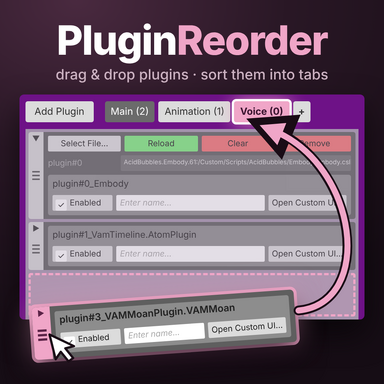
Plugin Reorder - Reorder your plugins and organize them in tabs!

Serenity for you and your plugins now! Easily reorder your plugins, organize them in tabs or collapse them to a smaller size.​

How to use
  • Add: Load as a Session Plugin.
  • Reorder: drag the grip at the left edge of a plugin.
  • Move several: tap grips to select plugins, then drag one of them. All selected plugins move together, even if they weren’t next to each other.
  • Cancel a drag: release the plugin outside the window...

Read more about this resource...
 
I am having a issue with removing tabs I created. When I click the x nothing happens. The plugin that is moved into the tab is easily removed by dragging it out. Besides that minor issue I am loving these QOL plugins. Thanks
 
I am having a issue with removing tabs I created. When I click the x nothing happens. The plugin that is moved into the tab is easily removed by dragging it out. Besides that minor issue I am loving these QOL plugins. Thanks
It is a safety feature, just hold shift as you click (or any controller trigger if you're in VR)!
 
It is a safety feature, just hold shift as you click (or any controller trigger if you're in VR)!
LOl, I think I got a little excited and skipped the instructions to try it out. Thanks for pointing that out.
 

Similar threads

Back
Top Bottom