Plugin Reorder

Plugins + Scripts Plugin Reorder

Download [<1 MB]

PetaZwega

Invaluable member
Featured Contributor
Joined
Apr 25, 2021
Messages
230
Reactions
4,654
PetaZwega submitted a new resource:

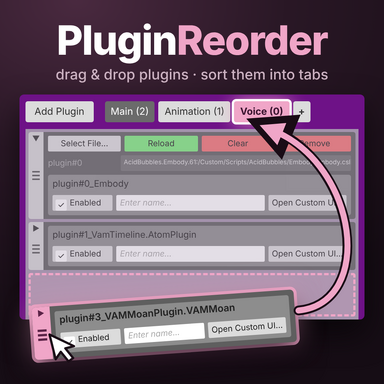
Plugin Reorder - Reorder your plugins and organize them in tabs!

Serenity for you and your plugins now! Easily reorder your plugins, organize them in tabs or collapse them to a smaller size.​

How to use
  • Add: Load as a Session Plugin.
  • Reorder: drag the grip at the left edge of a plugin.
  • Move several: tap grips to select plugins, then drag one of them. All selected plugins move together, even if they weren’t next to each other.
  • Cancel a drag: release the plugin outside the window...

Read more about this resource...
 
I am having a issue with removing tabs I created. When I click the x nothing happens. The plugin that is moved into the tab is easily removed by dragging it out. Besides that minor issue I am loving these QOL plugins. Thanks
 
I am having a issue with removing tabs I created. When I click the x nothing happens. The plugin that is moved into the tab is easily removed by dragging it out. Besides that minor issue I am loving these QOL plugins. Thanks
It is a safety feature, just hold shift as you click (or any controller trigger if you're in VR)!
 
It is a safety feature, just hold shift as you click (or any controller trigger if you're in VR)!
LOl, I think I got a little excited and skipped the instructions to try it out. Thanks for pointing that out.
 
Thank you for creating this—it is a very important plugin. However, there may be some issues that need to be adjusted.
My game version is 1.22.0.12. After loading the session plugin, I tried to drag the plugins around. After I changed the order of one plugin, the game briefly froze, and then all the text in the session plugin interface disappeared. I restarted the game and tried again, but the same thing happened. Also, after loading this plugin, the game freezes at random times, especially when I click on the session plugin interface. It freezes for a long time and can even make the game completely freeze.
 
Thank you for creating this—it is a very important plugin. However, there may be some issues that need to be adjusted.
My game version is 1.22.0.12. After loading the session plugin, I tried to drag the plugins around. After I changed the order of one plugin, the game briefly froze, and then all the text in the session plugin interface disappeared. I restarted the game and tried again, but the same thing happened. Also, after loading this plugin, the game freezes at random times, especially when I click on the session plugin interface. It freezes for a long time and can even make the game completely freeze.
You're completely right, it doesn't seem to work at all in the session plugins tab ...kinda ironic.

However I haven't encountered any game freezes or missing texts which could come from specific plugins. Would you tell me what plugins you have loaded as your session plugins?
 
The issue seems to have been well resolved with the updated version. However, there is a new problem: I loaded the character plugin and created a new tab, and then I couldn't delete it. I clicked the close button and nothing happened.
 
The issue seems to have been well resolved with the updated version. However, there is a new problem: I loaded the character plugin and created a new tab, and then I couldn't delete it. I clicked the close button and nothing happened.
Did you remember to press Shift as you clicked?
 
dude. thank you for so much for doing this. i swear it took me some time using a session load order while at the coming of days been adding stuff. this honestly made everything much easier to do. finally no more time spent during Vam session plugins
 
how do I restore the popup window with question about the access?
I had to accidently click a wrong button and now I get these messages:

[01:41:51] PluginReorder: writing the plugin order to 'Saves/scene/***.json' was denied; the scene keeps VaM's order.
 
Last edited:
how do I restore the popup window with question about the access?
I had to accidently click a wrong button and now I get these messages:

[01:41:51] PluginReorder: writing the plugin order to 'Saves/scene/***.json' was denied; the scene keeps VaM's order.
Try changing the order of one item and then save scene with a new name.
 
Try changing the order of one item and then save scene with a new name.
Unfortunatelly this didn't wrok :( I was trying to find where VAM keeps settings for those permissions... but I wasn't able to find so far.
 
Unfortunatelly this didn't wrok :( I was trying to find where VAM keeps settings for those permissions... but I wasn't able to find so far.
Sorry to hear that... As for the settings, it is a file that accompanies the scene and is stored at [VAM]\Saves\PluginData\PetaZwega\PluginReorder .
You will see that is follows your scene naming.
 
Sorry to hear that... As for the settings, it is a file that accompanies the scene and is stored at [VAM]\Saves\PluginData\PetaZwega\PluginReorder .
You will see that is follows your scene naming.
I did remove those files, and it's still not saving the plugin order, apparently VAM keeps those settings somewhere else.
I also tried with new scene, and it behaves the same way. So it's not scene saved in the scene.
I also removed the plugin reorder plugin from session plugins, saved default settings, restarted VAM, re-added it and access is still denied.
Maybe @PetaZwega would know where VAM keeps these permissions.

I also have a proceeding error saying:

[15:08:20] Plugin did not have signature!

This looks like VAM cannot get the plugin hash and is denying the save?
 
Last edited:
I did remove those files, and it's still not saving the plugin order, apparently VAM keeps those settings somewhere else.
I also tried with new scene, and it behaves the same way. So it's not scene saved in the scene.
I also removed the plugin reorder plugin from session plugins, saved default settings, restarted VAM, re-added it and access is still denied.
Maybe @PetaZwega would know where VAM keeps these permissions.

I also have a proceeding error saying:

[15:08:20] Plugin did not have signature!

This looks like VAM cannot get the plugin hash and is denying the save?
Try again, this time manually removing the file PetaZwega.PluginReorder.X.prefs (for each version) from the folder [VAM]\AddonPackagesUserPrefs as well as the plugin itself from [VAM].AddonPackages and the saves folder [VAM]\Saves\PluginData\PetaZwega\PluginReorder .

Then start VAM and install the plugin via Hub.
 
Try again, this time manually removing the file PetaZwega.PluginReorder.X.prefs (for each version) from the folder [VAM]\AddonPackagesUserPrefs as well as the plugin itself from [VAM].AddonPackages and the saves folder [VAM]\Saves\PluginData\PetaZwega\PluginReorder .

Then start VAM and install the plugin via Hub.
Still same 2 errors :(
 
Still same 2 errors :(
Ok then, after installing, open Package Manager (the white cube in the UI), click Plugins, find the plugin in the list and click it. "Enabled" should be checked. Then click User Prefs and check "Always Enable...".
 
Ok then, after installing, open Package Manager (the white cube in the UI), click Plugins, find the plugin in the list and click it. "Enabled" should be checked. Then click User Prefs and check "Always Enable...".
It is "enabled", and it is set to "always enable plugins from this package...", the plugin works, meaning, I see new handles to re-order plugins, I can make tabs etc. but it just doesn't save the order.
I am trying to de-compile VAM dlls to find out how this whole mechanism works, but looks like not all function calls are in Assembly-CSharp.dll, it's a pain to follow...
And who knows, maybe it is a bug in the reorder plugin?
 
It is "enabled", and it is set to "always enable plugins from this package...", the plugin works, meaning, I see new handles to re-order plugins, I can make tabs etc. but it just doesn't save the order.
I am trying to de-compile VAM dlls to find out how this whole mechanism works, but looks like not all function calls are in Assembly-CSharp.dll, it's a pain to follow...
And who knows, maybe it is a bug in the reorder plugin?

Sorry for taking so long to respond to this, and thank you @DrRagon for helping out!

However, I'm having difficulties replicating your problem.

It should only ask you for permissions at two moments:
1. The first time is when you add the plugin to your session plugins. If you accidentally clicked "Deny Always", this can be reversed in the User Prefs of the plugin in the Package Manager, as DrRagon said. Activate "Always Enable Plugins from..." and deactivate "Always Disable Plugins from..."
2. The other time is when saving a scene. However, that's only for the current session. So if you misclicked then, it should ask you again when restarting vam.

Do you remember when you clicked the wrong button? And are there any other plugins (session or scene plugins) that might interfere with this one?
 
Sorry for taking so long to respond to this, and thank you @DrRagon for helping out!

However, I'm having difficulties replicating your problem.

It should only ask you for permissions at two moments:
1. The first time is when you add the plugin to your session plugins. If you accidentally clicked "Deny Always" this can be reversed in the User Prefs of the plugin in the Package Manager, as DrRagon said. Activate "Always Enable Plugins from..." and deactivate "Always Disable Plugins from..."
2. The other time is when saving a scene. However, that's only for the current session. So if you misclicked then, it should ask you again when restarting vam.

Do you remember when you clicked the wrong button? And are there any other plugins (session or scene plugins) that might interfere with this one?
I think I clicked allowed the first time, and honestly I don't remember if I got this error the first time or not.
When I was decompiling the vam code, I found that if the plugin doesn't have the hash you get "Plugin did not have signature!" error first (this is what I get). And if that is the case, the panel to ask for permissions is not displayed and a denial is triggered.
Maybe I have some problematic plugins which are causing this... I am not sure how to check.
 
Last edited:
I think I clicked allowed the first time, and honestly I don't remember if I got this error the first time or not.
When I was decompiling the vam code, I found that if the plugin doesn't have the hash you get "Plugin did not have signature!" error first (this is what I get). And if that is the case, the panel to ask for permissions is not displayed and a denial is triggered.
Maybe I have some problematic plugins which are causing this... I am not sure how to check.
Before leaving you to the safe hands of the creator himself, i just wanted to make a suggestion: If you haven't done so already, perform an integrity check of your VAM installation, via VaM_Updater/Options and perhaps Sync/Repair All.
 
Before leaving you to the safe hands of the creator himself, i just wanted to make a suggestion: If you haven't done so already, perform an integrity check of your VAM installation, via VaM_Updater/Options and perhaps Sync/Repair All.
Hmm.. I was installing the CPU performance patches from here https://hub.virtamate.com/resources/vam-patch.70102/ back in the day.
Since you mentioned integrity checks, I did run the updater and it "said" that I am on version 1.22.0.12, which was weird. (but prior updater execution I restored assembly dll from a backup to remove the cpu performance patches, so it could be an old backup)

So... I did update VAM again to 1.22.0.13, I also did the core integrity check after that (no issues, since it download new files anyway I presume).
When I open a fairly new scene, I re-odreded the plugins, it did save the scene without error (I did accept the question about saving)....
BUT... then I restarted VAM, loaded the same scene, re-odered plugin and saved the scene and sadly this error "Plugin did not have signature!" appeared again. And following "PluginReorder: writing the plugin order to 'Saves/scene/***.json' was denied; the scene keeps VaM's order."

I don't have the CPU patches currently installed, but I do have the BepInEx and I had VaMLeanCore and FastAsyncLoad plugins...
So I did remove the plugins, I left the BepInEx, and... voila, problem solved... VAM asks for permissions to re-save the scene, and saves the order as it should...

Now the question is, what those plugins are doing so it is messing it up. I will try to find out which plugin is doing that or if both, and I will try to report to the creators.

Thank you DrRagon and PetaZwega. And sorry I didn't figure this out myself sooner.

PetaZwega - it may be a good idea to mention that on your plugin page. As other users may experience this issue and struggle like me.
I would also check on your side if you can replicate this issue with these plugins installed. But it's up to you.
 

Similar threads

Replies
12
Views
482
Replies
3
Views
459
Replies
8
Views
2K
Replies
15
Views
4K
Replies
32
Views
5K
Back
Top Bottom