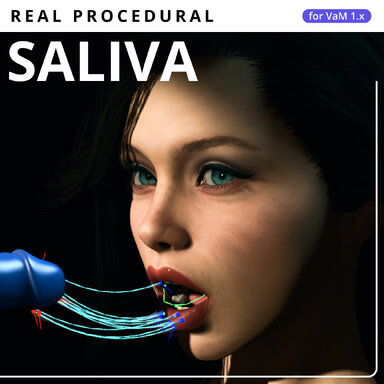
Procedural Saliva

Plugins + Scripts Procedural Saliva

Download [<1 MB]

ridgerock

Active member
Joined
Sep 18, 2026
Messages
22
Reactions
97
ridgerock submitted a new resource:

Procedural Saliva - Fully procedural liquid strands that form on contact, stretch, merge and break in VaM.

View attachment 625219View attachment 625220

Procedural Saliva
A complete, fully procedural contact-strand simulation that responds to what happens in your scene.

Fully procedural by design
To my knowledge, Procedural Saliva is VaM's first system of its kind: strands born from real surface contact, attached at both ends, with simulated stretching, thinning and merging. I know of no direct equivalent to this...

Read more about this resource...
 
i was literally searching for this for years now
i cant believe you made it you are awesome thank you so much!

some suggestions, maybe add more control to coloring ,glossiness and custom texture?
also can you add option to create strands from testicles to face?🙏
 
Last edited:
i was literally searching for this for years now
i cant believe you made it you are awesome thank you so much!

some suggestions, maybe add more control to coloring ,glossiness and custom texture?
also can you add option to create strands from trestles to face?🙏
1790328033474.png
Hi. Thanks for your feedback - I really appreciate it. In my dev version, you can already “drape” threads across the face. Right now, I'm already working on updates for all four of my plugins, as well as some other interesting thing that will be released soon. As for the materials, I’m still thinking about the most performance-efficient implementation that would still look decent. Most of my development time right now is spent optimizing for the ancient game engine - even extremely complex systems like slaps and mascara now consume resources at a negligible level.

P.S. You should try all my procedural systems together - I’ve always felt that this is exactly what VaM has been missing.
 
Last edited:
Hi. Thanks for your feedback - I really appreciate it. In my dev version, you can already “drape” threads across the face. Right now, I'm already working on updates for all four of my plugins, as well as some other interesting thing that will be released soon. As for the materials, I’m still thinking about the most performance-efficient implementation that would still look decent. Most of my development time right now is spent optimizing for the ancient game engine - even extremely complex systems like slaps and mascara now consume resources at a negligible level.

P.S. You should try all my procedural systems together - I’ve always felt that this is exactly what VaM has been missing.
"dev version" where can i get it??

i cant wait for the new features! :)
is it also possible to have the effect apply to any body part?
instead of only genital to face and lips maybe testicles to face, or from male hand to female hand, so the effect can apply from touching body parts between 2 characters. is it possible?
right now its working perfectly and no fps loss, but the color looks a bit out of place in my scene like different from cum clothing i have on my character.
 
"dev version" where can i get it??

i cant wait for the new features! :)
is it also possible to have the effect apply to any body part?
instead of only genital to face and lips maybe testicles to face, or from male hand to female hand, so the effect can apply from touching body parts between 2 characters. is it possible?
right now its working perfectly and no fps loss, but the color looks a bit out of place in my scene like different from cum clothing i have on my character.
1 - The “dev version” is called “dev” precisely because it's still under development. I might release an update for all my plugins tomorrow. At least, I hope so.
2 - Yes, it's possible to create such an effect between just about anything, and in theory it seems simple enough based on this plugin, but that's a whole different story—and it's a feature of a completely different, nonexistent plugin.
3 - The color issue can be resolved through the plugin’s settings—the transparency and color controls via RGB work perfectly there. In the next version, it will generally look more like a liquid and reflect light.
 
ridgerock updated Procedural Saliva with a new update entry:

0.4.13 — Better liquid shading, steadier strands and less repeated work

Changes since the initial Hub release, 0.4.10.
This update improves liquid highlights and attachment accuracy, adds control over strand lifetime, and removes repeated work from contact detection and rendering.

Liquid appearance and skin attachment
  • Corrected liquid highlights: Smoothness, Fresnel and Specular now use the correct parameters for VaM's native liquid shader. The existing sliders keep their ranges; their values now translate correctly...

Read the rest of this update entry...
 
1 - The “dev version” is called “dev” precisely because it's still under development. I might release an update for all my plugins tomorrow. At least, I hope so.
2 - Yes, it's possible to create such an effect between just about anything, and in theory it seems simple enough based on this plugin, but that's a whole different story—and it's a feature of a completely different, nonexistent plugin.
3 - The color issue can be resolved through the plugin’s settings—the transparency and color controls via RGB work perfectly there. In the next version, it will generally look more like a liquid and reflect light.
1 - thanks for your hard work 😊 I'm so happy you made this i was searching for years to have this effect.
2 - i hope you can add that feature in the future🤞 but its your decision.
3 - i tried with RGB and transparency but what was lacking was more liquid look more glossiness
 
Last edited:
I'd like the Saliva effect to apply to the character's self fingers as well, just like when inserting the VR hand into the vagina or mouth.
 
Hello Ridgerock, thanks for this it looks awsome but I have the same issue than Mm3. The stands are flickering.
latest update make it perfect with gloss
but the stands are flickering like crazy sometimes and even after setting to 32 strands only 16 show up

edit: i tried different scenes and the flickering happens in all of them, its unusable for me😭 REALLY hoping for a fix🙏
 
I'd like the Saliva effect to apply to the character's self fingers as well, just like when inserting the VR hand into the vagina or mouth.
This has already been done, since I play in VR myself. Try experimenting with the thickness settings.
 
Amazing work. I'm currently using JaxEffects by JaxZoa to get a drool effect, but that applies to clothing. A unique plugin. I hope the project continues to improve.
 
latest update make it perfect with gloss
but the stands are flickering like crazy sometimes and even after setting to 32 strands only 16 show up

edit: i tried different scenes and the flickering happens in all of them, its unusable for me😭 REALLY hoping for a fix🙏
Hello Ridgerock, thanks for this it looks awsome but I have the same issue than Mm3. The stands are flickering.

Edit the .bat startup file and try running it with these parameters:
Code:
START "VaM" VaM.exe -vrmode None -force-d3d11 -force-d3d11-no-singlethreaded -single-instance
You need to determine whether the entire thread disappears, the geometry flickers, or only the highlights flicker. The counter updates every half-second, so it may not show rapid skips. First, with Debug Mode off; then with Debug Mode on.

  • The plugin settings file from the VaM folder:
    Saves\PluginData\RidgeRock\ProceduralSaliva\settings.json
    Copy the settings that were in effect when the problem occurred, before making any experimental changes.

  • Log immediately after playback. Press Win+R, then enter:
    %USERPROFILE%\AppData\LocalLow\MeshedVR\VaM
    Send the output_log.txt file, saving a copy of it before the next time you launch VaM. It’s recommended to also include the error messages from the VaM window, if any appeared.

  • Brief description of the conditions: plugin and VaM versions, graphics card, Desktop or VR, FPS during flickering, Mouth or Vagina, contact with another Person or object. You can check the FPS via User Preferences → Performance → Performance Monitor.

  • Scene and steps to reproduce: the name/link to the scene or a minimal saved scene, followed by the exact steps: “load → add plugin → zoom in on the object → flickering begins.”

It is also very important to test in a clean scene without any other plugins.

EDIT: I ran a few tests but still unable to reproduce your problem on:
Windows 11 Pro 10.0.26200
Driver: Game Ready - 616.92 - Wed, Sep 9, 2026
NVIDIA GeForce RTX 4090
 
Last edited:
Edit the .bat startup file and try running it with these parameters:
Code:
START "VaM" VaM.exe -vrmode None -force-d3d11 -force-d3d11-no-singlethreaded -single-instance
You need to determine whether the entire thread disappears, the geometry flickers, or only the highlights flicker. The counter updates every half-second, so it may not show rapid skips. First, with Debug Mode off; then with Debug Mode on.

  • The plugin settings file from the VaM folder:
    Saves\PluginData\RidgeRock\ProceduralSaliva\settings.json
    Copy the settings that were in effect when the problem occurred, before making any experimental changes.

  • Log immediately after playback. Press Win+R, then enter:
    %USERPROFILE%\AppData\LocalLow\MeshedVR\VaM
    Send the output_log.txt file, saving a copy of it before the next time you launch VaM. It’s recommended to also include the error messages from the VaM window, if any appeared.

  • Brief description of the conditions: plugin and VaM versions, graphics card, Desktop or VR, FPS during flickering, Mouth or Vagina, contact with another Person or object. You can check the FPS via User Preferences → Performance → Performance Monitor.

  • Scene and steps to reproduce: the name/link to the scene or a minimal saved scene, followed by the exact steps: “load → add plugin → zoom in on the object → flickering begins.”

It is also very important to test in a clean scene without any other plugins.

EDIT: I ran a few tests but still unable to reproduce your problem on:
Windows 11 Pro 10.0.26200
Driver: Game Ready - 616.92 - Wed, Sep 9, 2026
NVIDIA GeForce RTX 4090
what bat file??

i have:
Windows 11 Home
NVIDIA GeForce RTX 4070 (12 GB)
driver 617.14

with me it does work sometimes but mostly gets broken specially with animation pattern.
i manages to make it work a bit by enabling and disabling emitter several times but it gets broken anyway. if i do something like right now, I'm writhing to you and its was working, now i got back to vam it's flickering again.

i don't know how it works if its shaders or something but it isn't stable, i set all setting to default it didn't help.
even if it does work the moment, i move the camera with mouse or keyboard the strands disappears and appears again with flicker.

i tried removing all plugin from my characters still nothing.
the previous version was ok but just lacking the gloss effect.
i didn't get any errors.

can you maybe please check it again? PLEASE!🙏
i was waiting for an effect like this for vam for years something i could only see in animations.

edit: shader quality or removing clothes did fix it but everything looks bad like that, fps seems to be the issue 35 and below causes it but its impossible to get higher fps with a good looking scene since vam is VERY badly optimized even in my setup
 
Last edited:
ridgerock updated Procedural Saliva with a new update entry:

0.4.14 — Hotfix

  • Addressed a possible cause of strand flickering at low FPS: existing strands now tolerate brief delays or failures when reading skin geometry.
  • Fixed an internal emitter capacity limit that could prevent Max Strands from reaching 32.
  • Increasing Max Strands now expands emitter capacity without resetting existing strands.
If you experienced flickering in 0.4.13, please try this hotfix in the same scene and report whether it helps, especially below 35 FPS.

Read the rest of this update entry...
 
what bat file??

i have:
Windows 11 Home
NVIDIA GeForce RTX 4070 (12 GB)
driver 617.14

with me it does work sometimes but mostly gets broken specially with animation pattern.
i manages to make it work a bit by enabling and disabling emitter several times but it gets broken anyway. if i do something like right now, I'm writhing to you and its was working, now i got back to vam it's flickering again.

i don't know how it works if its shaders or something but it isn't stable, i set all setting to default it didn't help.
even if it does work the moment, i move the camera with mouse or keyboard the strands disappears and appears again with flicker.

i tried removing all plugin from my characters still nothing.
the previous version was ok but just lacking the gloss effect.
i didn't get any errors.

can you maybe please check it again? PLEASE!🙏
i was waiting for an effect like this for vam for years something i could only see in animations.

edit: shader quality or removing clothes did fix it but everything looks bad like that, fps seems to be the issue 35 and below causes it but its impossible to get higher fps with a good looking scene since vam is VERY badly optimized even in my setup
I'm still trying to reproduce your issue, but it seems impossible even with the maximum number of threads and fast movement.
However, I've submitted an update for moderation that might potentially fix the problem, but this is just a guess on my part—I don't have enough data.

P.S. Just create a file named "VaM (Desktop Mode).bat" in the folder next to your VaM_Updater.exe, then open it in Notepad and type the following inside:
Code:
START “VaM” VaM.exe -vrmode None -force-d3d11 -force-d3d11-no-singlethreaded -single-instance
 
Last edited:
This has already been done, since I play in VR myself. Try experimenting with the thickness settings.
I was referring to the fingers of the character with the plugin applied, not the other character's fingers.
I'm talking about a masturbation.

I tried applying Character's fingers to the vagina area using the updated ProceduralSaliva.v2 plugin, but even after changing the 'Strand Thickness' to 4 and testing it, the effect still isn't applying to Character's fingers.

Additionally, I'd like to ask about another setting. When the distance between the start and end points of the Saliva stretches significantly, which setting should I set to maximum to maximize the force that keeps it connected without snapping?
 
I was referring to the fingers of the character with the plugin applied, not the other character's fingers.
I'm talking about a masturbation.

I tried applying Character's fingers to the vagina area using the updated ProceduralSaliva.v2 plugin, but even after changing the 'Strand Thickness' to 4 and testing it, the effect still isn't applying to Character's fingers.

Additionally, I'd like to ask about another setting. When the distance between the start and end points of the Saliva stretches significantly, which setting should I set to maximum to maximize the force that keeps it connected without snapping?
Got it. The character's own fingers will require additional collider settings, and because of self-collision, this will start to cause unnecessary workload. So for now, it's either your own fingers in VR, another character, or toys.

To answer your second question—try adjusting the Break Threshold and Max Length settings.
 
Got it. The character's own fingers will require additional collider settings, and because of self-collision, this will start to cause unnecessary workload. So for now, it's either your own fingers in VR, another character, or toys.

To answer your second question—try adjusting the Break Threshold and Max Length settings.
Got it. I'll adjust the Break Threshold and Max Length settings accordingly.
 
Back
Top Bottom