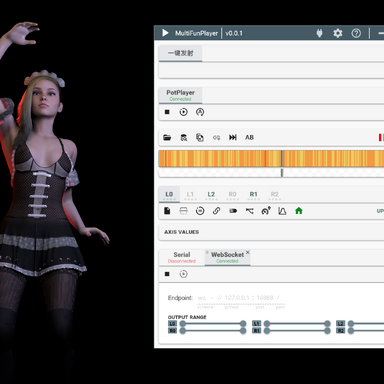
MFPButtDriver:  MultiFunPlayer  drive Person hip/butt bone movement

Plugins + Scripts MFPButtDriver: MultiFunPlayer drive Person hip/butt bone movement

Download [<1 MB]

nb9527

New member
Joined
Jul 30, 2026
Messages
13
Reactions
11
nb9527 submitted a new resource:

MFPButtDriver: MultiFunPlayer drive Person hip/butt bone movement - Receive WS/UDP data from MultiFunPlayer, drive Person hip/butt bone movement

MFP Butt Driver​

MultiFunPlayer 6-Axis Bone Driver for VAM


Receive data via WebSocket (WS) or UDP from MultiFunPlayer, and drive character bone movement inside VAM. Compatible with funscript playback in MultiFunPlayer / OpenFunscripter.

Who this plugin is for​

  1. OSR hardware users: Existing OSR VAM drivers rely on physical motion capture, which often results in repetitive or overly extreme movement. Hundreds of...

Read more about this resource...
 
nb9527 updated MFPButtDriver: MultiFunPlayer drive Person hip/butt bone movement with a new update entry:

V2 - Motion Calculation Rework, Spring Mode & UI Improvements

V2 Update


View attachment 610717
  1. Reworked motion calculation logic. Previously rotation pivoted around the center of Controller A and B with symmetrical swing. Now Controller B serves as the fixed pivot, and Controller A moves along an arc around B.
  2. Added six gain parameters and an adaptive gain mechanism to offset weakened motion caused by joint pulling effects.
  3. Added new Spring mode. This brings 12 extra adjustable parameters...

Read the rest of this update entry...
 
great work! Very cool plugin. managed to try a few funscripts with it and reduce the default settings for smaller movements. got some pretty convincing results. find it hard to compare to original video/funscript/vam to see how true it is but it looks good enough.

only big issue im having though is pitch seems to be replaced with roll and vice versa. hip is rolling left to right when it should be pitching up and down. pov from a seated position model straddling you while facing you. *edited to add: this only happens in one of my existing scenes. just tried it in a new scene leaving everything in default positions/rotations and it pitches fine

also the hip will at times very quickly move away about 1ft and returns quite sharpish noticed its at flat spots in the funscript, where there is no action.
 
Last edited:
I don't know if this makes sense since I just saw this plugin... Could you use it to generate short animation sequences to build from? For example, if you had a video+funscript source that had motions that you liked, could you connect the funscript to the model with this plugin, then record that basic animation. Then the idea would be to use that basic animation of desired movement and supplement with animating other non-controlled body parts using other tools. I hope that makes sense.
 
nb9527 updated MFPButtDriver: MultiFunPlayer drive Person hip/butt bone movement with a new update entry:

MFPButtDriver 3.0 Update – New Motion Modes, Natural Motion System & Media Player Bridge

MFPButtDriver 3.0 Update​

View attachment 611007View attachment 611009


Before diving into the changelog, I want to share some news. I recently discovered Yoooi.BusDriver.6.var. Its goals are nearly identical to MFPButtDriver. Admittedly, the naming made it hard to locate; I only found it indirectly via a scene containing MFP keywords.

I regret not finding it sooner, but I’m also glad I discovered it now. If I had...

Read the rest of this update entry...
 
great work! Very cool plugin. managed to try a few funscripts with it and reduce the default settings for smaller movements. got some pretty convincing results. find it hard to compare to original video/funscript/vam to see how true it is but it looks good enough.

only big issue im having though is pitch seems to be replaced with roll and vice versa. hip is rolling left to right when it should be pitching up and down. pov from a seated position model straddling you while facing you. *edited to add: this only happens in one of my existing scenes. just tried it in a new scene leaving everything in default positions/rotations and it pitches fine

also the hip will at times very quickly move away about 1ft and returns quite sharpish noticed its at flat spots in the funscript, where there is no action.
Thanks for your detailed feedback!

In previous versions, I implemented a simulated spring motion mode. Starting from V3, referencing BusDriver, I switched to VaM's built-in Physics Link system. Motion restoration should be far more accurate now. I recommend enabling Auto Gain if you encounter excessive movement amplitude.

Regarding the Pitch/Roll axis swap issue you encountered:My suspicion is that older motion modes altered the initial transform state of your character atom and changed its base orientation, creating the illusion that Pitch and Roll are swapped. This perfectly explains why everything works correctly in a brand-new scene — the character pose is fully reset there.

This issue rarely occurs under the new Physics Link mode. However, it may still happen when using Force or Direct mode. As a workaround, you can reset your character’s pose inside VaM, or use the Reset Origin function built into the plugin to mitigate the problem.

As for the sudden hip jumping on flat funscript segments, could you please test and see if this artifact still exists on V3? I have optimised parts of the interpolation and solving logic in this release, so the issue may have been improved. I will continue tuning the solver based on your test results.
 
I don't know if this makes sense since I just saw this plugin... Could you use it to generate short animation sequences to build from? For example, if you had a video+funscript source that had motions that you liked, could you connect the funscript to the model with this plugin, then record that basic animation. Then the idea would be to use that basic animation of desired movement and supplement with animating other non-controlled body parts using other tools. I hope that makes sense.
That’s an excellent workflow idea!

In V3, I’ve added media player control and script-related capabilities. This shift made me realize MultiFunPlayer is no longer mandatory. MFP outputs smoothed T-Code designed for physical hardware like OSR toys, which isn’t ideal for native VaM scene building.

This is exactly why I’m developing FunSequencer as my next project. It will load funscripts directly, remove MFP as the middleman, support clip trimming, and work seamlessly with Timeline and MacGruber’s plugins.

One small difference in my vision: I plan to keep driving animations live from the raw funscript data in FunSequencer, rather than baking and recording static animations. This way, the same funscript file can simultaneously drive motion inside VaM and send data to control OSR hardware at the same time.
 
That’s an excellent workflow idea!

In V3, I’ve added media player control and script-related capabilities. This shift made me realize MultiFunPlayer is no longer mandatory. MFP outputs smoothed T-Code designed for physical hardware like OSR toys, which isn’t ideal for native VaM scene building.

This is exactly why I’m developing FunSequencer as my next project. It will load funscripts directly, remove MFP as the middleman, support clip trimming, and work seamlessly with Timeline and MacGruber’s plugins.

One small difference in my vision: I plan to keep driving animations live from the raw funscript data in FunSequencer, rather than baking and recording static animations. This way, the same funscript file can simultaneously drive motion inside VaM and send data to control OSR hardware at the same time.
Sounds good - the less middleware you have to do the better. I'll be messing around with both approaches for sure.
 
I don't know if this makes sense since I just saw this plugin... Could you use it to generate short animation sequences to build from? For example, if you had a video+funscript source that had motions that you liked, could you connect the funscript to the model with this plugin, then record that basic animation. Then the idea would be to use that basic animation of desired movement and supplement with animating other non-controlled body parts using other tools. I hope that makes sense.

funnily enough this was my first thought and to answer your question yes! ☺️

I've just tested recording in the timeline plugin while a funscript was playing and it works. im looking at best settings to reduce the number of keyframes now.

Thanks for your detailed feedback!

In previous versions, I implemented a simulated spring motion mode. Starting from V3, referencing BusDriver, I switched to VaM's built-in Physics Link system. Motion restoration should be far more accurate now. I recommend enabling Auto Gain if you encounter excessive movement amplitude.

Regarding the Pitch/Roll axis swap issue you encountered:My suspicion is that older motion modes altered the initial transform state of your character atom and changed its base orientation, creating the illusion that Pitch and Roll are swapped. This perfectly explains why everything works correctly in a brand-new scene — the character pose is fully reset there.

This issue rarely occurs under the new Physics Link mode. However, it may still happen when using Force or Direct mode. As a workaround, you can reset your character’s pose inside VaM, or use the Reset Origin function built into the plugin to mitigate the problem.

As for the sudden hip jumping on flat funscript segments, could you please test and see if this artifact still exists on V3? I have optimised parts of the interpolation and solving logic in this release, so the issue may have been improved. I will continue tuning the solver based on your test results.

the orientation thing wasnt that big a deal i had an idea it was something like that :)

as for hip jump you say v3 but i only see v2 which ive just tested it on and still have the jumping hip. happens at these points I have arrowed. first one animation comes to rest then a big Jerk at the arrow, hip returns then second arrow when the animation gets going again. originally thought it was mfp's return to home feature where if its idle it returns to center but sadly it wasn't that. watching the axis values in mfp when the controllers are jerking shows no change in the values.

1785561585500.png
 
oh regarding the hip jumping, is it the plugin returning it to its "rest pose" ? i see it does something every second enabling debug. if i pause the script playback in mfp and just click on mfp script preview to advance to a specific time the controllers move correctly but then snap back to the rest pose i assume ?
 
oh regarding the hip jumping, is it the plugin returning it to its "rest pose" ? i see it does something every second enabling debug. if i pause the script playback in mfp and just click on mfp script preview to advance to a specific time the controllers move correctly but then snap back to the rest pose i assume ?
Thanks for the observation! The plugin does not actively pull everything back to a fixed rest pose by design.

This snap effect is a side effect of V2’s custom spring solver. During long static periods, floating-point calculation errors accumulate gradually. Even if you jump to a position via MFP’s preview, persistent drift causes the hip to snap back shortly after.

I have tested V2 and V3 on a matching funscript. The snapping issue exists on V2 and disappears on V3.I uploaded V3 for review a few hours ago, and it will be public within hours after approval.V3 adopts VaM native Physics Link with static sleep functionality to resolve this drift problem. It would be great if you can verify this after V3 is released.
 
Looks promising.
Would be nice you you could provide a little demo scene with script to test it out and better understand how it works.
 
Thanks for the observation! The plugin does not actively pull everything back to a fixed rest pose by design.

This snap effect is a side effect of V2’s custom spring solver. During long static periods, floating-point calculation errors accumulate gradually. Even if you jump to a position via MFP’s preview, persistent drift causes the hip to snap back shortly after.

I have tested V2 and V3 on a matching funscript. The snapping issue exists on V2 and disappears on V3.I uploaded V3 for review a few hours ago, and it will be public within hours after approval.V3 adopts VaM native Physics Link with static sleep functionality to resolve this drift problem. It would be great if you can verify this after V3 is released.

just been having a quick look at the update. it still snaps hip back if using "driven settings>drive mode: direct" albeit not as violently. it wont snap the hip back if using drive mode "physics link"

great work with the natural movement feature btw I like this. still to explore it fully.

Ive got a new issue ? the left and right foot control nodes keep snapping to position 0,0,0 (drive mode either physics or direct)

heres my workflow:
1. new scene > slate, light, and person atom added
2. person atom at 0,0,0
3. add timeline to person atom, vam default pose saved
4. add your plugin > enable udp, start server, select person and hip > click start
if at this point you click "Stop" before playing mfp the head will also shoot down to 0,0,0
5. start/play mfp (doesnt matter if you do this before point 4)

if the script gets to another one of those flat spots or you hit stop in your plugin it is now also snapping both feet to 0,0,0

edited to add: I do not have the natural movement feature enabled if it was somehow related ?

also getting an error on play/stop despite not having the bridge feature enabled:
!> [MFPButtDriver] Bridge not responding, communication paused for 10s"


if it helps you debug im using mfp with the "internal" mode to play the funscripts

1785658014829.png


Keep up the good work. this is a great plugin
 
Last edited:
i resolved the annoying foot issue by unpacking and commenting out some code in "nb.MFPButtDriver.3.var\Custom\Scripts\nb\MFPButtDriver\Internal\MFPButtBoneDriver.cs"

line 2380 & 2381

C#:
if (_nmLFootCtrl != null) { /*_nmLFootCtrl.control.position = _nmLFootRestPos; _nmLFootCtrl.control.rotation = _nmLFootRestRot;*/ if (_nmStatesSaved) { _nmLFootCtrl.currentPositionState = _nmLFootOrigPosState; _nmLFootCtrl.currentRotationState = _nmLFootOrigRotState; } }
if (_nmRFootCtrl != null) { /*_nmRFootCtrl.control.position = _nmRFootRestPos; _nmRFootCtrl.control.rotation = _nmRFootRestRot;*/ if (_nmStatesSaved) { _nmRFootCtrl.currentPositionState = _nmRFootOrigPosState; _nmRFootCtrl.currentRotationState = _nmRFootOrigRotState; } }
 
I've tried this and can't get it to work. I did exactly what the instructions said. It's not working.
 
I've tried this and can't get it to work. I did exactly what the instructions said. It's not working.

have you setup multifunplayer correctly ?

if you have it set to control hip make sure atoms hipcontrol is on for rotation and position
 
have you setup multifunplayer correctly ?

if you have it set to control hip make sure atoms hipcontrol is on for rotation and position
I honestly don't normally use it, but I installed and set it up as "internal", and everything seemed to be working; I had a funscript playing in it, had the server running. but the hip was doing nothing
 
have you setup multifunplayer correctly ?

if you have it set to control hip make sure atoms hipcontrol is on for rotation and position
"Assign Controller A (bottom) and Controller B (top)"a

I'm not sure what this is.
 
"Assign Controller A (bottom) and Controller B (top)"a

I'm not sure what this is.
that was an older version of the plugin. author hasnt updated the instructions. it is a little confusing.

heres my settings:

1785695123588.png


so should be
1. start multifunplayer set media source as Internal (no need for pot player). Set output target as UDP enter localhosthost:18888)
2. in buttdriver plugin set connection mode to UDP.
3. click start server
4, select person atom: person, Select Target: HipControl
5. make sure hipcontrol node is ON
6. click start
7. play the funscript in mfp

I also tune sway and surge to nothing and twist to about 5 in range settings. my pose gets crazy contorted if i don't
 
nb9527 updated MFPButtDriver: MultiFunPlayer drive Person hip/butt bone movement with a new update entry:

MFPButtDriver 4.0 Update – New Motion Modes, Media Player Bridge & Timeline animation takeover

View attachment 612345View attachment 612349

Before diving into the changelog, I want to share some news. I recently discovered Yoooi.BusDriver.6.var. Its goals are nearly identical to MFPButtDriver. Admittedly, the naming made it hard to locate; I only found it indirectly via a scene containing MFP keywords.

I regret not finding it sooner, but I’m also glad I discovered it now. If I had found it earlier, I would have lost motivation to...

Read the rest of this update entry...
 
that was an older version of the plugin. author hasnt updated the instructions. it is a little confusing.

heres my settings:

View attachment 611462

so should be
1. start multifunplayer set media source as Internal (no need for pot player). Set output target as UDP enter localhosthost:18888)
2. in buttdriver plugin set connection mode to UDP.
3. click start server
4, select person atom: person, Select Target: HipControl
5. make sure hipcontrol node is ON
6. click start
7. play the funscript in mfp

I also tune sway and surge to nothing and twist to about 5 in range settings. my pose gets crazy contorted if i don't
Sorry for the delay, I’ve just spotted this discussion. This plugin was temporarily taken down due to the Bridge exe file issue. Thank you for sharing your working setup notes, I really appreciate it.

You are absolutely right, I need to update the plugin instructions to remove references to the old "Controller A / Controller B" options which no longer exist in current versions.
 
just been having a quick look at the update. it still snaps hip back if using "driven settings>drive mode: direct" albeit not as violently. it wont snap the hip back if using drive mode "physics link"

great work with the natural movement feature btw I like this. still to explore it fully.

Ive got a new issue ? the left and right foot control nodes keep snapping to position 0,0,0 (drive mode either physics or direct)

heres my workflow:
1. new scene > slate, light, and person atom added
2. person atom at 0,0,0
3. add timeline to person atom, vam default pose saved
4. add your plugin > enable udp, start server, select person and hip > click start
if at this point you click "Stop" before playing mfp the head will also shoot down to 0,0,0
5. start/play mfp (doesnt matter if you do this before point 4)

if the script gets to another one of those flat spots or you hit stop in your plugin it is now also snapping both feet to 0,0,0

edited to add: I do not have the natural movement feature enabled if it was somehow related ?

also getting an error on play/stop despite not having the bridge feature enabled:
!> [MFPButtDriver] Bridge not responding, communication paused for 10s"


if it helps you debug im using mfp with the "internal" mode to play the funscripts

View attachment 611333

Keep up the good work. this is a great plugin
Thanks again for your thorough testing.
  1. As I mentioned in my last reply, only the Physics‑Link mode resolves the snapping issue, so it is set as the default mode now.
  2. Regarding feet and head snapping to world origin 0,0,0 when hitting Stop: this comes from leftover manual‑reset code originally written for the Direct mode. Now that Physics‑Link is the main mode, those code snippets should be removed. Your workaround for the foot issue confirms this. Since Direct mode introduces many bugs, I am considering removing it in the next release.
  3. The misleading "Bridge not responding" warning appearing even when the bridge feature is disabled will be fixed in the next version.
  4. Regarding your test setup: MFP Internal source is not required. When player control is turned off, there should be zero code communicating with the bridge executable. If you are interested, feel free to try out the player‑control feature — the bridge program is now hosted on GitHub. I will also add support for more players such as VLC in a future update.
 
i resolved the annoying foot issue by unpacking and commenting out some code in "nb.MFPButtDriver.3.var\Custom\Scripts\nb\MFPButtDriver\Internal\MFPButtBoneDriver.cs"

line 2380 & 2381

C#:
if (_nmLFootCtrl != null) { /*_nmLFootCtrl.control.position = _nmLFootRestPos; _nmLFootCtrl.control.rotation = _nmLFootRestRot;*/ if (_nmStatesSaved) { _nmLFootCtrl.currentPositionState = _nmLFootOrigPosState; _nmLFootCtrl.currentRotationState = _nmLFootOrigRotState; } }
if (_nmRFootCtrl != null) { /*_nmRFootCtrl.control.position = _nmRFootRestPos; _nmRFootCtrl.control.rotation = _nmRFootRestRot;*/ if (_nmStatesSaved) { _nmRFootCtrl.currentPositionState = _nmRFootOrigPosState; _nmRFootCtrl.currentRotationState = _nmRFootOrigRotState; } }
It looks like you are building scenes with MFPButtDriver. I don’t have much hands‑on experience creating scenes myself, so I really appreciate all your testing. I have a few questions I’d like to discuss with you.
Are you generating motions via MFPButtDriver and then recording those motions into Timeline? This workflow has two notable drawbacks:
  1. The T‑Code streamed from MFP is not the raw funscript data. MFP applies smoothing to funscript, plus configurable fade‑in / fade‑out at playback start and stop. On top of that, recording baked animations discards the original funscript entirely, which is critical for OSR hardware users.
  2. There is no obvious way to preserve audio synchronized with motion, and I am not aware of native Timeline functionality for this purpose.
That led me to design an alternative solution: FunSequencer. The workflow works like this:
  1. Create segments (seg1) clipped directly from the source funscript file — this covers exactly the motion range you would otherwise record as Timeline keyframes.
  2. Place triggers at the start and end of your Timeline animation: fire StartSegment(seg1) and StopSegment(seg1) respectively.
  3. For synchronized audio, use the extract‑audio feature. It extracts the matching audio range from your source video and saves it as seg1.wav. The audio will play automatically when StartSegment(seg1) gets triggered.
I understand this workflow may feel unintuitive for existing Timeline users, so I would love to hear more of your feedback and suggestions.
 
Back
Top Bottom