• Hi Guest!

    We are extremely excited to announce the release of our first Beta1.1 and the first release of our Public AddonKit!
    To participate in the Beta, a subscription to the Entertainer or Creator Tier is required. For access to the Public AddonKit you must be a Creator tier member. Once subscribed, download instructions can be found here.

    Click here for information and guides regarding the VaM2 beta. Join our Discord server for more announcements and community discussion about VaM2.
  • Hi Guest!

    VaM2 Resource Categories have now been added to the Hub! For information on posting VaM2 resources and details about VaM2 related changes to our Community Forums, please see our official announcement here.
Morph Merge And Split - Extended

Plugins + Scripts Morph Merge And Split - Extended

Download [<1 MB]

Skynet

Invaluable member
Featured Contributor
Joined
Jan 28, 2023
Messages
608
Reactions
3,953
Skynet submitted a new resource:

Morph Merge And Split - Extended - Extended features for the original Morph Merge & Split plugin

-- Content:
- Morph Merge and split script files.

-- Description:
- An edit to the original Morph Merge and split by @ceq3 , This edit adds the following features:
- Split hands feature.
- Split feet feature.
- Splitting hands & feet with custom falloff distance for smooth morph transitions, with visuals.
fully supports splitting bone morphs around feet & hands.
- Split morphs can be applied independently with no dislocation...

Read more about this resource...
 
Thank you for the great plugin.
In some models, the neck morph is severely distorted, affecting the clothing. Could you add a function in the next version to separate the face and neck?
 
Thank you for the great plugin.
In some models, the neck morph is severely distorted, affecting the clothing. Could you add a function in the next version to separate the face and neck?
that might be a problem from the original plugin, i haven't touched the original auto-fix head feature. btw you should enable it to avoid the issue you mentioned, idk if you had it enabled or not but that should generally fix the problem.

if you did have it enabled, then send me some screenshots so i can see where the problem might be
 
Thanks for this. Is there a way to make splits for the abdomen, or breast and butt area? Like isolate morphs for them?
 
Thanks for this. Is there a way to make splits for the abdomen, or breast and butt area? Like isolate morphs for them?
YES THIS.
it would be great if we could do breast and nipple/areolas! together and/or the option to separate them.
if you have bulbous nips in a breast morph, they will get quite distorted when you scale the breast morph up/down if they're combined.

i've been splitting them myself manually but if it was baked in it would be much easier.
 
YES THIS.
it would be great if we could do breast and nipple/areolas! together and/or the option to separate them.
if you have bulbous nips in a breast morph, they will get quite distorted when you scale the breast morph up/down if they're combined.

i've been splitting them myself manually but if it was baked in it would be much easier.
Yep. There are a few creators that do excellent boobs and butts (as well as making the upper torso and shoulders flow nicely ... but, sometimes they make the models too fat (belly or thighs) and it doesn't work when creating custom looks. I wish I could just be able to transplant the shoulders, upper torso, boobs onto another character that I work on. If Skynet could figure this out, it would be a godsend plugin.
 
I LOVE the skin you have, you can really see the vertices, i have one but they don't exactly line up for me. any chance you could share a link or something?
helpful when working with morphs.
you can find those in my Addon Textures package on the hub (free)
 
Yep. There are a few creators that do excellent boobs and butts (as well as making the upper torso and shoulders flow nicely ... but, sometimes they make the models too fat (belly or thighs) and it doesn't work when creating custom looks. I wish I could just be able to transplant the shoulders, upper torso, boobs onto another character that I work on. If Skynet could figure this out, it would be a godsend plugin.
probably in the future, will require some thinking for how to properly line up bone morphs in each of those individual areas
 
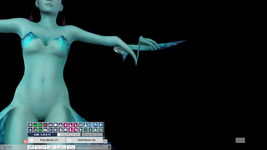
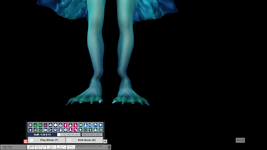
So maybe it's just this specific model, but I just tried the plugin with Zin's Princess Ruto, and the split between hands and feet has some major issues
1770317588343.png1770317626211.png

I've also tried it with Oni's Lola Bunny, and it had similar issue. but on a different axis
1770318042763.png
 
So maybe it's just this specific model, but I just tried the plugin with Zin's Princess Ruto, and the split between hands and feet has some major issues

I've also tried it with Oni's Lola Bunny, and it had similar issue. but on a different axis
aaah shit, i forgot to apply the bone morph correction to the falloff vertices aswell... will update with a fix soon. thanks for the report
 
Hey @Skynet! Great additions to the original!
I had a quick look at your code and it seems that you do not catch all head vertices with your static int array. Yours has some 8k elements but the face alone has around 13k vertices.
You can get all the verts like this procedurally:

var skin = ((DAZCharacterMaterialOptions)atom.GetStorableByID("skin")).skin;
var faceVerts = skin.Mesh.GetTriangles(11);

The argument of GetTriagles specifies a submesh. Those have the same id like the respective materials. Face is 11, lips are 5, head is 15 etc. To get the ids print out the array skin.materialNames. Could be used for the hands and feet as well (16 & 23).
To quickly verify the regions you can set skin.materialsEnabled[11] = false;

Have a grat day!
 
Fucking legend.

Any way I could convince you to add a feature to bake the atom's root scale into the combined morphs? (So that a new atom with the combined morphs and scale=1 is the same size as the original atom with scale<1)
 
Hey @Skynet! Great additions to the original!
I had a quick look at your code and it seems that you do not catch all head vertices with your static int array. Yours has some 8k elements but the face alone has around 13k vertices.
You can get all the verts like this procedurally:
Hi Cheesy
Where do the additional verts come from - I'm guessing from Vams internal smoothing?
There's only 8.9k in the base mesh if you select everything from neck up
1770472459692.png

It does rise to 9.4k if you go with an export from Vam after its converted to tri's.
I'm no coder, so I'm assuming the only verts of interest are those that drive the morph vert positions on the original base mesh

Just curious :)
 
Last edited:
Hey @Skynet! Great additions to the original!
I had a quick look at your code and it seems that you do not catch all head vertices with your static int array. Yours has some 8k elements but the face alone has around 13k vertices.
You can get all the verts like this procedurally:

var skin = ((DAZCharacterMaterialOptions)atom.GetStorableByID("skin")).skin;
var faceVerts = skin.Mesh.GetTriangles(11);
thank you.

if i am not mistaken you probably had the vertex count mixed up with triangles count, from the method you're recommending my guess is that it returns a triangle array and not a vertex array? which can explain why in your case it's more than 13k. usually the G2F head mesh including the neck material is no more than 8,9k vertices.
 
Last edited:
thank you.

if i am not mistaken you probably had the vertex count mixed up with triangles count, from the method you're recommending my guess is that it returns a triangle array and not a vertex array? which can explain why in your case it's more than 13k. usually the G2F head mesh including the neck material is no more than 8,9k vertices.
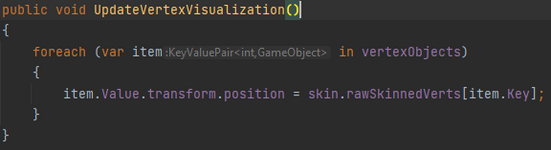
Yeah, I just realized that too. When using .GetIndizes I get 2657 verts. What confuses me though is, that if I visualize them like you do I also get duplicate spheres at the static, unskinned vertex positions. This doesn't matter too much for me cause the visualization is just for debugging, but it really confuses me. It seems that all the vertices are doubled (skinned and unsinned). The weird thing is that it doesn't matter how I get my verts, using GetIndizes or your array, the duplicates always show up. So even your array seems to have twice as much verts as needed, since there are double the amount of debug spheres than actual skinned vertices, righ? How did you get around that?
 
Back
Top Bottom