Session HeelAdjust3

Plugins + Scripts Session HeelAdjust3

Download [<1 MB]
[HAS] Girl init error: clothing:Tank Top callback slot owned by a foreign plugin; person skipped till re-enable.
How to fix that?
Removed all the atom plugins saved the scene, reloaded vam and added the latest version of the plugin as session plugin and I get this error and the plugin doesn't work.

I tried completly new scene without any plugins, added new base person atom, and I got this error after I added plugin as session plugin:
[HAS] Person init error: clothing:BooMoon.[Looks]_Lara.1:/Custom/Clothing/Female/Nial/Nosetrill ring L/Nosetrill ring L.vam callback slot owned by a foreign plugin; person skipped till re-enable.
This clothing is not even put on...

I think the plugin has some trouble with certain clothing items loaded by other plugins.
 
Last edited:
Migration to version 29 from version 27 breaks the script, even if I remove the previous script and load new on the female atom, it cannot be checked (enabled). Any idea how to fix this?
Then you should see a message in the error log window saying like "a present settings host version ({foreignVersion}) differs from the current packet version {version}". That means there is some another version plugin instance from an older .var here. It could be attached to the scene or session. Different versions instances could not co-exist.
 
[HAS] Girl init error: clothing:Tank Top callback slot owned by a foreign plugin; person skipped till re-enable.
How to fix that?
Removed all the atom plugins saved the scene, reloaded vam and added the latest version of the plugin as session plugin and I get this error and the plugin doesn't work.

I tried completly new scene without any plugins, added new base person atom, and I got this error after I added plugin as session plugin:
[HAS] Person init error: clothing:BooMoon.[Looks]_Lara.1:/Custom/Clothing/Female/Nial/Nosetrill ring L/Nosetrill ring L.vam callback slot owned by a foreign plugin; person skipped till re-enable.
This clothing is not even put on...

I think the plugin has some trouble with certain clothing items loaded by other plugins.
Thank you for your report, now I understand the issue. I will investigate it.
 
@Torrasque
I am still not certain of the root cause of your issue, but updating to version 30 effectively eliminates that specific type of error from the log. Please let me know here if the problem is resolved after switching to the new version.
You are the only one who reported this serious issue, which allowed me to discover a major oversight in a critical area. Thanks again for the report. I am sure other users have encountered the problem as well, but for some reason, they are remaining silent.
 
@Torrasque
I am still not certain of the root cause of your issue, but updating to version 30 effectively eliminates that specific type of error from the log. Please let me know here if the problem is resolved after switching to the new version.
You are the only one who reported this serious issue, which allowed me to discover a major oversight in a critical area. Thanks again for the report. I am sure other users have encountered the problem as well, but for some reason, they are remaining silent.
Version 30, seems to be working fine. Thanks.
 
The plugin works. :sneaky:
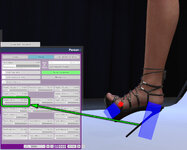
However, there seems to be a bug here: heel tilt angle is limited to 20 degrees.

*upd
ups; I figured it out - it's not a bug!
(I was just misled by that slider)
 

Attachments

  • 2026-10-06_140228.jpg
    2026-10-06_140228.jpg
    209.3 KB · Views: 0
The plugin works. :sneaky:
However, there seems to be a bug here: heel tilt angle is limited to 20 degrees.

*upd
ups; I figured it out - it's not a bug!
(I was just misled by that slider)
Hi, it is nice to see you tried my version as I know you have much staff using ShoeHelper - the plugin I dynamically remove from you great work.
Yes, the Foot Slope is the base value to adjust and a particular collider adjustment goes later if needed.
There are three ready-made presets for your clothes that goes right in this .var package. You can post here more and I include it in ongoing update making the end user live little simpler.
The preset from the video (can't attach it):
Saves\PluginData\Nickon\HeelAdjust3\VL13-ShoeKITSoleApinR.json
JSON:
{
   "Foot Slope" : "58",
   "Lock Toe Joint" : "false",
   "Lock Individual Toes" : "true",
   "HeelColScale" : [
      "0.005",
      "0.1850318",
      "0.005"
   ],
   "HeelColOffset" : [
      "0",
      "0",
      "-0.014"
   ],
   "ToeColScale" : [
      "0.1",
      "0.032",
      "0.1"
   ],
   "LinkedItems" : [
      "VL_13.Shoe_KIT2.1:/Custom/Clothing/Female/VL_13/Sh_KIT/Shoe_KIT_Sole_A_pin_L.vam",
      "VL_13.Shoe_KIT2.1:/Custom/Clothing/Female/VL_13/Sh_KIT/Shoe_KIT_Sole_A_pin_R.vam"
   ]
}
 
Can you add a mode to the session plugin so it doesn't interact with shoes that already have ShoeHelper set up?
 
Can you add a mode to the session plugin so it doesn't interact with shoes that already have ShoeHelper set up?
The plugin removes ShoeHelper only for the shoes that have preset file either in \Saves\PluginData\Nickon\HeelAdjust3\ or supplied in the plugin's .var. So in the first case you can remove the .json form the folder. Please report if it does not work or if the issue is the .var contained presets.
 
:unsure: Well an issue I've had is on some heels that use shoehelper as a clothing plugin the toes don't bend to their correct position when heel adjust is loaded as a session plugin, I even tested that it went back to normal after removing heel adjust as a session plugin.
But I'm not actually sure if it's intrinsic to shoehelper because when using the built-in Harli Heels the toes don't bend either, this might be a legacy issue from the older heel adjust plugins, either way could it be fixed?.
Images of what I mean using harli heels with alpha set to 0, one with heel adjust 3 loaded and one without:
hjon.png
hjoff.png

The confusing thing is that this does also happen with some heels that use ShoeHelper, at least YameteOuji's specifically.
1793481672865.png
 
:unsure: Well an issue I've had is on some heels that use shoehelper as a clothing plugin the toes don't bend to their correct position when heel adjust is loaded as a session plugin, I even tested that it went back to normal after removing heel adjust as a session plugin.
But I'm not actually sure if it's intrinsic to shoehelper because when using the built-in Harli Heels the toes don't bend either, this might be a legacy issue from the older heel adjust plugins, either way could it be fixed?.
Images of what I mean using harli heels with alpha set to 0, one with heel adjust 3 loaded and one without:
View attachment 638087View attachment 638088
The confusing thing is that this does also happen with some heels that use ShoeHelper, at least YameteOuji's specifically.
View attachment 638089
Please tell me exact shoe id (or just package name YameteOuji.xxx.var and shoe name). I will try to download it and investigate the issue.
But I think the issue is that you don't have HeelAdjust preset for that shoe. If the shoe has ShoeHelper applied then it fight with HeelAdjust. So you should choose the winner: either disable HeelAdjust (not remove, disabling should be enough) or let HeelAdjust to de-attach the ShoeHelper instance (for the session). For that you should create a preset for that shoe. Exactly the same process is demostrated in the main page's video.
 
Last edited:
Please tell me exact shoe id (or just package name YameteOuji.xxx.var and shoe name). I will try to download it and investigate the issue.
 
Thank you. Confirmed YameteOuji:240322_Heels_Katherine uses ShoeHelper so I suggest to create a HeelAdjust preset to replace it (I've updated my post).
If you have troubles to create the preset I will do it for you later.
 
What I don't understand is what makes this issue occur in the first place, and with the built-in harli heels too.
 
I made the preset for you. This should resolve the issue for you. Paste the following text in file named \Saves\PluginData\Nickon\HeelAdjust3\YameteOuji-240322HeelsKatherine.json After the file has been created press Rescan Presets or reload HeelAdjust.
JSON:
{
   "Foot Slope" : "50",
   "Lock Toe Joint" : "false",
   "Lock Individual Toes" : "true",
   "HeelColScale" : [
      "0.01",
      "0.138",
      "0.01"
   ],
   "HeelColOffset" : [
      "0",
      "0",
      "-0.015"
   ],
   "ToeColScale" : [
      "0.08000001",
      "0.01",
      "0.09"
   ],
   "ToeColOffset" : [
      "0",
      "0",
      "0.02"
   ]
}
After that HeelAdjust will de-attach ShoeHelper every time you equip the shoe. The both mentioned ways are demonstrated on the video: 1) equip the shoe with HAS disabled 2) HAS overrides ShoeHelper with the preset installed
 
The original CheesyFX HeelAdjust2 do the same with Harli Heels so I inherited this. The core reason is the foot joint drive X angle (accented in the video above) - HeelAdjust reacts on its changing.
I am thinking to eliminate that reaction.
 
Hello!
I'm super noob with HeelAdjust.
And it dont work for me cause i'm probably missing a lot of stuff.
but is there a way to save a kind of preset like:
"If that person wear theses heels, adjust angle to 45"
that would be enough for me. I dont mind to adjust each time for each character, but right now each time i load scene, i load pose, the feet turn flat, ignoring the heel, and the delta reset to 0 for both foot, and i think something like "remember the delta for that person" should be a very basic thing, but i have no idea where to do that, too much nerd calculation and additionnal effect while i'm just looking for a little more of quality of life :p
You guys are magicians and that's great but i dont want to read pages and pages of heels stuff when i just try to get something that rotate foot and remember the rotations ^^'


Any one kind enough to tell me how? Beside RTFM? :)
 
This is exactly what the plugin does.

The settings are saved in the scene data.
Please RTFM the part about preset basics :)
If you still have problems then please try to formulate it clearly or record a video.
I just load the scene and the delta return to 0.
Well thanks for the kind of help.
I'll found an alternative solution.
 

Attachments

  • 1793917582518.png
    1793917582518.png
    742.9 KB · Views: 0
I just load the scene and the delta return to 0.
Using the deltas for bend feet is not correct way to use the plugin. The deltas are used for solve another type of problem.
I think you do not have a preset file for the shoe on you screenshot. The plugin should "know" what angle you want feet to be bend for a particular shoe, that is why you need a preset file - it holds all the information for the particular shoe. The plugin package contains some ready-made preset **for some shoe I used** but not for all the available on the hub shoe.
So please watch the first video on the Overview Page (I just updated this) to learn how to create a preset. You do it once for every shoe item you want to use, after you save the presets you will get "a little more of quality of life".
Feel free to ask if you still have a problem.
 
Using the deltas for bend feet is not correct way to use the plugin. The deltas are used for solve another type of problem.
I think you do not have a preset file for the shoe on you screenshot. The plugin should "know" what angle you want feet to be bend for a particular shoe, that is why you need a preset file - it holds all the information for the particular shoe. The plugin package contains some ready-made preset **for some shoe I used** but not for all the available on the hub shoe.
So please watch the first video on the Overview Page (I just updated this) to learn how to create a preset. You do it once for every shoe item you want to use, after you save the presets you will get "a little more of quality of life".
Feel free to ask if you still have a problem.
I added HeelsAdjust 2, on a person.
Because i had hope it will save/remember the setting for the shoes.
But i noticed this "preset/save preset button", which make sense.
But in your plugin, i dont understand, i dont see it. And yours is a session plugin (i'm sure you already understood my problem here)
Anyway, thanks for your video. At first i was like "but why he have the preset button .." and i noticed you were using it directly on girl, and not as session.

So, now, every thing work... I first need to put the plugin on an person, mostly a person using some heels, then i can adjust, and save the settings, as an preset.
Then, once done i just let the plugin with session version to auto adjust the setting for shoes with preset saved~

I think it will work fine now. And if for now not every thing is correct, i'll manage ^^
Thanks a lot!
 
RTFM.png


Good to you.
I’ve highlighted in red—specifically for you—the parts within those "nerdy calculations" that explain exactly what you need to do in your situation. Reading through that document would have taken, at most, 10 minutes. Add a 3-minute video—which you’d need to watch three times—and you’re looking at a grand total of 20 minutes of "titanic" effort. Instead, you chose a path that took three days—and that’s only because I was responding as quickly as I could. It’s not that I mind—I’m always happy to help people—but it’s a shame you didn’t get to enjoy this "quality of life" improvement sooner. So, for the future, I’d strongly suggest you take the RTFM way.
Feel free to post your produced presets here - it may help other users.
 
View attachment 639540

Good to you.
I’ve highlighted in red—specifically for you—the parts within those "nerdy calculations" that explain exactly what you need to do in your situation. Reading through that document would have taken, at most, 10 minutes. Add a 3-minute video—which you’d need to watch three times—and you’re looking at a grand total of 20 minutes of "titanic" effort. Instead, you chose a path that took three days—and that’s only because I was responding as quickly as I could. It’s not that I mind—I’m always happy to help people—but it’s a shame you didn’t get to enjoy this "quality of life" improvement sooner. So, for the future, I’d strongly suggest you take the RTFM way.
Feel free to post your produced presets here - it may help other users.
Like i said, i did not saw i needed to use the plugin on person to edit preset.
Because it was an session i assumed i could edit directly.
And that's all, once i saw that, every thing was clear, and work fine.
Thank you²?
I dont know why you took time to highlight things in red, like i said in the message above, exactly this one:

"So, now, every thing work... I first need to put the plugin on an person, mostly a person using some heels, then i can adjust, and save the settings, as an preset."
:D
Should i hightlight in red too? Just kidding, thanks for the help, really. Good day!
 
Back
Top Bottom