Hi everyone,
I'm running into a very strange problem and hope someone can help.
I've been using two versions of VaM on my PC without any issues until today:
- **1.22.0.12** (my main project version, desktop mode)
- **1.22.0.13** (a clean "test" version, also desktop)
Everything worked perfectly until I decided to try VR mode today. I used Virtual Desktop (wired streaming) to launch `VaM (OpenVR).bat`, which started VaM through SteamVR. The game launched fine, but I immediately noticed that **all my session plugins were showing errors**.
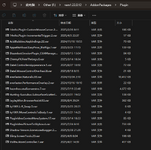
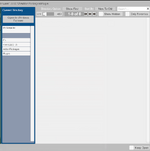
All my essential session plugin `.var` files are stored in `AddonPackages\Plugin` and I haven't moved them. I tried to re-add them via the in‑game session plugin editor, but when I opened the `Plugin` folder in VaM's built‑in file browser, **it appeared completely empty** – it didn't recognize any of the 20 `.var` files inside. I then checked my `AddonPackages\Scene` folder (which contains 64 scene `.var` files) and the file browser showed that as empty too. As a result, many of my scenes can't be loaded.
However, other folders like `AddonPackages\Others` and `AddonPackages\Clothes` are still being read correctly – their `.var` files show up fine.
I tried renaming the `AddonPackages\Plugin` folder to e.g. `01`, and when I opened that renamed folder in VaM, the `.var` files were suddenly readable again. But then VaM prompted me to accept user license permissions for **every single plugin** – I clicked "Agree to All" and saved my current session plugin setup as default. Unfortunately, **every time I restart VaM**, it asks for those same permissions again, as if VaM has lost the ability to remember my plugin permission history.
At first I thought my main project version might have been corrupted, so I repeated the VR launch with my clean "test" version (1.22.0.13) – and the exact same issues occurred:
- Some `.var` files in certain folders are not being read (they show as empty),
- Plugin permission prompts appear on every restart,
- The problem persists even when I switch back to **desktop mode**.
Has anyone encountered this before? What could be causing it, and how can I fix it?
Thanks in advance for any suggestions!
I'm running into a very strange problem and hope someone can help.
I've been using two versions of VaM on my PC without any issues until today:
- **1.22.0.12** (my main project version, desktop mode)
- **1.22.0.13** (a clean "test" version, also desktop)
Everything worked perfectly until I decided to try VR mode today. I used Virtual Desktop (wired streaming) to launch `VaM (OpenVR).bat`, which started VaM through SteamVR. The game launched fine, but I immediately noticed that **all my session plugins were showing errors**.
All my essential session plugin `.var` files are stored in `AddonPackages\Plugin` and I haven't moved them. I tried to re-add them via the in‑game session plugin editor, but when I opened the `Plugin` folder in VaM's built‑in file browser, **it appeared completely empty** – it didn't recognize any of the 20 `.var` files inside. I then checked my `AddonPackages\Scene` folder (which contains 64 scene `.var` files) and the file browser showed that as empty too. As a result, many of my scenes can't be loaded.
However, other folders like `AddonPackages\Others` and `AddonPackages\Clothes` are still being read correctly – their `.var` files show up fine.
I tried renaming the `AddonPackages\Plugin` folder to e.g. `01`, and when I opened that renamed folder in VaM, the `.var` files were suddenly readable again. But then VaM prompted me to accept user license permissions for **every single plugin** – I clicked "Agree to All" and saved my current session plugin setup as default. Unfortunately, **every time I restart VaM**, it asks for those same permissions again, as if VaM has lost the ability to remember my plugin permission history.
At first I thought my main project version might have been corrupted, so I repeated the VR launch with my clean "test" version (1.22.0.13) – and the exact same issues occurred:
- Some `.var` files in certain folders are not being read (they show as empty),
- Plugin permission prompts appear on every restart,
- The problem persists even when I switch back to **desktop mode**.
Has anyone encountered this before? What could be causing it, and how can I fix it?
Thanks in advance for any suggestions!