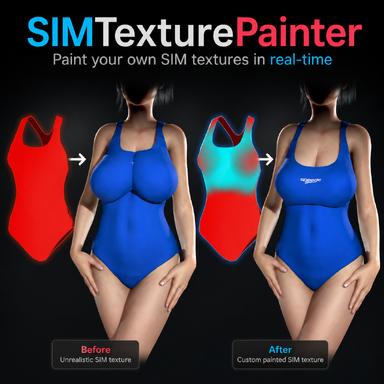
SIMTexturePainter

Plugins + Scripts SIMTexturePainter

Download [<1 MB]
Why don't I have the paint color option in my interface? My plugin version is 5, and currently I can't paint any colour.


!> [SIMTexturePainter:rebuild] atom='Person' chestRB=@(0.8, 1.2, 0.0) right=(1.0, 0.0, 0.0) chestCtrl=@(0.8, 1.2, 0.0) control=@(0.7, 0.0, 0.0) bakeAnchor=(0.8, 1.2, 0.0) bakeMeshCenter=(0.6, 1.4, 0.0) bakeRight=(1.0, 0.0, 0.0) haveBake=True overlayOffset=(0.7, -0.2, 0.0) overlayYaw=(0.0, 2.4, 0.0) paintVerts(n=0) controllers=[control,hipControl,pelvisControl,chestControl,headControl,rHandControl,lHandControl,rFootControl,lFootControl,neckControl,eyeTargetControl,rNippleControl,lNippleControl,testesControl,penisBaseControl,penisMidControl,…]
!> [SIMTexturePainter:rebuild] atom='Person' chestRB=@(0.8, 1.2, 0.0) right=(1.0, 0.0, 0.0) chestCtrl=@(0.8, 1.2, 0.0) control=@(0.7, 0.0, 0.0) bakeAnchor=(0.8, 1.2, 0.0) bakeMeshCenter=(0.2, 1.1, 0.0) bakeRight=(1.0, 0.0, 0.0) haveBake=True overlayOffset=(1.2, 0.2, 0.0) overlayYaw=(0.0, 1.9, 0.0) paintVerts(n=0) controllers=[control,hipControl,pelvisControl,chestControl,headControl,rHandControl,lHandControl,rFootControl,lFootControl,neckControl,eyeTargetControl,rNippleControl,lNippleControl,testesControl,penisBaseControl,penisMidControl,…]
 

Attachments
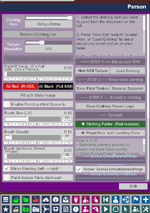
  • 20260529114712.png
    20260529114712.png
    109.3 KB · Views: 0
Last edited:
Why don't I have the paint color option in my interface? My plugin version is 5, and currently I can't paint any colour.


!> [SIMTexturePainter:rebuild] atom='Person' chestRB=@(0.8, 1.2, 0.0) right=(1.0, 0.0, 0.0) chestCtrl=@(0.8, 1.2, 0.0) control=@(0.7, 0.0, 0.0) bakeAnchor=(0.8, 1.2, 0.0) bakeMeshCenter=(0.6, 1.4, 0.0) bakeRight=(1.0, 0.0, 0.0) haveBake=True overlayOffset=(0.7, -0.2, 0.0) overlayYaw=(0.0, 2.4, 0.0) paintVerts(n=0) controllers=[control,hipControl,pelvisControl,chestControl,headControl,rHandControl,lHandControl,rFootControl,lFootControl,neckControl,eyeTargetControl,rNippleControl,lNippleControl,testesControl,penisBaseControl,penisMidControl,…]
!> [SIMTexturePainter:rebuild] atom='Person' chestRB=@(0.8, 1.2, 0.0) right=(1.0, 0.0, 0.0) chestCtrl=@(0.8, 1.2, 0.0) control=@(0.7, 0.0, 0.0) bakeAnchor=(0.8, 1.2, 0.0) bakeMeshCenter=(0.2, 1.1, 0.0) bakeRight=(1.0, 0.0, 0.0) haveBake=True overlayOffset=(1.2, 0.2, 0.0) overlayYaw=(0.0, 1.9, 0.0) paintVerts(n=0) controllers=[control,hipControl,pelvisControl,chestControl,headControl,rHandControl,lHandControl,rFootControl,lFootControl,neckControl,eyeTargetControl,rNippleControl,lNippleControl,testesControl,penisBaseControl,penisMidControl,…]

2 things I can think of:

- I haven't tested the plugin with male or futa models, so maybe it won't work on those
- The clothing item has no SIM data generated by the creator. If a clothing item doesn't have sim data, you'd need to generate it yourself by doing this:
Open the clothing item in Clothing Creator → Generate Sim Data → Clear Package → enable Sim → Save → Load the newly created Clothing Item → Refresh Clothing List in the Plugin → Select the new Clothing Item
 
2 things I can think of:

- I haven't tested the plugin with male or futa models, so maybe it won't work on those
- The clothing item has no SIM data generated by the creator. If a clothing item doesn't have sim data, you'd need to generate it yourself by doing this:
Open the clothing item in Clothing Creator → Generate Sim Data → Clear Package → enable Sim → Save → Load the newly created Clothing Item → Refresh Clothing List in the Plugin → Select the new Clothing Item
I have found the correct way to use it,thx a lot
 
@Mxx first thanks for making my favorite plugin of the year!


Few things I noticed:
  • When you load a clothing item and create a new texture, it paints everything at Red 255
    • You need to click on "paint all red 253" otherwise you will be in trouble. I have to go back and color shift some textures.
  • Latest version 5 has some strange painting behavior, related to folds in the mesh or something?
  • 1780502373593.png
 
@Mxx first thanks for making my favorite plugin of the year!


Few things I noticed:
  • When you load a clothing item and create a new texture, it paints everything at Red 255
    • You need to click on "paint all red 253" otherwise you will be in trouble. I have to go back and color shift some textures.
  • Latest version 5 has some strange painting behavior, related to folds in the mesh or something?
  • View attachment 596929

Hey, thanks for the feedback. I'm pretty busy with making scenes at the moment (which I like making more than plugins to be honest), but when I revisit this plugin I'll take these points into account!
 
Interested in one more suggestion? Currently, the sim files save as <name><region>final #.
But now some of my clothing items have 3 sim presets, and "final 1", final 2" and "final 3" gives me no clue what circumstances each is for.

How about adding a text box so users can name the sim set. So we end up with sets with names like "<name><region>off shoulder" or "<name><region>leaning forward".

Should be a pretty quick fix and a great addition to usability.
 
Interested in one more suggestion? Currently, the sim files save as <name><region>final #.
But now some of my clothing items have 3 sim presets, and "final 1", final 2" and "final 3" gives me no clue what circumstances each is for.

How about adding a text box so users can name the sim set. So we end up with sets with names like "<name><region>off shoulder" or "<name><region>leaning forward".

Should be a pretty quick fix and a great addition to usability.

I'll add it to the list :)
 
Hello, I really like your plugin. It has greatly facilitated my work in creating clothing textures, and it is very suitable for fine-tuning, allowing me to achieve more realistic simulations. However, I have encountered a problem. When I had over thirty clothing components in my creation, the plugin seemed to stop working properly. When I loaded the new clothing with the plugin, it failed to generate the canvas according to the correct model and instead displayed other models, like the picture shown here. I'm not sure if it's an accidental occurrence or a cumulative factor. Initially, it was working properly, but the problem emerged later.
1784292627355.png
 
Mxx updated SIMTexturePainter with a new update entry:

v6 - VR Support, Mask System, Load current SIM, Alt key brush resizing, Naming texture + some fixes

(switched to using v6 instead of v1.5 to match the .var file)

New features
  • VR support: aim with the green laser and hold the trigger to paint (right hand by default, disable the toggle to switch to left handed).
    Hold dominant hand trigger to paint (cyan/black),
    Hold BOTH triggers (so on both left and right controllers) to erase (paint red)
  • Mask system: new "Edit Mask" mode lets you paint mask...

Read the rest of this update entry...
 
So you cant edit a SIM texture to make lets say boobs come out of a tank top?,cuz i wasn't able to...Pin on shoulders doesn't seems to work for me at least.
 
So you cant edit a SIM texture to make lets say boobs come out of a tank top?,cuz i wasn't able to...Pin on shoulders doesn't seems to work for me at least.
No, a sim texture only determines which parts of the clothing are loose or stuck. Maybe using Skynet's clothing sculpt plugin you can achieve that
 
Heya Mxx, really great plugin!

I'm doing some edits to existing hub clothing sim, and some of them use a unified Sim texture that is used across multiple materials, with different materials represented as separate islands on the same map.

I was wondering if it would be possible to have, perhaps, a toggle that would allow making edits to a Unified sim map, as well as a unified texture when saving the sim off as a separate file?

I can merge them all with masks in Photoshop after exporting, but it would help workflow if this was integrated somehow.

Oh yeah, and welcome to the world of endless requests from the community 😉

Glad you're making neat stuff though, keep it up!
 
Heya Mxx, really great plugin!

I'm doing some edits to existing hub clothing sim, and some of them use a unified Sim texture that is used across multiple materials, with different materials represented as separate islands on the same map.

I was wondering if it would be possible to have, perhaps, a toggle that would allow making edits to a Unified sim map, as well as a unified texture when saving the sim off as a separate file?

I can merge them all with masks in Photoshop after exporting, but it would help workflow if this was integrated somehow.

Oh yeah, and welcome to the world of endless requests from the community 😉

Glad you're making neat stuff though, keep it up!

I'll note it down for when I revisit this plugin
 
Really cool to get this in VR, thanks!

For when you ever revisit:

Small issue:
  • The "fill all" function seems to indeed fill everything, regardless of material selection. I was expecting it to be limited to the current material(s).
  • And it cannot be undone. Luckily I was just doing a little test 😅

For usability especially in VR, I could see these being nice for UX (also for sculpting maybe):
  • It can be quite finicky to paint on thin features like seams at the moment. In software like Substance Painter, I believe when you start painting they heavily bias/limit the brush painting plane towards the normal plane where you start (probably moving average the reference normal over time so you can work along the mesh?), and prevent the brush leaving the mesh borders while painting (to prevent accidentally painting on other parts of the mesh that are behind).
  • An option to control brush strength through VR controller trigger strength would be cool (though this would likely need some kind of configurable pressure curve to be usable, maybe just parametrized ease-in)
 
Back
Top Bottom