

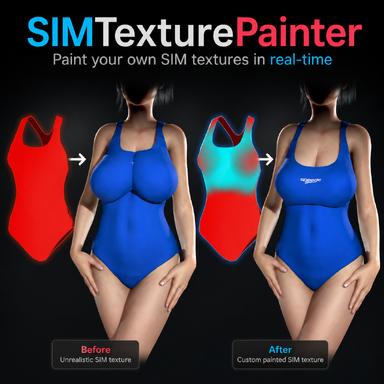
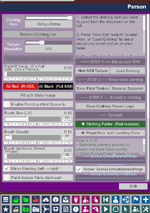
Why don't I have the paint color option in my interface? My plugin version is 5, and currently I can't paint any colour.
!> [SIMTexturePainter:rebuild] atom='Person' chestRB=@(0.8, 1.2, 0.0) right=(1.0, 0.0, 0.0) chestCtrl=@(0.8, 1.2, 0.0) control=@(0.7, 0.0, 0.0) bakeAnchor=(0.8, 1.2, 0.0) bakeMeshCenter=(0.6, 1.4, 0.0) bakeRight=(1.0, 0.0, 0.0) haveBake=True overlayOffset=(0.7, -0.2, 0.0) overlayYaw=(0.0, 2.4, 0.0) paintVerts(n=0) controllers=[control,hipControl,pelvisControl,chestControl,headControl,rHandControl,lHandControl,rFootControl,lFootControl,neckControl,eyeTargetControl,rNippleControl,lNippleControl,testesControl,penisBaseControl,penisMidControl,…]
!> [SIMTexturePainter:rebuild] atom='Person' chestRB=@(0.8, 1.2, 0.0) right=(1.0, 0.0, 0.0) chestCtrl=@(0.8, 1.2, 0.0) control=@(0.7, 0.0, 0.0) bakeAnchor=(0.8, 1.2, 0.0) bakeMeshCenter=(0.2, 1.1, 0.0) bakeRight=(1.0, 0.0, 0.0) haveBake=True overlayOffset=(1.2, 0.2, 0.0) overlayYaw=(0.0, 1.9, 0.0) paintVerts(n=0) controllers=[control,hipControl,pelvisControl,chestControl,headControl,rHandControl,lHandControl,rFootControl,lFootControl,neckControl,eyeTargetControl,rNippleControl,lNippleControl,testesControl,penisBaseControl,penisMidControl,…]
!> [SIMTexturePainter:rebuild] atom='Person' chestRB=@(0.8, 1.2, 0.0) right=(1.0, 0.0, 0.0) chestCtrl=@(0.8, 1.2, 0.0) control=@(0.7, 0.0, 0.0) bakeAnchor=(0.8, 1.2, 0.0) bakeMeshCenter=(0.6, 1.4, 0.0) bakeRight=(1.0, 0.0, 0.0) haveBake=True overlayOffset=(0.7, -0.2, 0.0) overlayYaw=(0.0, 2.4, 0.0) paintVerts(n=0) controllers=[control,hipControl,pelvisControl,chestControl,headControl,rHandControl,lHandControl,rFootControl,lFootControl,neckControl,eyeTargetControl,rNippleControl,lNippleControl,testesControl,penisBaseControl,penisMidControl,…]
!> [SIMTexturePainter:rebuild] atom='Person' chestRB=@(0.8, 1.2, 0.0) right=(1.0, 0.0, 0.0) chestCtrl=@(0.8, 1.2, 0.0) control=@(0.7, 0.0, 0.0) bakeAnchor=(0.8, 1.2, 0.0) bakeMeshCenter=(0.2, 1.1, 0.0) bakeRight=(1.0, 0.0, 0.0) haveBake=True overlayOffset=(1.2, 0.2, 0.0) overlayYaw=(0.0, 1.9, 0.0) paintVerts(n=0) controllers=[control,hipControl,pelvisControl,chestControl,headControl,rHandControl,lHandControl,rFootControl,lFootControl,neckControl,eyeTargetControl,rNippleControl,lNippleControl,testesControl,penisBaseControl,penisMidControl,…]
Attachments
Last edited:


