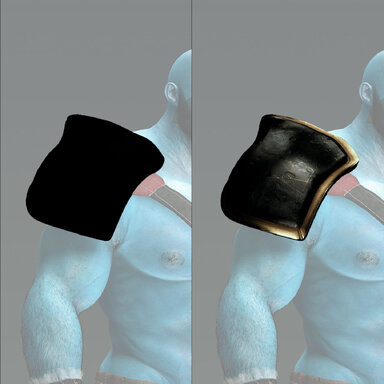
CUA Clothing Vamified

Plugins + Scripts CUA Clothing Vamified

Download [<1 MB]

vamBear

Well-known member
Joined
Sep 5, 2023
Messages
60
Reactions
322
vamBear submitted a new resource:

CUA Clothing Vamified - Adds Vamified, Colliders and Scale to

-- Use as Clothing Plugin!

- Credits to @Stopper & @qdaro for this amazing base plugin code! originally made by stopper, modified by qdaro then simplified by me.
- I simplified the plugin for my specific use case, mainly for rigid clothing items and CUA hair with physics.

-- What this plugin does:
- Multiple plugin instances can load their own CUAs in one clothing item, previous version had a bug when only one CUA atom could be loaded in...

Read more about this resource...
 
I've been trying to pack a Var with this plugin but it doesn't seem to work, I keep getting not valid asset paths.
I've tried editing the files but nothing is working.

Any help with this would be really appreciated.
 

Attachments

  • Screenshot 2026-07-08 020316.png
    Screenshot 2026-07-08 020316.png
    98.5 KB · Views: 0
I've been trying to pack a Var with this plugin but it doesn't seem to work, I keep getting not valid asset paths.
I've tried editing the files but nothing is working.

Any help with this would be really appreciated.
That sucks.

The best thing to do is to follow this : https://hub.virtamate.com/resources/clothing-plugins.37636/

Someone else has created an automated way of doing this but it requires you do some small amount of editing to the scripts once it's created the .var.

Good luck!
 
That sucks.

The best thing to do is to follow this : https://hub.virtamate.com/resources/clothing-plugins.37636/

Someone else has created an automated way of doing this but it requires you do some small amount of editing to the scripts once it's created the .var.

Good luck!

I got it to work in the end, Sorry for wasting your time.

I didn't realise when packing the var files I need to update the file path for the Assets when loading them in with a clothing item.
 
I got it to work in the end, Sorry for wasting your time.

I didn't realise when packing the var files I need to update the file path for the Assets when loading them in with a clothing item.
Not even wasted - Glad you got it sorted.
 
1785622134831.png


So is this a CUA plugin? cause when I use this and go to this menu to get a asset to use VAM shader, the CUA its displace from some inches away its original place. is this normal? I was suspecting this mod to change a CUA to use VAM shader not displace it,
 
vamBear updated CUA Clothing Vamified with a new update entry:

Version 4

💜 Special thanks to @Betestav, who reported the problems below and asked for them to be fixed. This update is largely your doing — thank you for the detailed reports!

Fixes (requested by @Betestav)​

  • Sliders now show 3 decimals. The position sliders used to display only two decimals (X.XX) and sometimes swallowed values you typed. They now show and keep three (X.XXX) — what you type is what you get.
  • Scaling...

Read the rest of this update entry...
 
vamBear updated CUA Clothing Vamified with a new update entry:

Version 5

💜 Special thanks to Betestav for finding and reporting this bug!

Fixes​

  • Bone attachments no longer clip-then-settle. On tightly fitted CUA hair/clothing attached to a Bone, moving or posing the person could make the asset surge into the body and then spring back into place. The bone attachment now syncs exactly like Skynet's ALT version — deliberately one frame behind — so the CUA's physics settles smoothly and it stays...

Read the rest of this update entry...
 
Back
Top Bottom
