• Hi Guest!

    We have posted a new VaM2 dev log on Patreon, starting a monthly cadence of written progress updates between Beta releases. Highlights include the new Gizmos System, Selection Carousel, and Modes System with Context-Specific Editing. Beta1.2 is 15 of 21 items complete.

    Read the full post on Patreon, or follow progress on the public Trello roadmap.
CUA Puppeteer

Plugins + Scripts CUA Puppeteer

Download [33.56 MB]

Shadow Venom

Well-known member
Featured Contributor
Joined
Oct 10, 2022
Messages
391
Reactions
2,457
Shadow Venom submitted a new resource:

CUA Puppeteer - Puppet a whole crowd of CUA characters from one animated Person. Or bake the motion and play it back

🎭 CUA Puppeteer

Puppet a whole crowd of CUA characters from one animated Person. Or bake the motion and play it back with no Person at all.

CUA Puppeteer drives resource-cheap Custom Unity Asset (CUA) characters from a single live Person's skeleton, in real time. The Person is your "lead": animate it with anything you already use (Timeline, mocap, physics), and every puppet follows it bone for bone. Puppets are just a skinned mesh with no physics, morph, or...

Read more about this resource...
 
怎么使用?
🚀 Quick start (Live)
  1. Add the CUA Puppeteer plugin to any atom (an Empty works well).
  2. Load one or more roxy CustomUnityAsset atoms as your puppets (or your own converted CUA).
  3. In the plugin: pick your Lead Person, then Add dancer (CUA) for each puppet atom.
  4. Put the lead at its base pose and click Calibrate (it also auto-calibrates on scene reload).
  5. Enable Drive and resume the lead's animation. The puppets follow.
  6. Rotate a puppet's atom to aim its facing. Add more puppets for a crowd. Turn on Mirror (L/R) for symmetric pairs. Nudge Ensemble Variation for natural drift.
 
Shadow Venom updated CUA Puppeteer with a new update entry:

V3 Update

  • Updated Skill.md and the plugin to better support CUAs whose original rigs do not include a Pelvis bone.
  • Renamed the companion example CUA package from R18SV_DancerPuppet_Roxy to R18SV_Puppeteer_Pack, and added a new male character, Mato.

Credits:

Mato mod version; the original release was by @AXnop.732

Read the rest of this update entry...
 
Where do you get roxy CustomUnityAsset atoms ?
1782941468187.png
 
Thank you, Master
I am a Chinese user who has recently been using VAM to conceptualize a Resident Evil comic. Your plugin has been of great help to me, but I have hit a snag: converting any humanoid CUA using an AI assistant.
I am unable to use the overseas AI coding assistant to create zombies CUA that can be driven by CUA_Puppeteer, which is very disappointing.
If possible, I hope Master could develop a local plugin that automatically binds skeletons to humanoid CUA.
I look forward to Master using divine power to solve this tricky problem. Once again, thank you, Master, for everything you do for us.
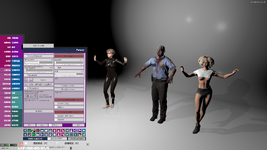
P.S.: The plugin UI in the picture is self-translated by me. I am also a plugin translator.✌
 

Attachments

  • Snipaste_2026-07-02_08-49-26.png
    Snipaste_2026-07-02_08-49-26.png
    1.1 MB · Views: 0
Thank you, Master
I am a Chinese user who has recently been using VAM to conceptualize a Resident Evil comic. Your plugin has been of great help to me, but I have hit a snag: converting any humanoid CUA using an AI assistant.
I am unable to use the overseas AI coding assistant to create zombies CUA that can be driven by CUA_Puppeteer, which is very disappointing.
If possible, I hope Master could develop a local plugin that automatically binds skeletons to humanoid CUA.
I look forward to Master using divine power to solve this tricky problem. Once again, thank you, Master, for everything you do for us.
P.S.: The plugin UI in the picture is self-translated by me. I am also a plugin translator.✌

Thanks for the feedback!

Although the examples in the documentation use AI models like Claude and OpenAI's Codex, in practice any agent-style LLM should be able to handle it, as long as it can execute CLI commands on your computer and create or modify files.

The comments in Skill.md and the accompanying Python scripts provide the AI with very detailed, explicit instructions. What it's really doing is applying a well-defined algorithm and performing a lot of repetitive processing, which is exactly the kind of work these AI agents are good at.

I imagine you probably have access to, or are already using, an AI with similar capabilities?
 
Thank you, Master
I am a Chinese user who has recently been using VAM to conceptualize a Resident Evil comic. Your plugin has been of great help to me, but I have hit a snag: converting any humanoid CUA using an AI assistant.
I am unable to use the overseas AI coding assistant to create zombies CUA that can be driven by CUA_Puppeteer, which is very disappointing.
If possible, I hope Master could develop a local plugin that automatically binds skeletons to humanoid CUA.
I look forward to Master using divine power to solve this tricky problem. Once again, thank you, Master, for everything you do for us.
P.S.: The plugin UI in the picture is self-translated by me. I am also a plugin translator.✌

Also, just to clarify a little:

CUA Puppeteer itself does not convert a model into a humanoid CUA. It only drives an existing CUA if the skeleton can be recognized and mapped correctly. The difficult part is the step before that: taking a humanoid model, especially game-ripped characters like zombies, and turning it into a CUA with a clean, usable humanoid bone structure.

For this kind of work, an AI coding agent is mainly used to run the provided Python/CLI tools, inspect the skeleton, rename or remap bones, fix scale/pose issues, and generate the required mapping data. It does not have to be Claude or Codex specifically. Any local agent that can read and write files and execute command-line tools should be able to help.

If overseas tools are hard to access, you may want to look at local alternatives such as

- Qwen Code
- Kimi Code CLI
- DeepSeek-based coding agents
- GLM coding tools

or similar CLI/IDE agents available in China. The key requirement is not the brand of the AI model, but whether it can operate on your local project files and run commands.
In fact, it doesn't really need to reason about anything. It's mostly just following the instructions and applying a well-defined algorithm over and over again, which is exactly the kind of repetitive work AI agents excel at.

So the AI model itself doesn't really need to be particularly "smart." As long as it can reliably follow instructions and execute the workflow, that's really all it needs.
 
Also, just to clarify a little:

CUA Puppeteer itself does not convert a model into a humanoid CUA. It only drives an existing CUA if the skeleton can be recognized and mapped correctly. The difficult part is the step before that: taking a humanoid model, especially game-ripped characters like zombies, and turning it into a CUA with a clean, usable humanoid bone structure.

For this kind of work, an AI coding agent is mainly used to run the provided Python/CLI tools, inspect the skeleton, rename or remap bones, fix scale/pose issues, and generate the required mapping data. It does not have to be Claude or Codex specifically. Any local agent that can read and write files and execute command-line tools should be able to help.

If overseas tools are hard to access, you may want to look at local alternatives such as

- Qwen Code
- Kimi Code CLI
- DeepSeek-based coding agents
- GLM coding tools

or similar CLI/IDE agents available in China. The key requirement is not the brand of the AI model, but whether it can operate on your local project files and run commands.
In fact, it doesn't really need to reason about anything. It's mostly just following the instructions and applying a well-defined algorithm over and over again, which is exactly the kind of repetitive work AI agents excel at.

So the AI model itself doesn't really need to be particularly "smart." As long as it can reliably follow instructions and execute the workflow, that's really all it needs.
Thank you, master, for your answer. Wishing you a good time.
 
CUA Puppeteer itself does not convert a model into a humanoid CUA. It only drives an existing CUA if the skeleton can be recognized and mapped correctly. The difficult part is the step before that: taking a humanoid model, especially game-ripped characters like zombies, and turning it into a CUA with a clean, usable humanoid bone structure.
Awesome work; I have been looking for something like this for awhile as a supplement to Hazmhox's great Crowd Generator plugin.

I looked up tutorials previously but thought I'd ask here since the tutorials are from 2 years ago now - Is it possible to export VAM Characters into CUA? I believe the answer was not directly, and that lots of post-export work has to be done. So being admittedly lazy, I haven't tried to do it.

Seeing this makes me wonder, if there's a way to "record" a character's appearance and controllers into a mesh/bone, which can then be converted into a CUA to be imported back by this plugin?
 
This works wonderfully! Can this be used without AI?
The plugin itself doesn't require AI to run. The AI is only there to automate the rig conversion process, so when you want to use your own custom CUA characters, you don't have to manually retarget and rename the bones.
 
Awesome work; I have been looking for something like this for awhile as a supplement to Hazmhox's great Crowd Generator plugin.

I looked up tutorials previously but thought I'd ask here since the tutorials are from 2 years ago now - Is it possible to export VAM Characters into CUA? I believe the answer was not directly, and that lots of post-export work has to be done. So being admittedly lazy, I haven't tried to do it.

Seeing this makes me wonder, if there's a way to "record" a character's appearance and controllers into a mesh/bone, which can then be converted into a CUA to be imported back by this plugin?
That's completely doable. In fact, I originally planned to implement a feature for it.

From a practical standpoint, though, it doesn't make much sense. Hair, for example, is much harder to handle properly on a CUA.
 
T
The plugin itself doesn't require AI to run. The AI is only there to automate the rig conversion process, so when you want to use your own custom CUA characters, you don't have to manually retarget and rename the bones.
That's what I've meant. Can we have a manual or at least a little hint of what my CUA character rig should look like? I won't use AI.
 
The standard DAZ G2 21-bone rig.

I'll put together a step-by-step "manual workflow" playbook when I get home.
Looking forward to that, I'm trying a G8M from Daz3d -> fbx -> unity -> assetbundle, then converting via Claude using the skill set. However I keep getting the arms raised at a 45 degree angle above the head of the dancer when the lead is in the default Tpose.
 
Looking forward to that, I'm trying a G8M from Daz3d -> fbx -> unity -> assetbundle, then converting via Claude using the skill set. However I keep getting the arms raised at a 45 degree angle above the head of the dancer when the lead is in the default Tpose.

This probably needs a bit of explanation.

At the moment, both the runtime plugin and the AI-assisted conversion only support the A-pose. The main reason is simply that I don't have a suitable T-pose asset to work with. Surprisingly, after scanning all of my CUA assets, it turns out they're all in A-pose. o_O

When you run Calibrate at runtime, here's what actually happens behind the scenes:

Person Atom → reset to A-pose → CUA (already in A-pose) is calibrated to the Person Atom → Person Atom is restored to its original state.

If you happen to have a good T-pose asset and don't mind sharing it, that would be a huge help. I'd be happy to add T-pose support while I'm at it.

As you already noticed, it requires a slightly different algorithm.
 
This probably needs a bit of explanation.

At the moment, both the runtime plugin and the AI-assisted conversion only support the A-pose. The main reason is simply that I don't have a suitable T-pose asset to work with. Surprisingly, after scanning all of my CUA assets, it turns out they're all in A-pose. o_O

When you run Calibrate at runtime, here's what actually happens behind the scenes:

Person Atom → reset to A-pose → CUA (already in A-pose) is calibrated to the Person Atom → Person Atom is restored to its original state.

If you happen to have a good T-pose asset and don't mind sharing it, that would be a huge help. I'd be happy to add T-pose support while I'm at it.

As you already noticed, it requires a slightly different algorithm.
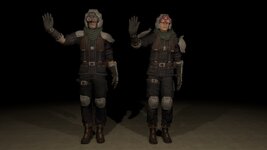
So the issue I was having is that to me A-pose is the standard pose used by the Genesis 8 figure. However the A pose this tool uses seems to be a little different with the arms down at a lower angle. Through trial and error I found adjusting the Genesis 8 pose in daz (to Right shoulder bend- bend 30, Right Thigh Bend - side to side 5.88 and Left shoulder bend - bend - -30, Left Thight Bend - side to side - -5.88) gave me a pretty good match.
I did the same with a G2M figure, different values but I matched the G8M pose in daz, and that also worked.

So from my end it's easier to adjust the figure I'm importing to match your expected A-pose than to configure a new pose type to import.
Results attached, CUA on the left, person on the right.
 

Attachments

  • 1783012962.jpg
    1783012962.jpg
    462.1 KB · Views: 0
Also, just to clarify a little:

CUA Puppeteer itself does not convert a model into a humanoid CUA. It only drives an existing CUA if the skeleton can be recognized and mapped correctly. The difficult part is the step before that: taking a humanoid model, especially game-ripped characters like zombies, and turning it into a CUA with a clean, usable humanoid bone structure.

For this kind of work, an AI coding agent is mainly used to run the provided Python/CLI tools, inspect the skeleton, rename or remap bones, fix scale/pose issues, and generate the required mapping data. It does not have to be Claude or Codex specifically. Any local agent that can read and write files and execute command-line tools should be able to help.

If overseas tools are hard to access, you may want to look at local alternatives such as

- Qwen Code
- Kimi Code CLI
- DeepSeek-based coding agents
- GLM coding tools

or similar CLI/IDE agents available in China. The key requirement is not the brand of the AI model, but whether it can operate on your local project files and run commands.
In fact, it doesn't really need to reason about anything. It's mostly just following the instructions and applying a well-defined algorithm over and over again, which is exactly the kind of repetitive work AI agents excel at.

So the AI model itself doesn't really need to be particularly "smart." As long as it can reliably follow instructions and execute the workflow, that's really all it needs.
Could this process be built into a VaM scene where we build the humanoid CUA from a person atom/look/appearance preset?
 
That's completely doable. In fact, I originally planned to implement a feature for it.

From a practical standpoint, though, it doesn't make much sense. Hair, for example, is much harder to handle properly on a CUA.
Yes, it seems like the exports I get are bald so that's likely the reason;

However for just filling out the scene, if hair "can" be recorded with the clothes and morphs etc., I think it'd be great to have the option, since I'd just use characters with short / shoulder length hair.

If it can be added in a future release I'd greatly appreciate it!
 

Similar threads

Replies
0
Views
98
Plugins + Scripts CUA Hammer
Replies
0
Views
140
Replies
3
Views
305
Assets + Accessories AnimeShader(CUA)
Replies
5
Views
917
Back
Top Bottom