• Hi Guest!

    We have posted a new VaM2 dev log on Patreon, starting a monthly cadence of written progress updates between Beta releases. Highlights include the new Gizmos System, Selection Carousel, and Modes System with Context-Specific Editing. Beta1.2 is 15 of 21 items complete.

    Read the full post on Patreon, or follow progress on the public Trello roadmap.

VaM 1.x Optimization for quest 3?

Threads regarding the original VaM 1.x

sans1234

Member
Joined
Nov 20, 2024
Messages
66
Reactions
4
Tried a watch a scene on my quest 3 for the first time, and I find my pc screen significantly more high res and nice looking (although flat). Are there any graphic options to explore that might yield better results?
Specifically im speaking about graphics and not fps.
Thank you!
 
You cannot separate graphics from FPS, they are "sides of the same coin" or whatever the expression is like.
Your first stop for tips and knowledge should be the VR guides section:
 
Upvote 0
Tried a watch a scene on my quest 3 for the first time, and I find my pc screen significantly more high res and nice looking (although flat). Are there any graphic options to explore that might yield better results?
Specifically im speaking about graphics and not fps.
Thank you!

Hard to help without any info about your setup, there are lots of factors that can affect image quality on the Quest 3 that aren’t related to VaM.

Link Cable generally gives the best image, but with the right setup, WiFi can work great too. Easiest way to go wireless is with Virtual Desktop. The link Atani shared includes a guide on launching VaM with it. That link actually covers most of what you’ll need, but if you want more specific help you’ll need to share what you’re doing and what your setup looks like.

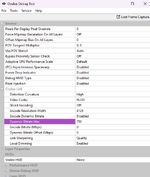
If you're using Quest Link, tweak some settings in the Oculus Debug Tool. I’ve attached mine if you want to try them or experiment on your own.
 

Attachments

  • 1756793646579.png
    1756793646579.png
    192.7 KB · Views: 0
Upvote 0
Hard to help without any info about your setup, there are lots of factors that can affect image quality on the Quest 3 that aren’t related to VaM.

Link Cable generally gives the best image, but with the right setup, WiFi can work great too. Easiest way to go wireless is with Virtual Desktop. The link Atani shared includes a guide on launching VaM with it. That link actually covers most of what you’ll need, but if you want more specific help you’ll need to share what you’re doing and what your setup looks like.

If you're using Quest Link, tweak some settings in the Oculus Debug Tool. I’ve attached mine if you want to try them or experiment on your own.
Hi mate, I was using virtual desktop with a cable.
Is the debug tool a different software?
Thanks
 
Upvote 0
Hard to help without any info about your setup, there are lots of factors that can affect image quality on the Quest 3 that aren’t related to VaM.

Link Cable generally gives the best image, but with the right setup, WiFi can work great too. Easiest way to go wireless is with Virtual Desktop. The link Atani shared includes a guide on launching VaM with it. That link actually covers most of what you’ll need, but if you want more specific help you’ll need to share what you’re doing and what your setup looks like.

If you're using Quest Link, tweak some settings in the Oculus Debug Tool. I’ve attached mine if you want to try them or experiment on your own.
Hi mate, I link through a cable to virtual desktop app. Not gonna lie didn't quite figure out the right way still :)
Is the oclulus debug tool an extra app i need to download? Or just some settings? Thanks!
 
Upvote 0
Back
Top Bottom