I could use some help.
Recently ive got a strange problem:
the diffuse Textures look all really strange. there are these square like yellow fragments on all of them. also the textures load instantly when i switch them. normally it took 1-2 seconds.
PS: when i try using the "auto-generate gens textures from torso texture" i get the following message:
"!> Genital diffuse texture blending only works if torso texture is 4096x4096. Torso diffuse texture is 1024 by 1024"
but they are all 4096x4096 textures...
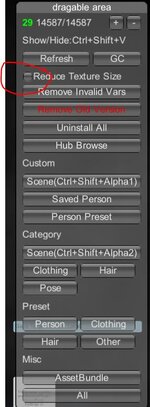
i think somehow VAM loads all my diffuse textures in 1k format or so.
what i tried so far:
-clean VAM Cache folder
-restart PC
-playing around in vam graphic settings
-starting desktop mode
-edit texture manually in paint and changed to 4096x4096
-deactivate session plugins and all other plugins
what i try next.
-reload vam with only VaM_Updater.exe and essential vars.
Recently ive got a strange problem:
the diffuse Textures look all really strange. there are these square like yellow fragments on all of them. also the textures load instantly when i switch them. normally it took 1-2 seconds.
PS: when i try using the "auto-generate gens textures from torso texture" i get the following message:
"!> Genital diffuse texture blending only works if torso texture is 4096x4096. Torso diffuse texture is 1024 by 1024"
but they are all 4096x4096 textures...
i think somehow VAM loads all my diffuse textures in 1k format or so.
what i tried so far:
-clean VAM Cache folder
-restart PC
-playing around in vam graphic settings
-starting desktop mode
-edit texture manually in paint and changed to 4096x4096
-deactivate session plugins and all other plugins
what i try next.
-reload vam with only VaM_Updater.exe and essential vars.
Attachments

Last edited: