
• Hi Guest!

    We have posted a new VaM2 dev log on Patreon, starting a monthly cadence of written progress updates between Beta releases. Highlights include the new Gizmos System, Selection Carousel, and Modes System with Context-Specific Editing. Beta1.2 is 15 of 21 items complete.

    Read the full post on Patreon, or follow progress on the public Trello roadmap.
SceneExplorer (session plugin)

Plugins + Scripts SceneExplorer (session plugin)

Download [<1 MB]

PrettyFrank

Well-known member
Featured Contributor
Joined
Jul 26, 2021
Messages
99
Reactions
453
PrettyFrank submitted a new resource:

SceneExplorer (session plugin) - SceneExplorer

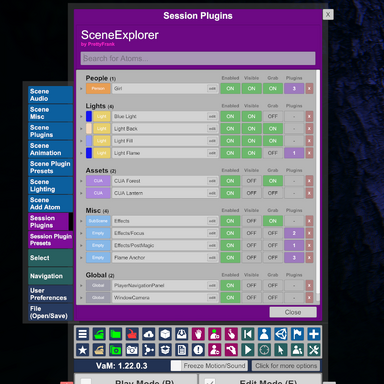
This one is hopefully pretty self-explanatory, but think of it as Finder or Windows Explorer for your scenes. It's designed to help you find and easily manage your scene atoms, especially as complexity grows.

To Install
Install as session plugin.

Search
Search is a simple tokenized search on the atom type and label. Additionally, searching for "plugin" or "plugins" will return atoms...

Read more about this resource...
 
Is there any way to always have this always open somehow? Kinda of like how timeline can be utilized on a simple sign?
 
Some requests on my part:
  • One amazing thing I would love to have with this plugin is if it could have have an icon over the VAM UI atoms list button (mouse pointer), like the LGAtom plugin does. Currently it's multiple clicks to get to the plugin in the Session Plugins tab.
  • On the plugin, I think it would be better to change the label of the booleans to match what is used in the VAM atoms. Like:
    • Visible → Hidden
    • Grab → Possessable
When I saw "visible" I thought it would hide the shader (Materials), but it was instead for hiding the atom.​

Much appreciated your work on this plugin, it's now part of my default Session plugins. 🙇
 
Is there any way to always have this always open somehow? Kinda of like how timeline can be utilized on a simple sign?
Not sure, but I may be able to reverse engineer something like @Stopper has to see how he undocks the panels. I agree it would be handy to put in the corner or something!
 
Some requests on my part:
  • One amazing thing I would love to have with this plugin is if it could have have an icon over the VAM UI atoms list button (mouse pointer), like the LGAtom plugin does. Currently it's multiple clicks to get to the plugin in the Session Plugins tab.
  • On the plugin, I think it would be better to change the label of the booleans to match what is used in the VAM atoms. Like:
    • Visible → Hidden
    • Grab → Possessable
When I saw "visible" I thought it would hide the shader (Materials), but it was instead for hiding the atom.​

Much appreciated your work on this plugin, it's now part of my default Session plugins. 🙇

Man, same page on the Visible vs Hidden thing (that bothers me too)... I'll give it some more thought, but the challenge is everything else is a positive state (on is present), where hidden is a reversed state (on kinda means off). So I opted for consistency. I might try a pass with Hidden but I'd need to change the color or something to make it obvious. Will play around though!

Will take a look at the LGAtom plugin, but if you don't mind explaining a bit more on that, it would help!
 
Will take a look at the LGAtom plugin, but if you don't mind explaining a bit more on that, it would help!
The LGAtom plugin does this:

Screenshot_20260407_144100.png


And clicking opens the plugin UI in the Session plugins tab.
 
Is there any way to always have this always open somehow? Kinda of like how timeline can be utilized on a simple sign?
This is coming in the next version as well - great suggestion! The panel will be draggable anywhere on screen, and can stay open when other atoms/controllers are selected.
 
Heads up to all, I have some ideas cooking on how to better leverage the copy/paste sort of actions, I just need to cook on it for awhile to see how best to handle things.

Ultimately I want to add power/flexibility without cluttering the interface or confusing folks... which can be tricky.
 
PrettyFrank updated SceneExplorer (session plugin) with a new update entry:

Lights color entire type badge now (not just small swatch)

To make things a little more obvious when tuning lights, the entire type badge will now take the light color as a background (instead of the small swatch in the demos). This includes contrast labels for readability.

I've also added a hover effect to the type label to hint that you can interact with it (clicking selects the item in question, typically used for editing the atom).

Read the rest of this update entry...
 
Back
Top Bottom