• Hi Guest!

    We are extremely excited to announce the release of our first Beta1.1 and the first release of our Public AddonKit!
    To participate in the Beta, a subscription to the Entertainer or Creator Tier is required. For access to the Public AddonKit you must be a Creator tier member. Once subscribed, download instructions can be found here.

    Click here for information and guides regarding the VaM2 beta. Join our Discord server for more announcements and community discussion about VaM2.
  • Hi Guest!

    VaM2 Resource Categories have now been added to the Hub! For information on posting VaM2 resources and details about VaM2 related changes to our Community Forums, please see our official announcement here.
PoseSaver Extended by Mo84

Plugins + Scripts PoseSaver Extended by Mo84

Download [<1 MB]

Mo84

Member
Joined
Nov 21, 2025
Messages
13
Reactions
28
Mo84 submitted a new resource:

PoseSaver Extended by Mo84 - Complete rewrite and major expansion of Kimowal PoseSaver with advanced features

Overview​

PoseSaver Extended is a complete rewrite and major expansion of the original PoseSaver plugin https://hub.virtamate.com/threads/posesaver.71729/ by Kimowal. While maintaining the core concept, this version has been rebuilt from the ground up with significant improvements, new systems, and a modern architecture. The codebase has grown from ~4,100 lines to over 7,100 lines of code (+74%), with most core systems completely rewritten. Based on: Original...

Read more about this resource...
 
Demo:


Screenshot 2025-11-24 202213.png
 
I just made a review of this new plug-in and I cannot wait to use it, but I wonder why was it created. Is it any sort of collaboration among Kimowal and you? I ask just in curisoity... I was looking forward to find a plug-in that worked like BodyLanguage but without its penetration thrusts, because it gave me looping error logs so many times, so thank you very much! BTW, as per the video above, I se it is a scene plug-in, right? That's so clever and helpful, so my characters won't need to have so many plug-ins!
 
Thanks for the review. About the creation It's not a collaboration. I started editing Kimowal's original PoseSaver from version 1.0 . My version diverged significantly(read overview or try plugin). I released it as a fork with his permission, with clear attribution that it's based on his original work. About BodyLanguage: I'm glad it helps but I don't use it, PoseSaverExtended focuses on pose management, camera sequences, and storytelling features. It's designed to be a clean, stable alternative for pose-based scenes. About scene plugin: Yes, it works as a scene plugin (you can add it to any atom. This keeps your characters clean without loading multiple plugins per person. If you have questions or suggestions, let me know. Enjoy using it.
 
Mo84 updated PoseSaver Extended by Mo84 with a new update entry:

Update 1

PoseSaverExtended - Update 1 Info

Note: While I've been working on several improvements and wasn't planning to rush this update, a critical save scene bug was discovered that needed immediate attention. This update includes both the bug fix and the new features I've been working on.

UI Improvements:
- Fixed tab hover effects for consistent behavior across all tabs
- Reorganized Objects tab: CUA objects in left column, Light atoms in right column below thumbnail
- Camera checkpoints moved...

Read the rest of this update entry...
 
Does the fade to black screen only work in desktop mode, no VR?
The fade to black screen and on-screen canvas (thumbnail buttons) currently only work in desktop mode. They use MonitorModeAuxUI which is desktop-specific. I don't have VR to test, but if there's interest, I could look into adding VR support for these features in a future update.
 
The fade to black screen and on-screen canvas (thumbnail buttons) currently only work in desktop mode. They use MonitorModeAuxUI which is desktop-specific. I don't have VR to test, but if there's interest, I could look into adding VR support for these features in a future update.
I'd love it if this were a feature. Unless I missed it, I haven't seen any other plugin offer a way to fade to black in VR.
Much appreciated if you can find a way to make it happen.
Thanks!
 
Mo84 updated PoseSaver Extended by Mo84 with a new update entry:

Big Update 2

# PoseSaver Extended - Big Update 2
Major update with new features and improvements.


## 🎥 Camera System (ENHANCED)

- **Easing Functions**: Added support for Linear, EaseIn, EaseOut, EaseInOut, EaseInQuad, EaseInCubic, EaseInQuart, EaseInExpog and more
- **Per-Checkpoint Easing**: Set different easing for each checkpoint or use pose default
- **View per Point**...

Read the rest of this update entry...
 
Hey, I asssume Kimowal removed his plugin from the hub as of now so.. going to ask here. I assume it's not expanded into saving extra parameters when saving poses, so my suggestion is to enable saving finger joints (DAZ bones), which you can pose with Ruvik's PosingHelper - those are not morphs, but finger joints which enables way superior posing of the fingers. BodyLanguage does indeed save those parameters, so you can check how it's done there - it's not about allowing posing using that method (because that's way too many sliders and extra work), but simply allow to save those parameters if anyone has changed them with external plugins. Thanks.
 
Last edited:
Hey, I asssume Kimowal removed his plugin from the hub as of now so.. going to ask here. I assume it's not expanded into saving extra parameters when saving poses, so my suggestion is to enable saving finger joints (DAZ bones), which you can pose with Ruvik's PosingHelper - those are not morphs, but finger joints which enables way superior posing of the fingers. BodyLanguage does indeed save those parameters, so you can check how it's done there - it's not about allowing posing using that method (because that's way too many sliders and extra work), but simply allow to save those parameters if anyone has changed them with external plugins. Thanks.
This is a different plugin, so I'm not sure if you've tested it
Finger joints (DAZ bones) should already be captured. In ShouldStorableBeIncluded, there's a check for DAZBone: if (includePose && storable is DAZBone) return true;
Since CapturePersonPose calls this with includePose = true, all DAZ bones, including finger joints used by PosingHelper, should be included when capturing poses. The code uses VaM's GetJSON() on each storable, which should capture all bone rotations, including finger joints set by external plugins. I'll test this to confirm finger joints are being saved and restored correctly. If there are any issues, I'll adjust the code. Thanks for the suggestion.
 
Hey, I asssume Kimowal removed his plugin from the hub as of now so.. going to ask here. I assume it's not expanded into saving extra parameters when saving poses, so my suggestion is to enable saving finger joints (DAZ bones), which you can pose with Ruvik's PosingHelper - those are not morphs, but finger joints which enables way superior posing of the fingers. BodyLanguage does indeed save those parameters, so you can check how it's done there - it's not about allowing posing using that method (because that's way too many sliders and extra work), but simply allow to save those parameters if anyone has changed them with external plugins. Thanks.
I tested with Ruvik's PosingHelper plugin and confirmed that finger joints are morphs, not DAZ bones. Simply check the "Save Morphs" toggle in the main options and it works without issues. Important note: If you use morphs anywhere in your scene (including finger posing with PosingHelper), enable "Save Morphs" in the main options at the start, even if a specific pose doesn't use morphs.
Screenshot 2025-12-07 181712.png
 
I tested with Ruvik's PosingHelper plugin and confirmed that finger joints are morphs, not DAZ bones. Simply check the "Save Morphs" toggle in the main options and it works without issues. Important note: If you use morphs anywhere in your scene (including finger posing with PosingHelper), enable "Save Morphs" in the main options at the start, even if a specific pose doesn't use morphs.
View attachment 547823
I will check, but not sure if you know - if you add optional finger posing plugin that is in Ruvik's var, you can enable advanced finger posing, which allows you to control each of the 3 finger joints separately (and carpals) - but if it works then very good indeed. I'll test it later. (simple finger posing mode uses stock VAM morphs I think).
 
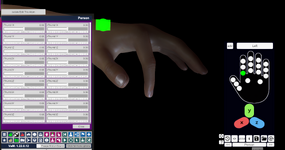
Yea, those are not saving (advanced mode) - you need to add PHFingerSliders.cs from the Ruvik's var, and then you can click `min` button in the upper left in hand posing ui (becomes `adv` like in the screenshot), parameters are listed in the plugin window.
 

Attachments

  • VaM_aaiu3Oz5Eo.png
    VaM_aaiu3Oz5Eo.png
    973.2 KB · Views: 0
Yup I didn't change to adv. I will try to add those in future update .
 
First of all .. great plugin!!🫶
would it be possible to make a checkbox for the eyetargetControl to be saved in the pose as well?
i figured i could add an object and target the eyes to that ... but still it would be great if this would be an option.
 
First of all .. great plugin!!🫶
would it be possible to make a checkbox for the eyetargetControl to be saved in the pose as well?
i figured i could add an object and target the eyes to that ... but still it would be great if this would be an option.
Thanks, I'm glad you like it! I intentionally removed the eyes target feature because I was having issues with the CUE plugin, but it turned out the problem was something else entirely - I just forgot to add the eyes target back. I've taken a bit of a break from the plugin, but if you have any more suggestions or feedback, please let me know. I'll do my best to update it in the next few days.
 
Last edited:
I really like the plugin, the UI is more logical than kimowal's version, do you plan on continue the work on this? I really appreciate the fact that it works on an empty atom that i can save the preset, way easier than bodylanguage to load various preset from within the scene.
 
I really like the plugin, the UI is more logical than kimowal's version, do you plan on continue the work on this? I really appreciate the fact that it works on an empty atom that i can save the preset, way easier than bodylanguage to load various preset from within the scene.
Thanks for the feedback, really. I'm glad to hear that you like the UI. For me it was easy and fast, but I was worried if others would find it as easy and logical too. Regarding work on the plugin, I currently have no more ideas, all I can do is fix a bug or two, unless you tell me what specifically to add or fix.
I'm currently working on some fixes that people mentioned above. If you have any suggestions, now's the time to let me know.
 
Back
Top Bottom